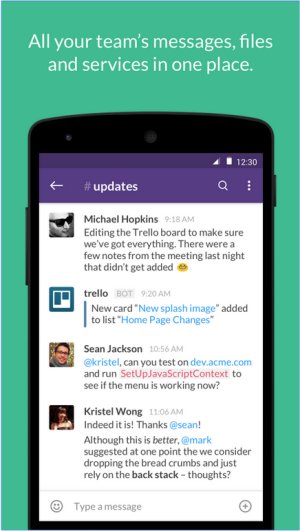
Slack continues to be a leading platform for team communication and collaboration, with its latest version, 4.53.269, reinforcing its commitment to enhancing user experience. Designed to centralize team communications, Slack offers real-time messaging, file sharing, and both one-on-one and group conversations.
Why Choose Slack?
Slack is more than just a messaging app; it serves as a comprehensive collaboration tool intended to replace traditional email reliance. Its user-friendly interface facilitates real-time chat, video calls, and file sharing while integrating seamlessly with various productivity applications. This functionality makes Slack invaluable for businesses, remote teams, and organizations aiming for a streamlined workspace.
Key Features of Slack:
1. Channels & Direct Messages: Organize conversations by projects, topics, or departments to maintain focus.
2. File Sharing: Easily share documents, images, and links directly within chats.
3. Integrations: Connect with tools like Google Drive, Trello, Zoom, and Asana to enhance workflows.
4. Searchable History: Quickly locate past messages and files for efficient information retrieval.
5. Automation & Bots: Use Slackbot to automate tasks, set reminders, and respond to common inquiries.
6. Voice & Video Calls: Communicate effectively without switching applications.
Pricing Structure:
Slack offers a free plan that includes essential features, like access to 90 days of message history and limited integrations. For teams that need more capabilities, paid plans such as Pro, Business+, and Enterprise Grid provide unlimited message history, advanced integrations, and enhanced administrative controls, catering to larger organizations.
Comparative Advantages:
When compared to alternatives like Microsoft Teams and Google Chat, Slack stands out due to its intuitive design, ease of use, and adaptability to various workflows. This is particularly beneficial for remote teams, where organized communication is crucial. However, the limitations of the free plan and the costs associated with paid tiers may pose challenges for rapidly growing teams.
Pros and Cons:
Pros:
- User-friendly interface
- Extensive third-party app integrations
- Organized discussions through channels
- Accessibility across all devices
- Searchable message history (with paid plans)
Cons:
- Free plan restricts message history to 90 days
- Potential for distraction from excessive notifications
- Costs can accumulate for larger teams with paid plans
Final Thoughts:
In conclusion, Slack remains an exceptional tool for enhancing team communication and productivity. Its wide range of features, strong integration capabilities, and overall user experience make it a top choice for modern workplaces. While it is particularly effective for teams of all sizes, organizations should be prepared to manage notification settings and consider the implications of paid plans. As Slack continues to evolve, it is poised to remain at the forefront of team collaboration solutions, adapting to the ever-changing needs of the workforce. Furthermore, as remote work trends continue to rise, the importance of effective communication tools like Slack will only increase
Why Choose Slack?
Slack is more than just a messaging app; it serves as a comprehensive collaboration tool intended to replace traditional email reliance. Its user-friendly interface facilitates real-time chat, video calls, and file sharing while integrating seamlessly with various productivity applications. This functionality makes Slack invaluable for businesses, remote teams, and organizations aiming for a streamlined workspace.
Key Features of Slack:
1. Channels & Direct Messages: Organize conversations by projects, topics, or departments to maintain focus.
2. File Sharing: Easily share documents, images, and links directly within chats.
3. Integrations: Connect with tools like Google Drive, Trello, Zoom, and Asana to enhance workflows.
4. Searchable History: Quickly locate past messages and files for efficient information retrieval.
5. Automation & Bots: Use Slackbot to automate tasks, set reminders, and respond to common inquiries.
6. Voice & Video Calls: Communicate effectively without switching applications.
Pricing Structure:
Slack offers a free plan that includes essential features, like access to 90 days of message history and limited integrations. For teams that need more capabilities, paid plans such as Pro, Business+, and Enterprise Grid provide unlimited message history, advanced integrations, and enhanced administrative controls, catering to larger organizations.
Comparative Advantages:
When compared to alternatives like Microsoft Teams and Google Chat, Slack stands out due to its intuitive design, ease of use, and adaptability to various workflows. This is particularly beneficial for remote teams, where organized communication is crucial. However, the limitations of the free plan and the costs associated with paid tiers may pose challenges for rapidly growing teams.
Pros and Cons:
Pros:
- User-friendly interface
- Extensive third-party app integrations
- Organized discussions through channels
- Accessibility across all devices
- Searchable message history (with paid plans)
Cons:
- Free plan restricts message history to 90 days
- Potential for distraction from excessive notifications
- Costs can accumulate for larger teams with paid plans
Final Thoughts:
In conclusion, Slack remains an exceptional tool for enhancing team communication and productivity. Its wide range of features, strong integration capabilities, and overall user experience make it a top choice for modern workplaces. While it is particularly effective for teams of all sizes, organizations should be prepared to manage notification settings and consider the implications of paid plans. As Slack continues to evolve, it is poised to remain at the forefront of team collaboration solutions, adapting to the ever-changing needs of the workforce. Furthermore, as remote work trends continue to rise, the importance of effective communication tools like Slack will only increase
Slack 4.53.269 released
Slack puts all your team communications in one place wherever you go with real-time messaging, file sharing, and one-to-one and group conversations.