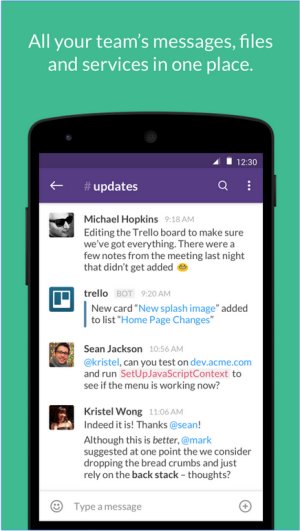
Slack is a comprehensive communication platform that centralizes team interactions through real-time messaging, file sharing, and group conversations, designed to enhance efficiency by minimizing email dependence. Its user-friendly interface supports real-time chats, video calls, and file sharing, making it a vital tool for businesses and remote teams seeking an all-in-one workspace.
Key Features of Slack:
- Channels & Direct Messages: Organize discussions by project or topic to maintain clarity and relevance.
- File Sharing: Effortlessly upload and share files within conversations.
- Integrations: Connect with numerous apps like Google Drive, Trello, and Zoom to streamline workflows.
- Searchable History: Quickly access past messages and files for easy reference.
- Automation & Bots: Utilize Slackbot for reminders and task automation.
- Voice & Video Calls: Conduct conversations without switching applications.
Pricing Structure:
Slack offers a free plan with basic features, including access to 90 days of message history and limited integrations. Paid plans, such as Pro, Business+, and Enterprise Grid, provide more extensive functionalities, including unlimited message history and advanced administrative controls, catering to the diverse needs of teams and organizations.
Comparison with Competitors:
When compared to platforms like Microsoft Teams and Google Chat, Slack is noted for its intuitive design and adaptability to various workflows, making it especially beneficial for remote teams. However, limitations in the free plan regarding message history and integrations may hinder the growth of expanding teams, and costs can accumulate for larger organizations.
Pros and Cons:
Pros:
- User-friendly interface
- Extensive app integrations
- Organized discussions through channels
- Multi-device compatibility
- Searchable message history (with paid plans)
Cons:
- Free plan limits message history
- Potential for distraction due to notifications
- Paid plans can become costly for larger teams
Geek Verdict:
Slack remains a leading choice for enhancing team communication and productivity. Its robust features and integrations make it suitable for teams of all sizes, provided the budget allows. By streamlining communication and consolidating work tools, Slack offers an exceptional collaboration experience—just be prepared to manage notifications effectively.
Future Considerations:
As Slack continues to evolve, future updates may introduce even more integrations, enhanced security features, and tools to better manage notifications. This evolution will further solidify its position as a go-to platform for team collaboration and productivity, ensuring it meets the ever-changing needs of modern workplaces
Key Features of Slack:
- Channels & Direct Messages: Organize discussions by project or topic to maintain clarity and relevance.
- File Sharing: Effortlessly upload and share files within conversations.
- Integrations: Connect with numerous apps like Google Drive, Trello, and Zoom to streamline workflows.
- Searchable History: Quickly access past messages and files for easy reference.
- Automation & Bots: Utilize Slackbot for reminders and task automation.
- Voice & Video Calls: Conduct conversations without switching applications.
Pricing Structure:
Slack offers a free plan with basic features, including access to 90 days of message history and limited integrations. Paid plans, such as Pro, Business+, and Enterprise Grid, provide more extensive functionalities, including unlimited message history and advanced administrative controls, catering to the diverse needs of teams and organizations.
Comparison with Competitors:
When compared to platforms like Microsoft Teams and Google Chat, Slack is noted for its intuitive design and adaptability to various workflows, making it especially beneficial for remote teams. However, limitations in the free plan regarding message history and integrations may hinder the growth of expanding teams, and costs can accumulate for larger organizations.
Pros and Cons:
Pros:
- User-friendly interface
- Extensive app integrations
- Organized discussions through channels
- Multi-device compatibility
- Searchable message history (with paid plans)
Cons:
- Free plan limits message history
- Potential for distraction due to notifications
- Paid plans can become costly for larger teams
Geek Verdict:
Slack remains a leading choice for enhancing team communication and productivity. Its robust features and integrations make it suitable for teams of all sizes, provided the budget allows. By streamlining communication and consolidating work tools, Slack offers an exceptional collaboration experience—just be prepared to manage notifications effectively.
Future Considerations:
As Slack continues to evolve, future updates may introduce even more integrations, enhanced security features, and tools to better manage notifications. This evolution will further solidify its position as a go-to platform for team collaboration and productivity, ensuring it meets the ever-changing needs of modern workplaces
Slack 4.52.155 Beta / 4.51.191 released
Slack puts all your team communications in one place wherever you go with real-time messaging, file sharing, and one-to-one and group conversations.