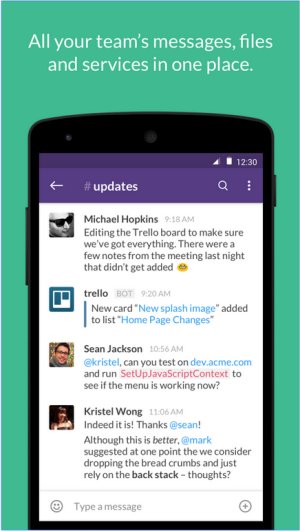
Slack is a leading communication and collaboration tool that centralizes team interactions through real-time messaging, file sharing, and both one-on-one and group conversations. The recent release of Slack version 4.50.121 continues to enhance its reputation as a powerful platform designed to optimize team efficiency by minimizing the need for email and consolidating messaging into a single interface.
Key Features of Slack
At its core, Slack functions primarily as a messaging application, but its capabilities are significantly enhanced through features such as Channels. These allow teams to categorize conversations by project, department, or topic, ensuring discussions remain organized and relevant. Additionally, direct messaging offers quick communication for smaller groups, while the ability to share files and links directly within chats reduces reliance on email attachments. Slack's advanced search function makes retrieving past messages and files straightforward, further enhancing productivity.
One of Slack’s standout features is its extensive integration possibilities. The platform connects seamlessly with various tools, including Google Drive, Trello, Zoom, and Asana, among thousands of others. This integration transforms Slack into a central hub for collaboration, project management, and workflow automation, making it more than just a messaging tool.
Additional Features Include:
- Channels & Direct Messages: Organize conversations effectively.
- File Sharing: Share documents and images directly in chats.
- Integrations: Connect with hundreds of applications for streamlined workflows.
- Searchable History: Easily access past communications and documents.
- Automation & Bots: Utilize Slackbot for reminders and task automation.
- Voice & Video Calls: Communicate via calls without switching platforms.
Pricing Structure
Slack offers a free plan that serves as a solid introduction to the platform, including access to 90 days of message history, up to 10 integrations, and one-on-one video calls. For teams needing more extensive functionality, the Pro plan provides unlimited message history, advanced integrations, and group video calls with screen sharing. Larger organizations can opt for the Business+ and Enterprise Grid plans that offer additional security and administrative features.
Comparison with Competitors
When compared to competitors like Microsoft Teams and Google Chat, Slack is notable for its user-friendly interface, ease of setup, and adaptability to diverse workflows. It proves particularly beneficial for remote teams, where clear and structured communication is paramount. However, the limitations of the free plan regarding message history and integrations could hinder the growth of expanding teams, and the cumulative costs of paid plans may be a consideration for larger organizations.
Pros and Cons
Pros:
- Intuitive and clean interface
- Extensive third-party app integrations
- Organized discussion channels
- Cross-device accessibility (desktop, mobile, web)
- Searchable message history (available with paid plans)
Cons:
- Free plan limited to 90 days of message history
- Potential for notification overload
- Paid plans may be costly for larger teams
Final Thoughts
In summary, Slack remains an exceptional choice for teams aiming to enhance communication and productivity. With its comprehensive feature set, strong integration capabilities, and user-friendly design, Slack continues to be a preferred solution for modern workplaces. It serves as a powerful collaboration tool for teams of all sizes, provided they have the budget to support its paid offerings. Teams should also be prepared to manage notifications effectively to maintain focus amidst the flurry of incoming communications.
Future Directions
As Slack continues to evolve, future updates may focus on enhancing user experience, expanding integrations with emerging tools, and improving features that address the needs of rapidly growing teams. Additionally, as remote work remains prevalent, further innovations in video conferencing and collaborative tools could enhance Slack’s functionality, solidifying its position as a cornerstone in team communication
Key Features of Slack
At its core, Slack functions primarily as a messaging application, but its capabilities are significantly enhanced through features such as Channels. These allow teams to categorize conversations by project, department, or topic, ensuring discussions remain organized and relevant. Additionally, direct messaging offers quick communication for smaller groups, while the ability to share files and links directly within chats reduces reliance on email attachments. Slack's advanced search function makes retrieving past messages and files straightforward, further enhancing productivity.
One of Slack’s standout features is its extensive integration possibilities. The platform connects seamlessly with various tools, including Google Drive, Trello, Zoom, and Asana, among thousands of others. This integration transforms Slack into a central hub for collaboration, project management, and workflow automation, making it more than just a messaging tool.
Additional Features Include:
- Channels & Direct Messages: Organize conversations effectively.
- File Sharing: Share documents and images directly in chats.
- Integrations: Connect with hundreds of applications for streamlined workflows.
- Searchable History: Easily access past communications and documents.
- Automation & Bots: Utilize Slackbot for reminders and task automation.
- Voice & Video Calls: Communicate via calls without switching platforms.
Pricing Structure
Slack offers a free plan that serves as a solid introduction to the platform, including access to 90 days of message history, up to 10 integrations, and one-on-one video calls. For teams needing more extensive functionality, the Pro plan provides unlimited message history, advanced integrations, and group video calls with screen sharing. Larger organizations can opt for the Business+ and Enterprise Grid plans that offer additional security and administrative features.
Comparison with Competitors
When compared to competitors like Microsoft Teams and Google Chat, Slack is notable for its user-friendly interface, ease of setup, and adaptability to diverse workflows. It proves particularly beneficial for remote teams, where clear and structured communication is paramount. However, the limitations of the free plan regarding message history and integrations could hinder the growth of expanding teams, and the cumulative costs of paid plans may be a consideration for larger organizations.
Pros and Cons
Pros:
- Intuitive and clean interface
- Extensive third-party app integrations
- Organized discussion channels
- Cross-device accessibility (desktop, mobile, web)
- Searchable message history (available with paid plans)
Cons:
- Free plan limited to 90 days of message history
- Potential for notification overload
- Paid plans may be costly for larger teams
Final Thoughts
In summary, Slack remains an exceptional choice for teams aiming to enhance communication and productivity. With its comprehensive feature set, strong integration capabilities, and user-friendly design, Slack continues to be a preferred solution for modern workplaces. It serves as a powerful collaboration tool for teams of all sizes, provided they have the budget to support its paid offerings. Teams should also be prepared to manage notifications effectively to maintain focus amidst the flurry of incoming communications.
Future Directions
As Slack continues to evolve, future updates may focus on enhancing user experience, expanding integrations with emerging tools, and improving features that address the needs of rapidly growing teams. Additionally, as remote work remains prevalent, further innovations in video conferencing and collaborative tools could enhance Slack’s functionality, solidifying its position as a cornerstone in team communication
Slack 4.50.121 released
Slack puts all your team communications in one place wherever you go with real-time messaging, file sharing, and one-to-one and group conversations.