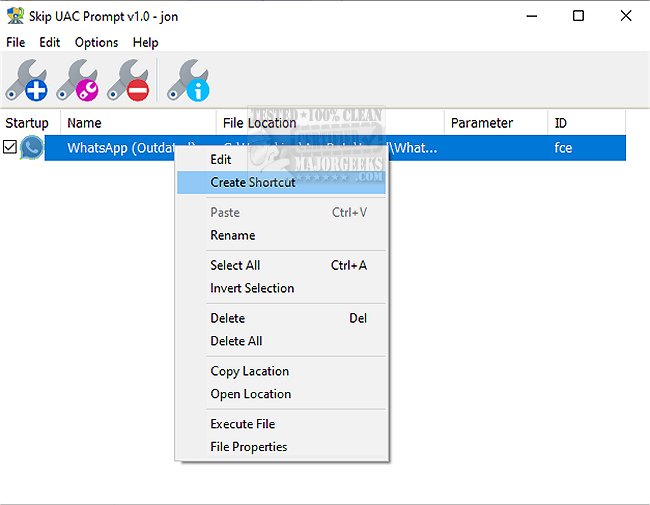
The newly released Skip UAC Prompt 1.3 offers users a streamlined solution for managing User Account Control (UAC) settings specifically for individual applications during system startup. This portable application simplifies the process of disabling UAC prompts for selected apps, allowing them to run with elevated privileges without the usual interruptions.
Typically, when users add applications to the Windows Startup folder, these programs operate under regular user permissions, which suffices for most tasks. However, certain programs require administrative rights to execute properly. Windows prevents these elevated tasks from running automatically at startup and instead prompts users with a UAC message for confirmation. Skip UAC Prompt addresses this inconvenience by allowing users to bypass the UAC prompt for designated applications.
While users can create elevated shortcuts using Task Scheduler to run programs without UAC prompts, this method can be cumbersome and time-consuming. Skip UAC Prompt simplifies this by enabling users to easily toggle UAC settings for specific applications without altering system-wide configurations.
Additionally, Skip UAC Prompt supports command-line parameters, allowing users to customize their experience further. To view the list of available commands, users can navigate to the application’s directory in Command Prompt and enter "SkipUAC_x64.exe /?," ensuring that they run the program with administrative privileges for full functionality.
As a user-friendly solution, Skip UAC Prompt is particularly beneficial for those who frequently run applications requiring elevated permissions, enhancing productivity by reducing disruptions caused by UAC prompts.
Extension: Future Implications and User Considerations
The introduction of tools like Skip UAC Prompt highlights the ongoing need for balancing security and user convenience in Windows operating systems. As more users rely on software that requires administrative access, the demand for solutions that facilitate seamless operation while maintaining security standards will likely grow.
However, users should exercise caution when disabling UAC for specific applications, as it can expose systems to potential security vulnerabilities. It's vital to ensure that only trusted applications are granted elevated permissions.
Looking ahead, developers might consider enhancing tools like Skip UAC Prompt with additional features, such as automated security assessments for applications seeking elevated access or integration with antivirus software to monitor for malicious behavior. This would provide an extra layer of security while still offering the convenience users seek.
Overall, Skip UAC Prompt represents a step towards more flexible user experiences in Windows, and its continued evolution could significantly impact how users interact with system security features in the future
Typically, when users add applications to the Windows Startup folder, these programs operate under regular user permissions, which suffices for most tasks. However, certain programs require administrative rights to execute properly. Windows prevents these elevated tasks from running automatically at startup and instead prompts users with a UAC message for confirmation. Skip UAC Prompt addresses this inconvenience by allowing users to bypass the UAC prompt for designated applications.
While users can create elevated shortcuts using Task Scheduler to run programs without UAC prompts, this method can be cumbersome and time-consuming. Skip UAC Prompt simplifies this by enabling users to easily toggle UAC settings for specific applications without altering system-wide configurations.
Additionally, Skip UAC Prompt supports command-line parameters, allowing users to customize their experience further. To view the list of available commands, users can navigate to the application’s directory in Command Prompt and enter "SkipUAC_x64.exe /?," ensuring that they run the program with administrative privileges for full functionality.
As a user-friendly solution, Skip UAC Prompt is particularly beneficial for those who frequently run applications requiring elevated permissions, enhancing productivity by reducing disruptions caused by UAC prompts.
Extension: Future Implications and User Considerations
The introduction of tools like Skip UAC Prompt highlights the ongoing need for balancing security and user convenience in Windows operating systems. As more users rely on software that requires administrative access, the demand for solutions that facilitate seamless operation while maintaining security standards will likely grow.
However, users should exercise caution when disabling UAC for specific applications, as it can expose systems to potential security vulnerabilities. It's vital to ensure that only trusted applications are granted elevated permissions.
Looking ahead, developers might consider enhancing tools like Skip UAC Prompt with additional features, such as automated security assessments for applications seeking elevated access or integration with antivirus software to monitor for malicious behavior. This would provide an extra layer of security while still offering the convenience users seek.
Overall, Skip UAC Prompt represents a step towards more flexible user experiences in Windows, and its continued evolution could significantly impact how users interact with system security features in the future
Skip UAC Prompt 1.3 released
With Skip UAC Prompt, you can easily deactivate User Account Control (UAC) for specific applications upon system startup.