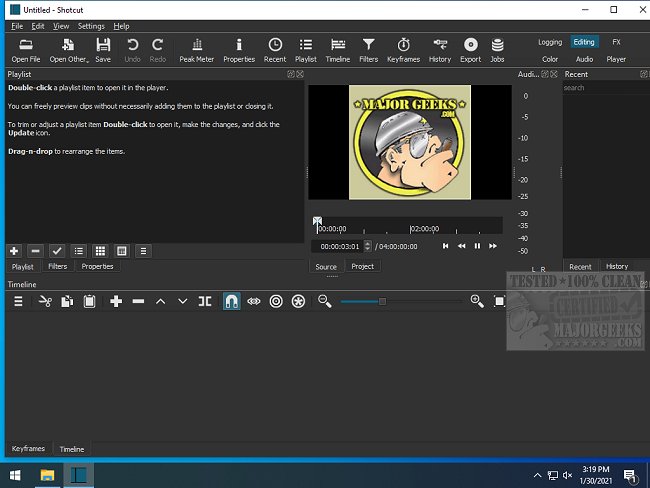
Shotcut is a powerful, open-source, cross-platform video editor that allows users to convert and edit video files across a wide array of formats. With the latest release, version 26.11.15, Shotcut continues to solidify its reputation as a viable alternative to commercial video editing software.
Why Choose Shotcut?
Shotcut stands out in the video editing landscape primarily for its no-cost model, devoid of hidden fees or watermarks that often plague free software. Its interface may not be the most modern, but it compensates with a rich feature set that appeals to both novices and seasoned editors. The integration of FFmpeg allows for extensive compatibility with formats ranging from standard MP4 to high-definition 4K footage.
The user-friendly drag-and-drop timeline simplifies the editing process, enabling users to focus on essential tasks like cutting and refining their videos without unnecessary distractions. Among its suite of tools, Shotcut offers various video filters, transitions, keyframe animations, and chroma key capabilities for green-screen effects. The audio editing features are equally robust, including equalization, compression, and real-time audio scopes.
Practical Applications of Shotcut
Whether you want to document family gatherings, create engaging vlogs, or compile gaming highlight reels, Shotcut is an excellent choice. It allows for the addition of transitions, text overlays, background music, and slow-motion effects, making it easy to transform raw footage into polished final products. Its versatility in supporting both vertical and widescreen formats ensures that your videos are optimized for platforms like TikTok and YouTube.
Key Features of Shotcut:
- Multi-Format Timeline: Combine various resolutions and frame rates in a single project.
- Capture Options: Supports screen, webcam, and audio recording (Linux only).
- Network Stream Playback: Compatible with various streaming protocols.
- Customizable UI: Offers dockable panels for a personalized editing workspace.
- Advanced Audio Tools: Includes signal level meters and volume controls.
- Encoding & Transcoding: Leverages FFmpeg for extensive format support.
Pros and Cons
Pros:
- Completely free and open-source, with no hidden costs.
- Supports a wide range of audio and video formats.
- Advanced features are available, including GPU acceleration.
- Cross-platform compatibility (Windows, Mac, and Linux).
Cons:
- The user interface may seem outdated compared to premium editors.
- There is a steeper learning curve for beginners unfamiliar with video editing.
- The interface can become disorganized if not managed carefully.
- Lacks a built-in asset library for music and effects.
Final Thoughts
Shotcut may not cater to every user’s needs, but it provides a robust editing suite for those willing to invest time in learning its functionalities. Perfect for both personal projects and budding YouTube creators, Shotcut empowers users to craft videos without financial constraints. While it may have its quirks, for those who embrace the challenge, it serves as an invaluable tool in video editing.
As video content continues to grow in popularity, Shotcut’s ongoing updates and feature enhancements position it as a strong contender in the realm of free video editing software
Why Choose Shotcut?
Shotcut stands out in the video editing landscape primarily for its no-cost model, devoid of hidden fees or watermarks that often plague free software. Its interface may not be the most modern, but it compensates with a rich feature set that appeals to both novices and seasoned editors. The integration of FFmpeg allows for extensive compatibility with formats ranging from standard MP4 to high-definition 4K footage.
The user-friendly drag-and-drop timeline simplifies the editing process, enabling users to focus on essential tasks like cutting and refining their videos without unnecessary distractions. Among its suite of tools, Shotcut offers various video filters, transitions, keyframe animations, and chroma key capabilities for green-screen effects. The audio editing features are equally robust, including equalization, compression, and real-time audio scopes.
Practical Applications of Shotcut
Whether you want to document family gatherings, create engaging vlogs, or compile gaming highlight reels, Shotcut is an excellent choice. It allows for the addition of transitions, text overlays, background music, and slow-motion effects, making it easy to transform raw footage into polished final products. Its versatility in supporting both vertical and widescreen formats ensures that your videos are optimized for platforms like TikTok and YouTube.
Key Features of Shotcut:
- Multi-Format Timeline: Combine various resolutions and frame rates in a single project.
- Capture Options: Supports screen, webcam, and audio recording (Linux only).
- Network Stream Playback: Compatible with various streaming protocols.
- Customizable UI: Offers dockable panels for a personalized editing workspace.
- Advanced Audio Tools: Includes signal level meters and volume controls.
- Encoding & Transcoding: Leverages FFmpeg for extensive format support.
Pros and Cons
Pros:
- Completely free and open-source, with no hidden costs.
- Supports a wide range of audio and video formats.
- Advanced features are available, including GPU acceleration.
- Cross-platform compatibility (Windows, Mac, and Linux).
Cons:
- The user interface may seem outdated compared to premium editors.
- There is a steeper learning curve for beginners unfamiliar with video editing.
- The interface can become disorganized if not managed carefully.
- Lacks a built-in asset library for music and effects.
Final Thoughts
Shotcut may not cater to every user’s needs, but it provides a robust editing suite for those willing to invest time in learning its functionalities. Perfect for both personal projects and budding YouTube creators, Shotcut empowers users to craft videos without financial constraints. While it may have its quirks, for those who embrace the challenge, it serves as an invaluable tool in video editing.
As video content continues to grow in popularity, Shotcut’s ongoing updates and feature enhancements position it as a strong contender in the realm of free video editing software
Shotcut 26.11.15 released
Shotcut is an Open Source, cross-platform video editor capable of converting and editing video files in various formats.