The latest version of SearchMyFiles, version 3.36, has been launched, offering users a powerful tool for searching files on their system. This software allows for searches by various criteria including wildcards, modification/creation/access times, file attributes, content (both text and binary), and file sizes. One of the standout features of SearchMyFiles is that it requires no installation or additional DLL files; users can simply run the executable file, SearchMyFiles.exe, to get started.
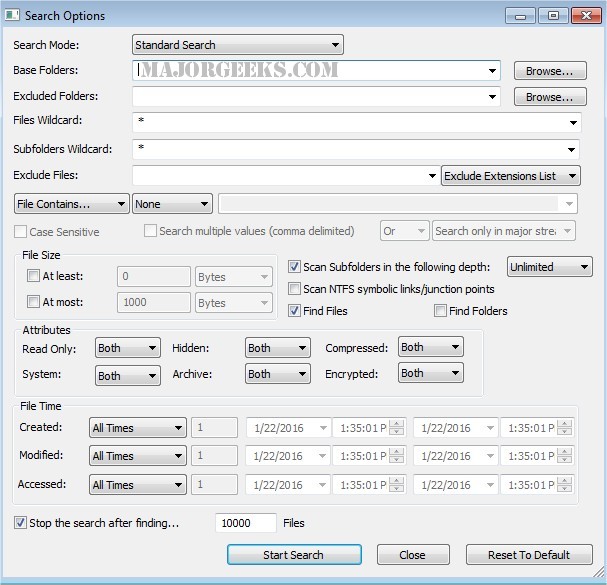
Upon launching the application, users are greeted with a 'Search Options' dialog. Here, they can specify the base folders or drives for the search, set wildcards, and customize other search parameters. After configuring the options, users click 'Ok' to initiate the search. The results are displayed in the main window during the search process, and users can stop the search at any time by clicking the 'Stop' menu.
Once the search is concluded, users have the option to select one or multiple files and save the results in various formats, including text, CSV, HTML, or XML, through the 'Save Selected Items' option. Additionally, users can open individual files with their default programs using the 'Open Selected File' feature.
Extension: Enhancements and Future Prospects
With the new version, users can expect enhanced performance and speed, as well as improved accuracy in search results. Future updates may include advanced filtering options and integration with cloud storage services, allowing users to search files stored in the cloud seamlessly.
Moreover, the development team may look into user feedback for additional features that could enhance overall user experience, such as customizable search templates or the ability to save frequently used search criteria for quick access. As technology evolves, the potential for SearchMyFiles to incorporate artificial intelligence for smarter search capabilities could also be on the horizon, making file management even more efficient and user-friendly.
Overall, SearchMyFiles 3.36 stands as a robust solution for file searching needs, with the promise of further improvements and features in future releases
Upon launching the application, users are greeted with a 'Search Options' dialog. Here, they can specify the base folders or drives for the search, set wildcards, and customize other search parameters. After configuring the options, users click 'Ok' to initiate the search. The results are displayed in the main window during the search process, and users can stop the search at any time by clicking the 'Stop' menu.
Once the search is concluded, users have the option to select one or multiple files and save the results in various formats, including text, CSV, HTML, or XML, through the 'Save Selected Items' option. Additionally, users can open individual files with their default programs using the 'Open Selected File' feature.
Extension: Enhancements and Future Prospects
With the new version, users can expect enhanced performance and speed, as well as improved accuracy in search results. Future updates may include advanced filtering options and integration with cloud storage services, allowing users to search files stored in the cloud seamlessly.
Moreover, the development team may look into user feedback for additional features that could enhance overall user experience, such as customizable search templates or the ability to save frequently used search criteria for quick access. As technology evolves, the potential for SearchMyFiles to incorporate artificial intelligence for smarter search capabilities could also be on the horizon, making file management even more efficient and user-friendly.
Overall, SearchMyFiles 3.36 stands as a robust solution for file searching needs, with the promise of further improvements and features in future releases
SearchMyFiles 3.36 released
SearchMyFiles allows you to search files in your system by wildcard easily, last modified/created/last accessed time, file attributes, content (text or binary search), and file size.