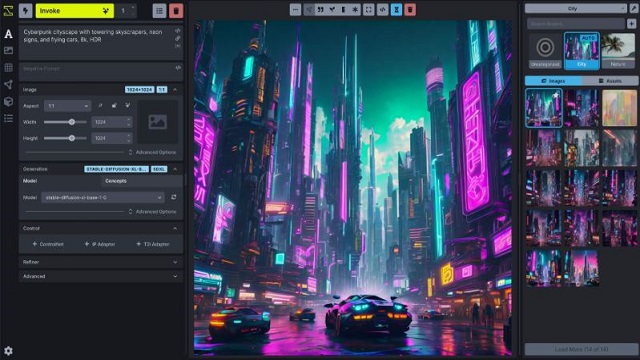
InvokeAI is an open-source AI image generation tool that runs locally on Windows, macOS, and Linux platforms. It utilizes Stable Diffusion models, allowing users to create and edit images without relying on cloud services, ensuring privacy and control over their work. The interface is designed for users serious about image manipulation, offering a polished experience with a focus on utility rather than simplicity.
Key Features:
- Generates images from text prompts using Stable Diffusion.
- Allows in-painting and out-painting, enabling targeted edits without regenerating the entire image.
- Offers control over various advanced settings like samplers, seeds, steps, and CFG scale.
- Facilitates management of multiple models locally, eliminating cloud-related limitations.
- Supports local upscaling of images.
Use Case Advantages:
InvokeAI is ideal for those frustrated with subscription models and usage limits typical of cloud tools. All images remain local unless the user chooses to share them, and there are no ongoing fees. Users can also integrate custom models, particularly from Hugging Face, although this process has its challenges, including vague error messages. The recommended approach for model installation involves manually downloading models and placing them in a local directory, circumventing some of the software’s issues.
Installation and Setup:
Installing InvokeAI involves setting up the Launcher, which pulls in necessary files. Users may encounter some hurdles, such as download failures or the need for manual updates, but a straightforward retry often resolves these issues. It requires a good GPU with ample VRAM for optimal performance, and initial launches may take time to set up.
User Interface and Workflow:
The interface, while clean and responsive, is not always intuitive; for example, the "INVOKE" button is crucial for generating images but may be mistaken for branding. Once users acclimate to the layout, they can effectively manage their image generation process. InvokeAI’s workflows streamline this process, allowing users to build visual pipelines that produce consistent outputs, making it particularly useful for projects requiring uniformity in image formats and styles.
Pros and Cons:
*Pros:*
- Local operation ensures user privacy and control.
- Open-source, allowing for commercial use under the Apache 2.0 license.
- Exceptional Unified Canvas feature for precise edits.
- Effective model management with support for custom models.
- Cross-platform compatibility without feature restrictions.
*Cons:*
- Initial setup may be challenging for newcomers to local AI tools.
- Model installation can be unreliable when sourced online.
- Lacks a functional built-in file manager.
- Requires substantial GPU and VRAM resources.
- Not beginner-friendly compared to more straightforward cloud alternatives.
Conclusion:
InvokeAI is a robust and flexible AI image generator, catering to users who value creative control and privacy. While it presents some challenges, particularly in model management and usability, it remains a powerful tool for those adept at navigating technical setups. Its workflows can significantly enhance productivity, making it suitable for professionals and enthusiasts working extensively with images. For those willing to engage with its quirks, InvokeAI offers significant creative potential without the constraints of subscriptions or cloud dependencies. Users encountering difficulties can find support within the MajorGeeks community, further enhancing the software's usability.
Future Directions:
Ongoing improvements and updates to InvokeAI could enhance user experience, particularly in the areas of model installation and interface intuitiveness. Continued community engagement may also lead to more streamlined workflows and additional features, making this tool even more accessible for a broader range of users
Key Features:
- Generates images from text prompts using Stable Diffusion.
- Allows in-painting and out-painting, enabling targeted edits without regenerating the entire image.
- Offers control over various advanced settings like samplers, seeds, steps, and CFG scale.
- Facilitates management of multiple models locally, eliminating cloud-related limitations.
- Supports local upscaling of images.
Use Case Advantages:
InvokeAI is ideal for those frustrated with subscription models and usage limits typical of cloud tools. All images remain local unless the user chooses to share them, and there are no ongoing fees. Users can also integrate custom models, particularly from Hugging Face, although this process has its challenges, including vague error messages. The recommended approach for model installation involves manually downloading models and placing them in a local directory, circumventing some of the software’s issues.
Installation and Setup:
Installing InvokeAI involves setting up the Launcher, which pulls in necessary files. Users may encounter some hurdles, such as download failures or the need for manual updates, but a straightforward retry often resolves these issues. It requires a good GPU with ample VRAM for optimal performance, and initial launches may take time to set up.
User Interface and Workflow:
The interface, while clean and responsive, is not always intuitive; for example, the "INVOKE" button is crucial for generating images but may be mistaken for branding. Once users acclimate to the layout, they can effectively manage their image generation process. InvokeAI’s workflows streamline this process, allowing users to build visual pipelines that produce consistent outputs, making it particularly useful for projects requiring uniformity in image formats and styles.
Pros and Cons:
*Pros:*
- Local operation ensures user privacy and control.
- Open-source, allowing for commercial use under the Apache 2.0 license.
- Exceptional Unified Canvas feature for precise edits.
- Effective model management with support for custom models.
- Cross-platform compatibility without feature restrictions.
*Cons:*
- Initial setup may be challenging for newcomers to local AI tools.
- Model installation can be unreliable when sourced online.
- Lacks a functional built-in file manager.
- Requires substantial GPU and VRAM resources.
- Not beginner-friendly compared to more straightforward cloud alternatives.
Conclusion:
InvokeAI is a robust and flexible AI image generator, catering to users who value creative control and privacy. While it presents some challenges, particularly in model management and usability, it remains a powerful tool for those adept at navigating technical setups. Its workflows can significantly enhance productivity, making it suitable for professionals and enthusiasts working extensively with images. For those willing to engage with its quirks, InvokeAI offers significant creative potential without the constraints of subscriptions or cloud dependencies. Users encountering difficulties can find support within the MajorGeeks community, further enhancing the software's usability.
Future Directions:
Ongoing improvements and updates to InvokeAI could enhance user experience, particularly in the areas of model installation and interface intuitiveness. Continued community engagement may also lead to more streamlined workflows and additional features, making this tool even more accessible for a broader range of users
InvokeAI 6.13.8 released
InvokeAI is an open-source AI image generation and creative toolkit that runs on Windows, macOS, and Linux.