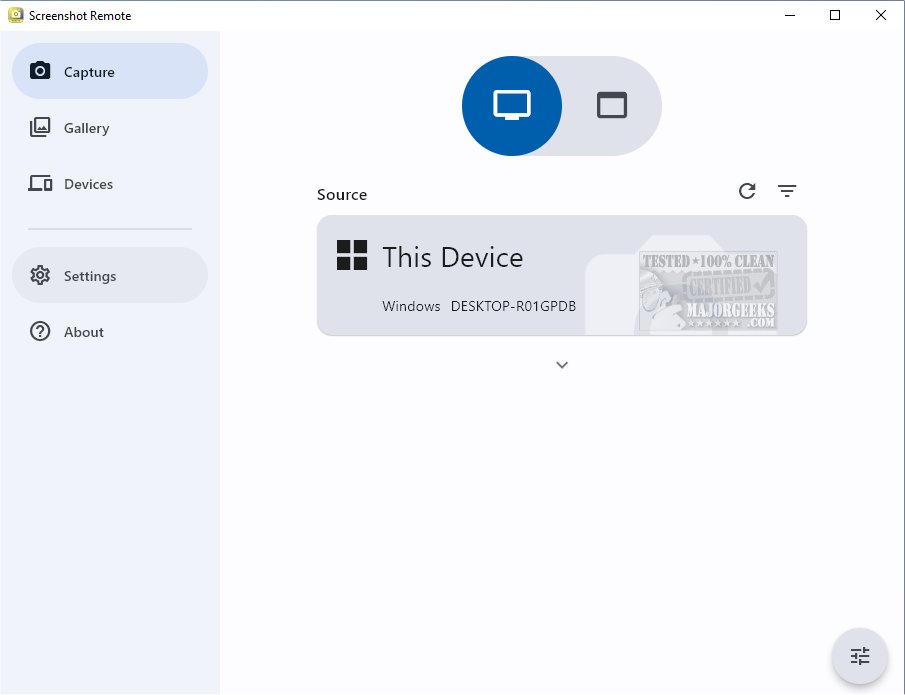
Screenshot Remote has launched version 2.0.1, a sophisticated tool designed to capture and organize screenshots across various platforms efficiently and securely. This application allows users to easily capture and categorize screenshots from their desktops, web browsers, and mobile devices, ensuring that all visual content is easily accessible and organized in one centralized location.
Key Features and Functionality
One of the standout features of Screenshot Remote is its ability to capture screenshots from remote computers using a mobile device, tablet, or another computer connected through a local network or Wi-Fi. This functionality is particularly beneficial for various applications, including monitoring, technical support, or personal use, offering users unparalleled convenience and flexibility in both home and business environments.
Multiplatform Support with Limitations
While Screenshot Remote is a multi-platform application providing a user-friendly experience across different devices, there are some restrictions for Android and iOS users. Specifically, the ability to capture screenshots on these platforms is limited to remote computers due to strict policy restrictions. However, PC and Mac users can fully utilize the screen capture functionality without any hindrances.
Enhanced Security Features
Security is a priority for Screenshot Remote, as it ensures that all captured data is stored locally on the user’s devices without being uploaded to external servers. This approach guarantees high data security and peace of mind. The communication between devices is secured through industry-standard encryption protocols over the local network or Wi-Fi. Users can also customize their screen capture settings to suit their preferences, enhancing their overall experience.
Multi-Monitor Support and Efficient Management
For users with multiple monitors, Screenshot Remote includes a feature allowing them to select which monitor to capture, ensuring precision in their screenshots. The dedicated Gallery tab serves as a storage space for screenshots and provides tools for editing and sharing, streamlining the entire process from capture to usage.
Device Pairing and Management
To use Screenshot Remote, users must initiate a pairing process between their devices to create a secure connection for seamless screenshot transfer and management. Pairing requests can be sent directly from the Capture tab, and users can manage their paired devices through a dedicated Devices tab.
Conclusion and Future Prospects
Screenshot Remote 2.0.1 represents a significant advancement in screenshot management across various devices, merging convenience, security, and user-friendly design. As remote work and digital collaboration continue to rise, tools like Screenshot Remote are likely to see increased demand and further enhancements in future updates. Users can look forward to potential new features and expanded functionalities that cater to their evolving needs in screenshot capturing and management.
Related Resources:
- How to Take Screenshots in Windows 10 & 11
- How to Create Screen Snip Shortcut in Windows 10 & 11
- How to Take High Resolution Screenshots in Windows 10 & 1
Key Features and Functionality
One of the standout features of Screenshot Remote is its ability to capture screenshots from remote computers using a mobile device, tablet, or another computer connected through a local network or Wi-Fi. This functionality is particularly beneficial for various applications, including monitoring, technical support, or personal use, offering users unparalleled convenience and flexibility in both home and business environments.
Multiplatform Support with Limitations
While Screenshot Remote is a multi-platform application providing a user-friendly experience across different devices, there are some restrictions for Android and iOS users. Specifically, the ability to capture screenshots on these platforms is limited to remote computers due to strict policy restrictions. However, PC and Mac users can fully utilize the screen capture functionality without any hindrances.
Enhanced Security Features
Security is a priority for Screenshot Remote, as it ensures that all captured data is stored locally on the user’s devices without being uploaded to external servers. This approach guarantees high data security and peace of mind. The communication between devices is secured through industry-standard encryption protocols over the local network or Wi-Fi. Users can also customize their screen capture settings to suit their preferences, enhancing their overall experience.
Multi-Monitor Support and Efficient Management
For users with multiple monitors, Screenshot Remote includes a feature allowing them to select which monitor to capture, ensuring precision in their screenshots. The dedicated Gallery tab serves as a storage space for screenshots and provides tools for editing and sharing, streamlining the entire process from capture to usage.
Device Pairing and Management
To use Screenshot Remote, users must initiate a pairing process between their devices to create a secure connection for seamless screenshot transfer and management. Pairing requests can be sent directly from the Capture tab, and users can manage their paired devices through a dedicated Devices tab.
Conclusion and Future Prospects
Screenshot Remote 2.0.1 represents a significant advancement in screenshot management across various devices, merging convenience, security, and user-friendly design. As remote work and digital collaboration continue to rise, tools like Screenshot Remote are likely to see increased demand and further enhancements in future updates. Users can look forward to potential new features and expanded functionalities that cater to their evolving needs in screenshot capturing and management.
Related Resources:
- How to Take Screenshots in Windows 10 & 11
- How to Create Screen Snip Shortcut in Windows 10 & 11
- How to Take High Resolution Screenshots in Windows 10 & 1
Screenshot Remote 2.0.1 released
Screenshot Remote seamlessly captures and organizes screenshots across different platforms while ensuring secure and efficient management.