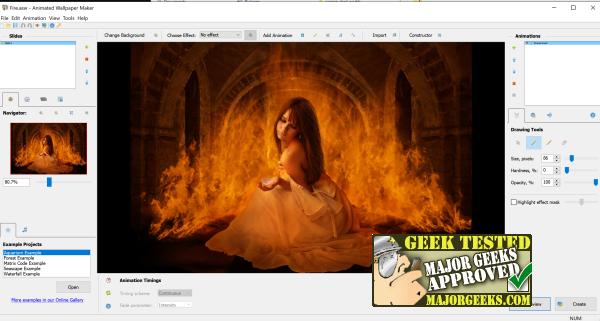
Animated Wallpaper Maker version 4.5.52 has been released, offering users the ability to transform their static desktop backgrounds into dynamic animated displays. This user-friendly software allows individuals to enhance their desktops with just a few clicks, turning ordinary images into captivating animated art. Users can start their creative process using predefined project files or create custom animations from scratch.
To begin, simply load any desired image and choose from a vast library of animations by clicking the plus icon next to the animation window. The program also offers options to incorporate fading, shaping effects, and sound support for .wav files, adding depth to the animated wallpaper. Once the design is complete, users can save their project, set it as the current background, or export it as an executable file (.exe) for later use. The executable file allows the Animated Wallpaper Maker program to run in the system tray, facilitating easy access to manage the animated wallpaper.
While the price of $39.77 may seem steep initially, many users may find the software worth the investment after experiencing its fun and creative capabilities. Additionally, the software's recent release is accompanied by a collection of cool and spooky wallpapers available for download on MajorGeeks.
In conclusion, Animated Wallpaper Maker 4.5.52 is a versatile tool for anyone looking to liven up their desktop environment. Whether you are a casual user wanting to personalize your workspace or someone who enjoys experimenting with digital art, this software provides a plethora of features to explore. With its easy-to-use interface and extensive animation options, it caters to both beginners and enthusiasts alike. This makes it an appealing choice for those interested in desktop customization
To begin, simply load any desired image and choose from a vast library of animations by clicking the plus icon next to the animation window. The program also offers options to incorporate fading, shaping effects, and sound support for .wav files, adding depth to the animated wallpaper. Once the design is complete, users can save their project, set it as the current background, or export it as an executable file (.exe) for later use. The executable file allows the Animated Wallpaper Maker program to run in the system tray, facilitating easy access to manage the animated wallpaper.
While the price of $39.77 may seem steep initially, many users may find the software worth the investment after experiencing its fun and creative capabilities. Additionally, the software's recent release is accompanied by a collection of cool and spooky wallpapers available for download on MajorGeeks.
In conclusion, Animated Wallpaper Maker 4.5.52 is a versatile tool for anyone looking to liven up their desktop environment. Whether you are a casual user wanting to personalize your workspace or someone who enjoys experimenting with digital art, this software provides a plethora of features to explore. With its easy-to-use interface and extensive animation options, it caters to both beginners and enthusiasts alike. This makes it an appealing choice for those interested in desktop customization
Animated Wallpaper Maker 4.5.52 released
Animated Wallpaper Maker can turn any desktop background into an animated masterpiece.