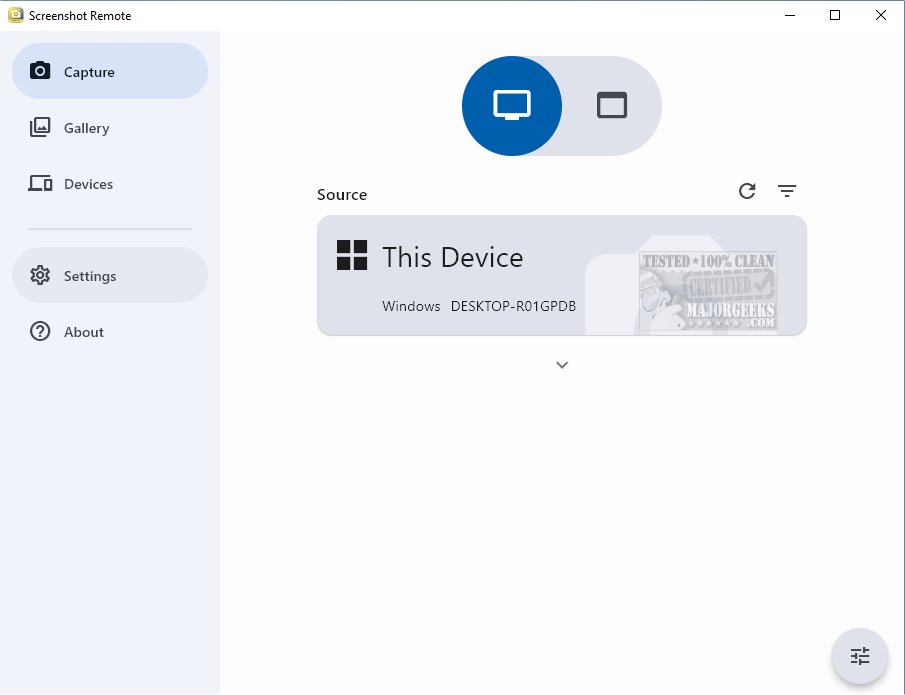
The latest version of Screenshot Remote, 1.1.4, brings enhanced functionality for capturing and organizing screenshots across multiple platforms while prioritizing secure and efficient management. This innovative tool allows users to effortlessly capture and categorize screenshots from various devices, including desktops, web browsers, and mobile devices, consolidating all visual content in one accessible location.
Convenience and Flexibility
Screenshot Remote enables users to capture screenshots from remote computers via smartphones, tablets, or other computers, utilizing local network connections or Wi-Fi. This feature is particularly beneficial for both personal and professional scenarios, such as remote monitoring, technical support, or simply managing personal projects from a distance.
Multi-Platform Compatibility with Limitations
While Screenshot Remote offers a user-friendly experience across devices, it is important to note that full screen capture functionality is available only on PC and Mac. Due to stringent policy restrictions, Android and iOS devices have limitations, allowing screenshot capture solely from remote computers, which can restrict some user scenarios.
Data Security Measures
Prioritizing user security, Screenshot Remote ensures that all data remains local to the user's devices, eliminating the risks associated with uploading to external servers. Image and command transfers between devices are encrypted using industry-standard protocols over local networks. Users have the option to customize their screen capture settings, providing a tailored experience that meets their specific needs.
Multi-Monitor Support and Efficient Management
For users with multiple monitors, Screenshot Remote features a selection option to choose which monitor to capture, enhancing precision in the screenshot process. The integrated Gallery tab serves as a dedicated storage space for screenshots, equipped with editing tools and sharing options, streamlining the entire workflow from capture to usage.
Device Pairing and Management
To establish secure connections for seamless screenshot transfer and management, users must initiate a pairing process between their devices. This can be done directly from the Capture tab, with an accessible Devices tab for managing and editing paired devices effectively.
Conclusion and Future Prospects
Screenshot Remote 1.1.4 stands out as a powerful tool for users needing efficient screenshot management across devices. As technology continues to evolve, future updates could enhance compatibility with mobile platforms and introduce additional features that further simplify the screenshot process. Overall, Screenshot Remote is positioned as an essential tool for both personal and professional use, offering unmatched convenience, security, and flexibility.
Related Resources:
- How to Take Screenshots in Windows 10 & 11
- How to Create Screen Snip Shortcut in Windows 10 & 11
- How to Take High-Resolution Screenshots in Windows 10 & 1
Convenience and Flexibility
Screenshot Remote enables users to capture screenshots from remote computers via smartphones, tablets, or other computers, utilizing local network connections or Wi-Fi. This feature is particularly beneficial for both personal and professional scenarios, such as remote monitoring, technical support, or simply managing personal projects from a distance.
Multi-Platform Compatibility with Limitations
While Screenshot Remote offers a user-friendly experience across devices, it is important to note that full screen capture functionality is available only on PC and Mac. Due to stringent policy restrictions, Android and iOS devices have limitations, allowing screenshot capture solely from remote computers, which can restrict some user scenarios.
Data Security Measures
Prioritizing user security, Screenshot Remote ensures that all data remains local to the user's devices, eliminating the risks associated with uploading to external servers. Image and command transfers between devices are encrypted using industry-standard protocols over local networks. Users have the option to customize their screen capture settings, providing a tailored experience that meets their specific needs.
Multi-Monitor Support and Efficient Management
For users with multiple monitors, Screenshot Remote features a selection option to choose which monitor to capture, enhancing precision in the screenshot process. The integrated Gallery tab serves as a dedicated storage space for screenshots, equipped with editing tools and sharing options, streamlining the entire workflow from capture to usage.
Device Pairing and Management
To establish secure connections for seamless screenshot transfer and management, users must initiate a pairing process between their devices. This can be done directly from the Capture tab, with an accessible Devices tab for managing and editing paired devices effectively.
Conclusion and Future Prospects
Screenshot Remote 1.1.4 stands out as a powerful tool for users needing efficient screenshot management across devices. As technology continues to evolve, future updates could enhance compatibility with mobile platforms and introduce additional features that further simplify the screenshot process. Overall, Screenshot Remote is positioned as an essential tool for both personal and professional use, offering unmatched convenience, security, and flexibility.
Related Resources:
- How to Take Screenshots in Windows 10 & 11
- How to Create Screen Snip Shortcut in Windows 10 & 11
- How to Take High-Resolution Screenshots in Windows 10 & 1
Screenshot Remote 1.1.4 released
Screenshot Remote seamlessly captures and organizes screenshots across different platforms while ensuring secure and efficient management.