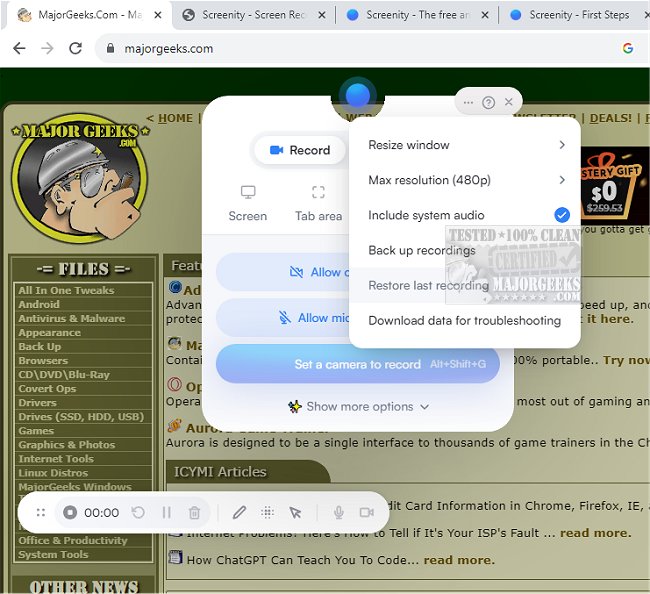
Screenity for Chrome has released version 4.5.3, enhancing its reputation as a user-friendly screen recording extension that offers an unlimited and seamless recording experience. This tool allows users to capture high-quality screen recordings with audio, while also providing options for annotations and highlights to enhance the content’s informative value. Its intuitive interface and customizable settings make it ideal for creating tutorials, presentations, demos, or any other form of video content. Notably, users can utilize the extension without needing to create an account, reinforcing its accessibility and privacy-centric design.
Screenity for Chrome stands out as a versatile tool for producing high-quality product demonstrations, tutorials, and presentations, as well as facilitating team feedback. The extension supports unlimited recordings from various sources, including specific areas of the screen, the entire desktop, applications, or even the webcam. It features capabilities for recording both microphone and internal audio, alongside a push-to-talk feature for added convenience.
The extension also incorporates advanced functionalities like AI-powered camera backgrounds and blurring effects to enhance the visual quality of recordings. Users can smoothly zoom in on particular areas, blur sensitive content for privacy, and utilize a comprehensive editor to modify recordings by cutting, trimming, or cropping them. Highlighting clicks and cursor movements, as well as activating a spotlight mode, further enriches the viewer's experience.
Screenity offers practical features including setting alarms for automatic recording stops, exporting in various formats (mp4, gif, WebM), and saving recordings directly to Google Drive for easy sharing. Users can also customize their recording environment by setting countdowns and hiding or repositioning user interface elements.
With Screenity for Chrome, there are no restrictions on the number or duration of recordings, making it an invaluable tool for endless video creation. Users will need to grant permissions for microphone and camera access to fully utilize its features.
In addition to Screenity, users might find it beneficial to explore related tools and guides, such as how to take screenshots or create screen snip shortcuts in Windows 10 and 11, further enhancing their productivity and content creation capabilities
Screenity for Chrome stands out as a versatile tool for producing high-quality product demonstrations, tutorials, and presentations, as well as facilitating team feedback. The extension supports unlimited recordings from various sources, including specific areas of the screen, the entire desktop, applications, or even the webcam. It features capabilities for recording both microphone and internal audio, alongside a push-to-talk feature for added convenience.
The extension also incorporates advanced functionalities like AI-powered camera backgrounds and blurring effects to enhance the visual quality of recordings. Users can smoothly zoom in on particular areas, blur sensitive content for privacy, and utilize a comprehensive editor to modify recordings by cutting, trimming, or cropping them. Highlighting clicks and cursor movements, as well as activating a spotlight mode, further enriches the viewer's experience.
Screenity offers practical features including setting alarms for automatic recording stops, exporting in various formats (mp4, gif, WebM), and saving recordings directly to Google Drive for easy sharing. Users can also customize their recording environment by setting countdowns and hiding or repositioning user interface elements.
With Screenity for Chrome, there are no restrictions on the number or duration of recordings, making it an invaluable tool for endless video creation. Users will need to grant permissions for microphone and camera access to fully utilize its features.
In addition to Screenity, users might find it beneficial to explore related tools and guides, such as how to take screenshots or create screen snip shortcuts in Windows 10 and 11, further enhancing their productivity and content creation capabilities
Screenity for Chrome 4.5.3 released
Screenity for Chrome is a user-friendly screen recording extension designed to provide a seamless and unlimited recording experience.