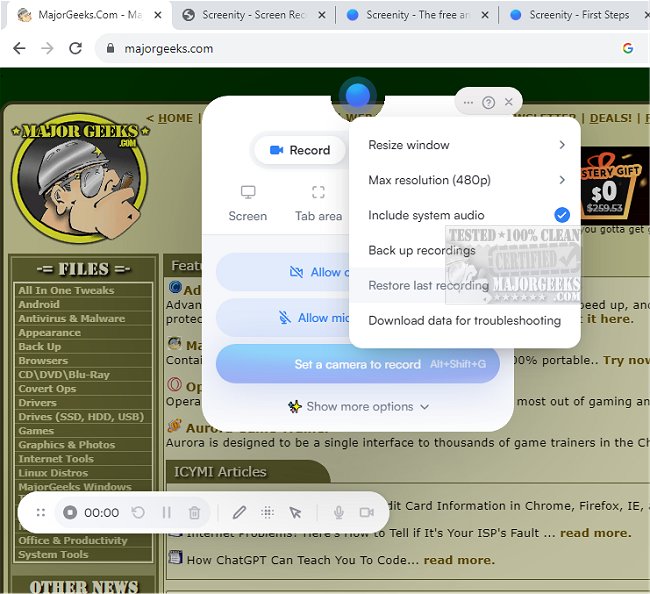
Screenity for Chrome has launched its latest version, 4.4.0, enhancing its reputation as a user-friendly screen recording extension that allows for seamless, unlimited recording. This tool is designed for capturing high-quality videos with audio, making it ideal for tutorials, presentations, demos, and other video content creation. Importantly, users can access Screenity without any sign-in requirements, ensuring a straightforward and privacy-centered experience.
The extension stands out for its versatility, enabling users to record their entire screen, specific tabs, applications, or even webcam footage. It also supports audio recording from microphones or internal sources, and features like push-to-talk functionality. Users can annotate their recordings with drawings, text, arrows, and shapes, enhancing the informative quality of their videos.
Screenity integrates advanced features such as AI-powered camera backgrounds, smooth zoom capabilities, and tools for blurring sensitive content to maintain privacy. Additionally, users can edit their recordings comprehensively, including cutting, trimming, and cropping clips, as well as managing audio tracks.
With features like click highlighting, spotlight mode, and customizable recording settings—such as setting alarms for automatic stops and countdowns—Screenity provides a robust experience. Users can export their recordings in various formats, including mp4, gif, and WebM, or save directly to Google Drive for easy sharing.
In summary, Screenity for Chrome 4.4.0 is an exceptional tool for anyone looking to create unlimited high-quality recordings efficiently. Its extensive features cater to a wide range of video creation needs while prioritizing user privacy and convenience. As technology continues to evolve, tools like Screenity will likely incorporate even more innovative functionalities, making video recording and sharing an increasingly streamlined process for users across different platforms
The extension stands out for its versatility, enabling users to record their entire screen, specific tabs, applications, or even webcam footage. It also supports audio recording from microphones or internal sources, and features like push-to-talk functionality. Users can annotate their recordings with drawings, text, arrows, and shapes, enhancing the informative quality of their videos.
Screenity integrates advanced features such as AI-powered camera backgrounds, smooth zoom capabilities, and tools for blurring sensitive content to maintain privacy. Additionally, users can edit their recordings comprehensively, including cutting, trimming, and cropping clips, as well as managing audio tracks.
With features like click highlighting, spotlight mode, and customizable recording settings—such as setting alarms for automatic stops and countdowns—Screenity provides a robust experience. Users can export their recordings in various formats, including mp4, gif, and WebM, or save directly to Google Drive for easy sharing.
In summary, Screenity for Chrome 4.4.0 is an exceptional tool for anyone looking to create unlimited high-quality recordings efficiently. Its extensive features cater to a wide range of video creation needs while prioritizing user privacy and convenience. As technology continues to evolve, tools like Screenity will likely incorporate even more innovative functionalities, making video recording and sharing an increasingly streamlined process for users across different platforms
Screenity for Chrome 4.4.0 released
Screenity for Chrome is a user-friendly screen recording extension designed to provide a seamless and unlimited recording experience.