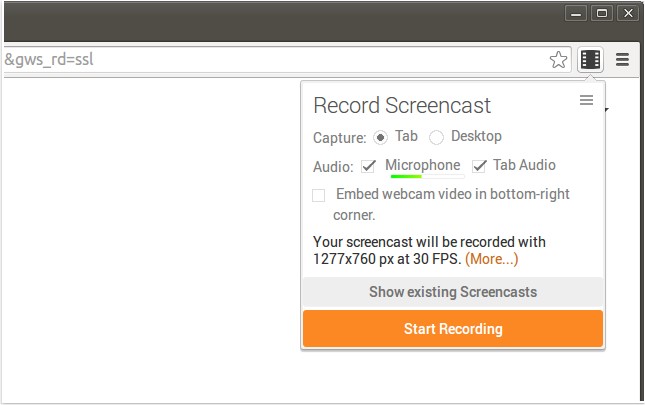
Screencastify for Chrome has released version 4.24.5, enhancing its functionality as a screen recording tool. This extension allows users to capture their screen activity, including audio, making it ideal for creating YouTube tutorials, presentations, and more. The recorded videos are saved in WebM/vp8 format with Ogg Vorbis audio, ensuring high-quality output. Users have multiple options for saving their recordings, including local storage, uploading directly to YouTube, or saving to Google Drive, all with just a simple click. Notably, Screencastify operates without relying on external software like Java or Flash, making it compatible with Chromebooks and Chromeboxes.
Key features of Screencastify include seamless integration with Google Drive, which allows users to access their recordings from anywhere and helps conserve local storage on devices like Chromebooks. Sharing recordings is straightforward; users can upload directly to YouTube or Google Drive with ease, receiving instant links to their content. Additionally, users can enhance their recordings by adding a webcam feed, allowing them to personalize their videos. Keyboard shortcuts can also be configured for quick access to recording functions.
Beyond its primary functions, Screencastify stands out in the realm of screen recording tools, offering an efficient and user-friendly experience for educators, content creators, and professionals alike. As users continue to seek innovative ways to create and share content online, tools like Screencastify are becoming increasingly essential in the digital landscape. With its latest updates, Screencastify remains a strong contender for anyone looking to elevate their online presentations or tutorials.
To further enrich user experience, additional resources and guides on related topics, such as managing tab audio in browsers and troubleshooting video playback issues, are also available, ensuring that users are equipped with comprehensive knowledge to optimize their online activities
Key features of Screencastify include seamless integration with Google Drive, which allows users to access their recordings from anywhere and helps conserve local storage on devices like Chromebooks. Sharing recordings is straightforward; users can upload directly to YouTube or Google Drive with ease, receiving instant links to their content. Additionally, users can enhance their recordings by adding a webcam feed, allowing them to personalize their videos. Keyboard shortcuts can also be configured for quick access to recording functions.
Beyond its primary functions, Screencastify stands out in the realm of screen recording tools, offering an efficient and user-friendly experience for educators, content creators, and professionals alike. As users continue to seek innovative ways to create and share content online, tools like Screencastify are becoming increasingly essential in the digital landscape. With its latest updates, Screencastify remains a strong contender for anyone looking to elevate their online presentations or tutorials.
To further enrich user experience, additional resources and guides on related topics, such as managing tab audio in browsers and troubleshooting video playback issues, are also available, ensuring that users are equipped with comprehensive knowledge to optimize their online activities
Screencastify for Chrome 4.24.5 released
Screencastify for Chrome will record all your screen activity including audio making it perfect for YouTube tutorials, presentations and more.