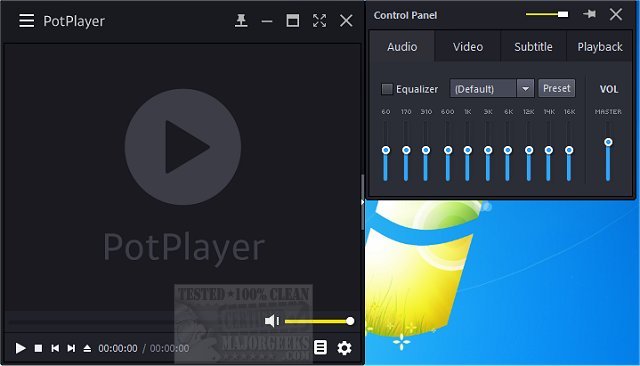
PotPlayer is a versatile media player that excels in playing various video and audio formats while also providing support for TV channels, subtitles, and customizable skins. A portable version is available for users who prefer mobility without installation.
Why Choose PotPlayer?
PotPlayer is designed for users who seek high performance without compromising on ease of use. It supports an extensive range of media formats—including MP4, MKV, AVI, FLV, MP3, and FLAC—eliminating the need for additional codec installations. Optimized for hardware acceleration, PotPlayer ensures smooth playback of high-definition videos even on less powerful systems, making it an ideal choice for all users.
Key Features:
- Wide Format Support: Plays a vast array of video and audio formats effortlessly.
- Smooth Performance & Hardware Acceleration: Utilizes technologies like DXVA, CUDA, and QuickSync to minimize CPU usage while ensuring seamless playback.
- Advanced Subtitle Support: Offers compatibility with various subtitle formats, allowing for customization in size, position, and timing.
- Highly Customizable Controls: Users can adjust playback speed, audio settings, and apply video filters with ease.
- Seamless Playlist Management: Remembers the last 200 files played, allowing users to resume watching where they left off without hassle.
- 3D and 360-Degree Video Support: Supports immersive video formats, providing a unique viewing experience.
- Built-in Screen Capture & Bookmarking: Users can take screenshots and bookmark scenes for quick access later.
- Minimal System Impact: Lightweight design ensures efficient performance on both modern and older hardware.
Geek Verdict: PotPlayer stands out as one of the top media players available, rivaling options like VLC and MPC-HC. With its robust features and customization options, it offers a superior user experience. If you're in search of a free, feature-rich media player, PotPlayer is a highly recommended choice. Download it today to experience uninterrupted playback.
Additional Resources:
- How to Enable Windows Sonic Surround Sound on Windows 10 & 11
- How to Rename Your Sound Input or Output Devices
- How to Change Sound Audio Balance in Windows 10 & 11
- How to Change Default Sound Output Device in Windows 10 & 11
In conclusion, PotPlayer not only meets the demands of casual viewers but also caters to the needs of power users, making it a well-rounded solution for media playback. With ongoing updates and improvements, users can expect even more features and enhancements in future releases
Why Choose PotPlayer?
PotPlayer is designed for users who seek high performance without compromising on ease of use. It supports an extensive range of media formats—including MP4, MKV, AVI, FLV, MP3, and FLAC—eliminating the need for additional codec installations. Optimized for hardware acceleration, PotPlayer ensures smooth playback of high-definition videos even on less powerful systems, making it an ideal choice for all users.
Key Features:
- Wide Format Support: Plays a vast array of video and audio formats effortlessly.
- Smooth Performance & Hardware Acceleration: Utilizes technologies like DXVA, CUDA, and QuickSync to minimize CPU usage while ensuring seamless playback.
- Advanced Subtitle Support: Offers compatibility with various subtitle formats, allowing for customization in size, position, and timing.
- Highly Customizable Controls: Users can adjust playback speed, audio settings, and apply video filters with ease.
- Seamless Playlist Management: Remembers the last 200 files played, allowing users to resume watching where they left off without hassle.
- 3D and 360-Degree Video Support: Supports immersive video formats, providing a unique viewing experience.
- Built-in Screen Capture & Bookmarking: Users can take screenshots and bookmark scenes for quick access later.
- Minimal System Impact: Lightweight design ensures efficient performance on both modern and older hardware.
Geek Verdict: PotPlayer stands out as one of the top media players available, rivaling options like VLC and MPC-HC. With its robust features and customization options, it offers a superior user experience. If you're in search of a free, feature-rich media player, PotPlayer is a highly recommended choice. Download it today to experience uninterrupted playback.
Additional Resources:
- How to Enable Windows Sonic Surround Sound on Windows 10 & 11
- How to Rename Your Sound Input or Output Devices
- How to Change Sound Audio Balance in Windows 10 & 11
- How to Change Default Sound Output Device in Windows 10 & 11
In conclusion, PotPlayer not only meets the demands of casual viewers but also caters to the needs of power users, making it a well-rounded solution for media playback. With ongoing updates and improvements, users can expect even more features and enhancements in future releases
PotPlayer 1.7.23118 released
PotPlayer is a comprehensive video and audio player that also supports TV channels, subtitles, and skins. Portable version also available.