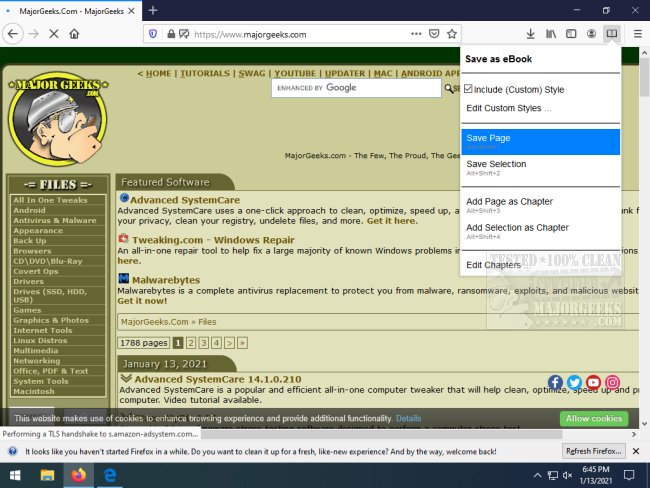
The release of Save as eBook for Chrome and Firefox 2.3.0 introduces a handy tool for users looking to save their favorite webpages in EPUB format. This extension streamlines the process of saving content, allowing users to click on the extension icon and select "save as eBook" for a straightforward experience.
The tool includes several useful features, such as the ability to incorporate custom styles through CSS, edit chapters, and retain all images and links from the original webpage. This makes it especially beneficial for saving rich-text content like recipes or informative Wikipedia entries. Users are not required to save entire pages; instead, they can choose specific content by using the "save selection" option from the dropdown menu. For those needing broader multi-page information, the extension allows for the compilation of multiple sources into one EPUB file, which can then be organized by adding pages as chapters.
To read the saved EPUBs on tablets, users will need to convert the files to MOBI format using Calibre or a similar application. This tool is particularly useful for students, educators, and anyone who frequently needs to reference curated content in a workable eBook format.
In summary, Save as eBook for Chrome and Firefox 2.3.0 is a versatile extension designed to enhance the way users collect and manage online information. It caters to individual needs by allowing for personalized content selection and organization, making it an essential tool for anyone who values efficiency and accessibility in digital reading. As digital content continues to grow, tools like this will play a crucial role in how we interact with and utilize information from the web
The tool includes several useful features, such as the ability to incorporate custom styles through CSS, edit chapters, and retain all images and links from the original webpage. This makes it especially beneficial for saving rich-text content like recipes or informative Wikipedia entries. Users are not required to save entire pages; instead, they can choose specific content by using the "save selection" option from the dropdown menu. For those needing broader multi-page information, the extension allows for the compilation of multiple sources into one EPUB file, which can then be organized by adding pages as chapters.
To read the saved EPUBs on tablets, users will need to convert the files to MOBI format using Calibre or a similar application. This tool is particularly useful for students, educators, and anyone who frequently needs to reference curated content in a workable eBook format.
In summary, Save as eBook for Chrome and Firefox 2.3.0 is a versatile extension designed to enhance the way users collect and manage online information. It caters to individual needs by allowing for personalized content selection and organization, making it an essential tool for anyone who values efficiency and accessibility in digital reading. As digital content continues to grow, tools like this will play a crucial role in how we interact with and utilize information from the web
Save as eBook for Chrome and Firefox 2.3.0 released
Save as eBook for Chrome and Firefox allows you to save your favorite webpages in EPUB format incorporating several useful features.
Save as eBook for Chrome and Firefox 2.3.0 released @ MajorGeeks