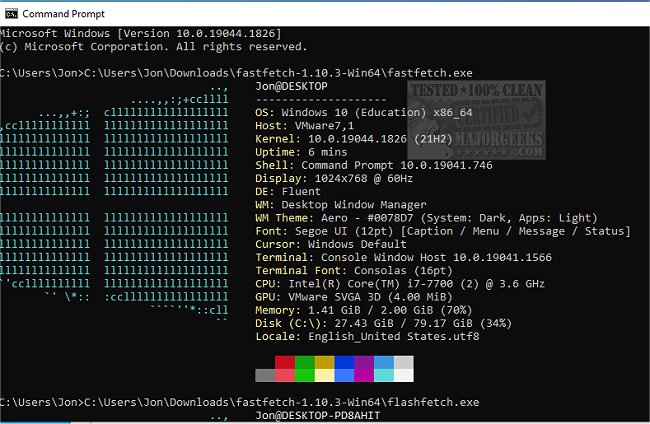
Fastfetch version 2.68.1 has been released, enhancing its capabilities as an Open Source multi-platform application that efficiently retrieves and displays system information in an attractive format. Written primarily in C, Fastfetch is designed with performance and customizability in mind. It comes with two executables, which can be configured through various flags. Users can make these configurations persistent by setting them in the $XDG_CONFIG_HOME/fastfetch/config.conf file. To learn about the available options, users can execute the command "fastfetch --help."
The second executable, known as flashfetch, is optimized at compile time to reduce overhead. Users can configure flashfetch directly in the source file src/flashfetch.c. Fastfetch is under continuous development, with new features being added regularly, which can significantly enhance performance on slower machines. Additionally, the application includes premade configuration files located in the presets directory, which can be loaded using the command "--load-config" and can also serve as useful examples for using format arguments.
Fastfetch allows extensive customization of logos, with detailed documentation available in the developer repository for users interested in personalizing their display.
In summary, Fastfetch is a powerful tool for users seeking a quick and customizable way to display system information. Its ongoing development promises even more features, making it a valuable resource for both casual users and tech enthusiasts alike. Moreover, users can explore related topics such as identifying hardware in their computers, learning about their Intel processor and generation, checking the number of CPU cores, and finding the serial number of their Windows PC for comprehensive system management
The second executable, known as flashfetch, is optimized at compile time to reduce overhead. Users can configure flashfetch directly in the source file src/flashfetch.c. Fastfetch is under continuous development, with new features being added regularly, which can significantly enhance performance on slower machines. Additionally, the application includes premade configuration files located in the presets directory, which can be loaded using the command "--load-config" and can also serve as useful examples for using format arguments.
Fastfetch allows extensive customization of logos, with detailed documentation available in the developer repository for users interested in personalizing their display.
In summary, Fastfetch is a powerful tool for users seeking a quick and customizable way to display system information. Its ongoing development promises even more features, making it a valuable resource for both casual users and tech enthusiasts alike. Moreover, users can explore related topics such as identifying hardware in their computers, learning about their Intel processor and generation, checking the number of CPU cores, and finding the serial number of their Windows PC for comprehensive system management
Fastfetch 2.68.1 released
Fastfetch is an Open Source multi-platform app capable of quickly fetching and displaying system info.