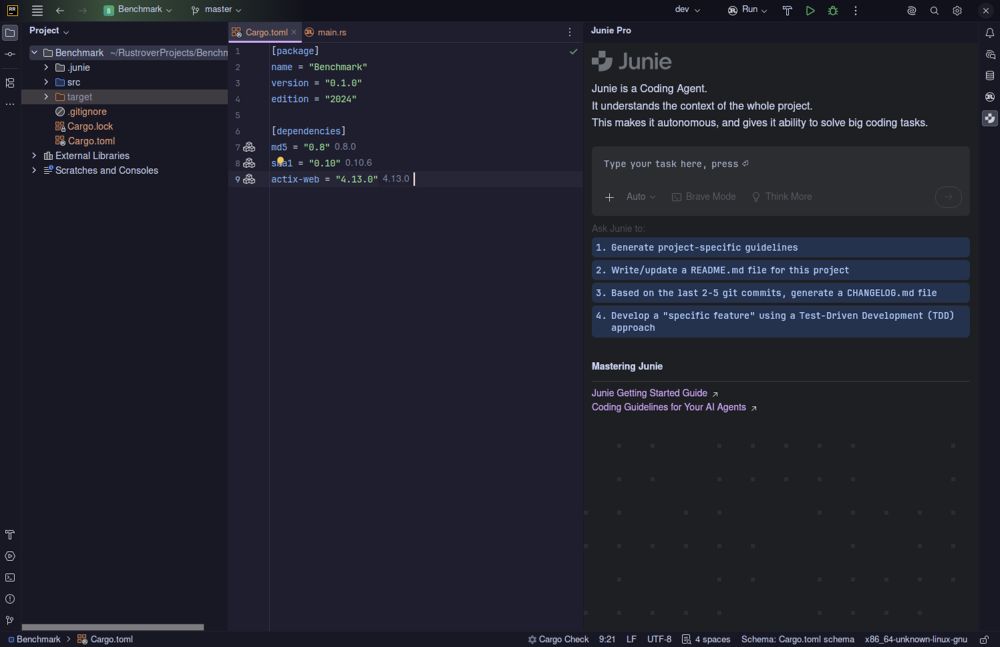
The latest release of RustRover, version 2026.2.2, marks a significant improvement in the experience of developing Rust applications. This integrated development environment (IDE) from JetBrains aims to eliminate the common frustrations associated with plugin hunting and configuration, providing developers with all the necessary tools to write, test, and debug Rust code right from the start.
Key Features of RustRover IDE
RustRover stands out by offering a fully integrated environment, which includes built-in AI capabilities, database tools, and real-time collaboration features. Unlike traditional setups that require extensive configuration and multiple plugins for functionalities such as linting, debugging, and version control, RustRover is designed to be ready-to-use. Developers simply need to point the IDE to their `Cargo.toml` file to begin working without the usual setup hassles.
However, this convenience comes with a trade-off: increased memory usage. JetBrains products are known for their rich feature set, which can lead to significant RAM consumption, particularly on machines with limited memory. Users with 8 GB of RAM may experience slowdowns, especially during project indexing, though the IDE performs well on modern hardware.
AI Capabilities and Usability
RustRover's AI features have garnered attention for their practicality. The platform allows integration with AI models such as Claude, GPT-4, and others, providing enhanced code completion and context-aware suggestions. This contrasts with typical code suggestions that can often feel generic or contextually irrelevant. Users have reported positive experiences, citing the AI's ability to understand complex coding patterns and provide useful insights.
The IDE's native AI integration eliminates the need for context switching, allowing developers to access suggestions and refactoring prompts directly within the code view. For more intensive tasks, such as generating tests or handling complex macro expansions, RustRover delegates work to specialized AI models, optimizing performance.
Collaboration and Database Tools
RustRover includes features for real-time collaboration, making it easier for teams to work together, regardless of their geographical locations. It allows for the sharing of project configurations, which helps maintain consistency in coding styles among team members. Additionally, its built-in Git integration simplifies version control processes, covering essential functionalities without requiring extra extensions.
The IDE also integrates database management tools derived from JetBrains' DataGrip, enabling users to interact with various databases seamlessly. This feature is particularly useful for developers working on backend projects, as they can debug database connections without needing to switch between multiple applications.
Licensing and Accessibility
JetBrains offers RustRover for free for non-commercial use, which is an attractive option for hobbyists, learners, and open-source contributors. However, commercial developers must secure a paid license for any work that is monetized. This structure ensures that budget-conscious users can access professional-quality tools without the usual financial barriers.
Pros and Cons of RustRover IDE
Pros:
- Zero-config setup with full support for Cargo, TOML, and debugging.
- Native AI integration that understands Rust-specific patterns.
- Built-in database client and Docker management enhance workflow efficiency.
- Free tier available for hobbyists and educators.
Cons:
- High RAM usage may hinder performance on older machines.
- Commercial usage requires a paid license, which may be a concern for small teams.
- User interface may feel cluttered for those requiring only basic functionalities.
- Limited plugin ecosystem compared to alternatives like VS Code.
Conclusion
For developers prioritizing an efficient and polished coding experience, RustRover offers a compelling solution. It alleviates the common pain points of project setup and management, allowing users to focus on coding without the typical distractions of configuration and troubleshooting. While the IDE may not be ideal for those with older hardware or minimalist preferences, it represents a significant advancement in Rust development environments. As users explore the capabilities of RustRover, they are encouraged to engage with the community for support and additional tips
Key Features of RustRover IDE
RustRover stands out by offering a fully integrated environment, which includes built-in AI capabilities, database tools, and real-time collaboration features. Unlike traditional setups that require extensive configuration and multiple plugins for functionalities such as linting, debugging, and version control, RustRover is designed to be ready-to-use. Developers simply need to point the IDE to their `Cargo.toml` file to begin working without the usual setup hassles.
However, this convenience comes with a trade-off: increased memory usage. JetBrains products are known for their rich feature set, which can lead to significant RAM consumption, particularly on machines with limited memory. Users with 8 GB of RAM may experience slowdowns, especially during project indexing, though the IDE performs well on modern hardware.
AI Capabilities and Usability
RustRover's AI features have garnered attention for their practicality. The platform allows integration with AI models such as Claude, GPT-4, and others, providing enhanced code completion and context-aware suggestions. This contrasts with typical code suggestions that can often feel generic or contextually irrelevant. Users have reported positive experiences, citing the AI's ability to understand complex coding patterns and provide useful insights.
The IDE's native AI integration eliminates the need for context switching, allowing developers to access suggestions and refactoring prompts directly within the code view. For more intensive tasks, such as generating tests or handling complex macro expansions, RustRover delegates work to specialized AI models, optimizing performance.
Collaboration and Database Tools
RustRover includes features for real-time collaboration, making it easier for teams to work together, regardless of their geographical locations. It allows for the sharing of project configurations, which helps maintain consistency in coding styles among team members. Additionally, its built-in Git integration simplifies version control processes, covering essential functionalities without requiring extra extensions.
The IDE also integrates database management tools derived from JetBrains' DataGrip, enabling users to interact with various databases seamlessly. This feature is particularly useful for developers working on backend projects, as they can debug database connections without needing to switch between multiple applications.
Licensing and Accessibility
JetBrains offers RustRover for free for non-commercial use, which is an attractive option for hobbyists, learners, and open-source contributors. However, commercial developers must secure a paid license for any work that is monetized. This structure ensures that budget-conscious users can access professional-quality tools without the usual financial barriers.
Pros and Cons of RustRover IDE
Pros:
- Zero-config setup with full support for Cargo, TOML, and debugging.
- Native AI integration that understands Rust-specific patterns.
- Built-in database client and Docker management enhance workflow efficiency.
- Free tier available for hobbyists and educators.
Cons:
- High RAM usage may hinder performance on older machines.
- Commercial usage requires a paid license, which may be a concern for small teams.
- User interface may feel cluttered for those requiring only basic functionalities.
- Limited plugin ecosystem compared to alternatives like VS Code.
Conclusion
For developers prioritizing an efficient and polished coding experience, RustRover offers a compelling solution. It alleviates the common pain points of project setup and management, allowing users to focus on coding without the typical distractions of configuration and troubleshooting. While the IDE may not be ideal for those with older hardware or minimalist preferences, it represents a significant advancement in Rust development environments. As users explore the capabilities of RustRover, they are encouraged to engage with the community for support and additional tips
RustRover 2026.2.2 released
RustRover drops the plugin hunting and config headaches by shipping with everything needed to write, test, and debug Rust code right out of the box.