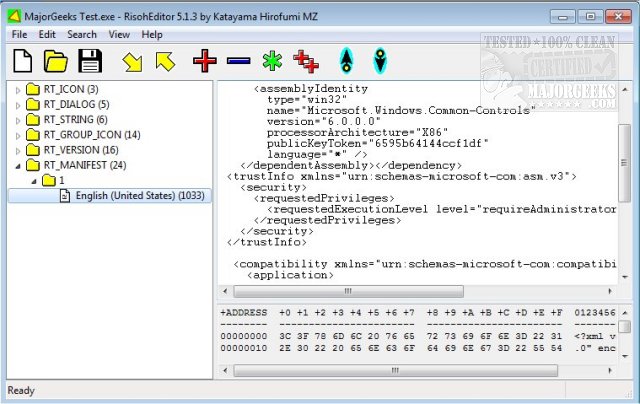
RisohEditor version 5.9.7 has been released, offering a free tool for managing resource data within DLL and EXE files. The application enables users to add, edit, extract, and remove various resource components like Dialogs, Menus, Icons, Cursors, and String Tables. Designed for ease of use, RisohEditor provides a user-friendly interface that simplifies the process of editing Windows application resources without overwhelming users with complex navigation.
The name "Risoh" translates to "ideal" in Japanese, reflecting the application's goal of providing a streamlined editing experience. Features such as color coding enhance the user experience by allowing for quick identification of different elements, making it suitable for individuals with basic programming knowledge.
Key features of RisohEditor include high scalability, full Unicode support for international resources, the ability to read the "resource.h" header file, GUI editing capabilities, and compatibility with Visual C++ 2017 for exported resources. Users are advised to refrain from installing the application in the "C:\Program Files" or "C:\Program Files (x86)" directories, as the resource compiler (windres) does not handle spaces in file paths well.
In addition to these features, future updates could further enhance RisohEditor by incorporating additional support for newer programming languages, improved debugging tools, and expanded file format compatibility. This would make the tool even more versatile for developers working on a wider range of applications. Furthermore, integrating more advanced editing features, such as version control and collaborative editing options, could attract more users and streamline the development process
The name "Risoh" translates to "ideal" in Japanese, reflecting the application's goal of providing a streamlined editing experience. Features such as color coding enhance the user experience by allowing for quick identification of different elements, making it suitable for individuals with basic programming knowledge.
Key features of RisohEditor include high scalability, full Unicode support for international resources, the ability to read the "resource.h" header file, GUI editing capabilities, and compatibility with Visual C++ 2017 for exported resources. Users are advised to refrain from installing the application in the "C:\Program Files" or "C:\Program Files (x86)" directories, as the resource compiler (windres) does not handle spaces in file paths well.
In addition to these features, future updates could further enhance RisohEditor by incorporating additional support for newer programming languages, improved debugging tools, and expanded file format compatibility. This would make the tool even more versatile for developers working on a wider range of applications. Furthermore, integrating more advanced editing features, such as version control and collaborative editing options, could attract more users and streamline the development process
RisohEditor 5.9.7 released
RisohEditor is designed for adding, editing, extracting, and removing the resource data from DLL/EXE files for free.