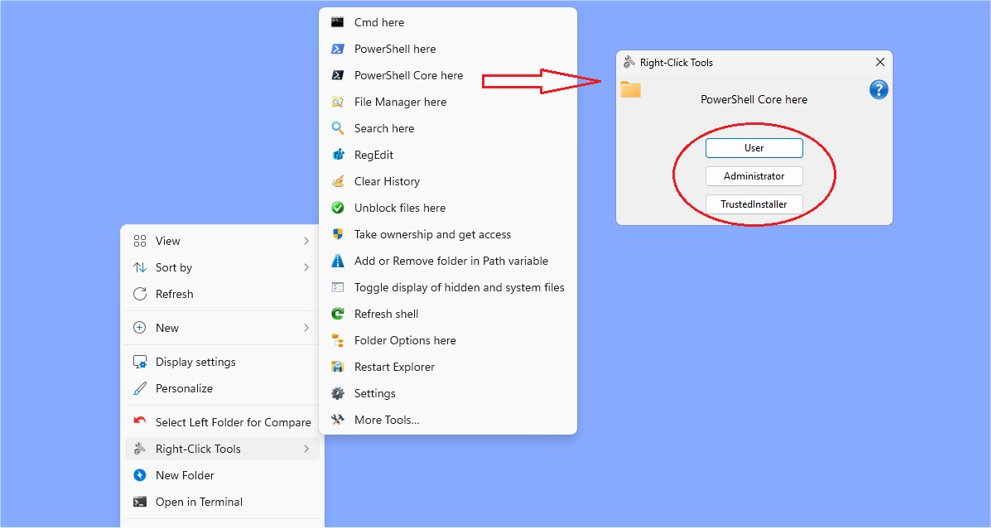
RightClickTools has launched its latest version, 2.0.5, enhancing the Windows Explorer experience with a robust right-click context menu that offers a variety of powerful utilities. This tool is designed for power users seeking to improve their efficiency and control within the Windows operating system.
Key Features and Functionalities
RightClickTools provides a seamless integration with both modern and classic context menus of Windows 11, allowing users to choose their preferred interface for a personalized experience. This integration facilitates direct access to utilities from the context menu, streamlining workflows and reducing the need for navigating through multiple windows.
One of the standout features of RightClickTools is its ability to operate under different security contexts—User, Administrator, and TrustedInstaller modes. This flexibility is particularly beneficial for system administrators and advanced users, enabling them to execute tasks with varying permission levels according to their specific needs.
Portability and Customization
The suite includes a built-in launcher that allows users to run utilities directly from external media, such as USB drives, without installation on local systems. This is particularly useful for users who need to troubleshoot different machines or work in varied environments.
RightClickTools comes pre-configured with a range of essential utilities for file management and system diagnostics. For users desiring a tailored experience, the tool provides options to customize settings through INI files, allowing them to optimize their toolset to better suit their workflows.
Available Tools
RightClickTools offers a diverse array of functionalities, including:
- Cmd, PowerShell, and RegEdit Launchers: Run these utilities with varying permission levels.
- Search Here: Construct complex searches using Advanced Query Syntax or run preferred search tools.
- Clear History: Options to clear various system histories and temporary files.
- Unblock Files: Remove the Mark of the Web from files in selected folders.
- Take Ownership: Reset ownership and access rights for selected folders.
- Path Variable Management: Easily add or remove folder paths to the User or System environment variables.
- Display Hidden Files: Toggle visibility of hidden and system files quickly.
- Refresh Shell: Options to refresh the Windows shell or reset the icon cache.
- Folder Options: Set folder types, colors, and icons for organization.
- Restart Explorer: Quickly restart Windows Explorer with confirmation.
- Settings Access: Quick access to configuration files and Windows settings.
- Date Time Tool: Modify file date and time attributes for multiple files.
- Screenshot Tool: Capture screenshots with a border for context.
- More Tools: Expandable menu allowing user-defined scripts and programs.
- Launcher Mode: Run tools without adding them to the context menu for easy access.
Conclusion
RightClickTools 2.0.5 emerges as an essential utility for anyone aiming to enhance productivity and expand capabilities within Windows. With its array of versatile tools, ease of use, and extensive customization options, it is an invaluable addition to any power user's toolkit. Whether for everyday tasks or advanced system management, RightClickTools empowers users to work more efficiently and effectively within their Windows environments
Key Features and Functionalities
RightClickTools provides a seamless integration with both modern and classic context menus of Windows 11, allowing users to choose their preferred interface for a personalized experience. This integration facilitates direct access to utilities from the context menu, streamlining workflows and reducing the need for navigating through multiple windows.
One of the standout features of RightClickTools is its ability to operate under different security contexts—User, Administrator, and TrustedInstaller modes. This flexibility is particularly beneficial for system administrators and advanced users, enabling them to execute tasks with varying permission levels according to their specific needs.
Portability and Customization
The suite includes a built-in launcher that allows users to run utilities directly from external media, such as USB drives, without installation on local systems. This is particularly useful for users who need to troubleshoot different machines or work in varied environments.
RightClickTools comes pre-configured with a range of essential utilities for file management and system diagnostics. For users desiring a tailored experience, the tool provides options to customize settings through INI files, allowing them to optimize their toolset to better suit their workflows.
Available Tools
RightClickTools offers a diverse array of functionalities, including:
- Cmd, PowerShell, and RegEdit Launchers: Run these utilities with varying permission levels.
- Search Here: Construct complex searches using Advanced Query Syntax or run preferred search tools.
- Clear History: Options to clear various system histories and temporary files.
- Unblock Files: Remove the Mark of the Web from files in selected folders.
- Take Ownership: Reset ownership and access rights for selected folders.
- Path Variable Management: Easily add or remove folder paths to the User or System environment variables.
- Display Hidden Files: Toggle visibility of hidden and system files quickly.
- Refresh Shell: Options to refresh the Windows shell or reset the icon cache.
- Folder Options: Set folder types, colors, and icons for organization.
- Restart Explorer: Quickly restart Windows Explorer with confirmation.
- Settings Access: Quick access to configuration files and Windows settings.
- Date Time Tool: Modify file date and time attributes for multiple files.
- Screenshot Tool: Capture screenshots with a border for context.
- More Tools: Expandable menu allowing user-defined scripts and programs.
- Launcher Mode: Run tools without adding them to the context menu for easy access.
Conclusion
RightClickTools 2.0.5 emerges as an essential utility for anyone aiming to enhance productivity and expand capabilities within Windows. With its array of versatile tools, ease of use, and extensive customization options, it is an invaluable addition to any power user's toolkit. Whether for everyday tasks or advanced system management, RightClickTools empowers users to work more efficiently and effectively within their Windows environments
RightClickTools 2.0.5 released
RightClickTools adds a right-click context menu to Windows Explorer, providing many valuable tools.