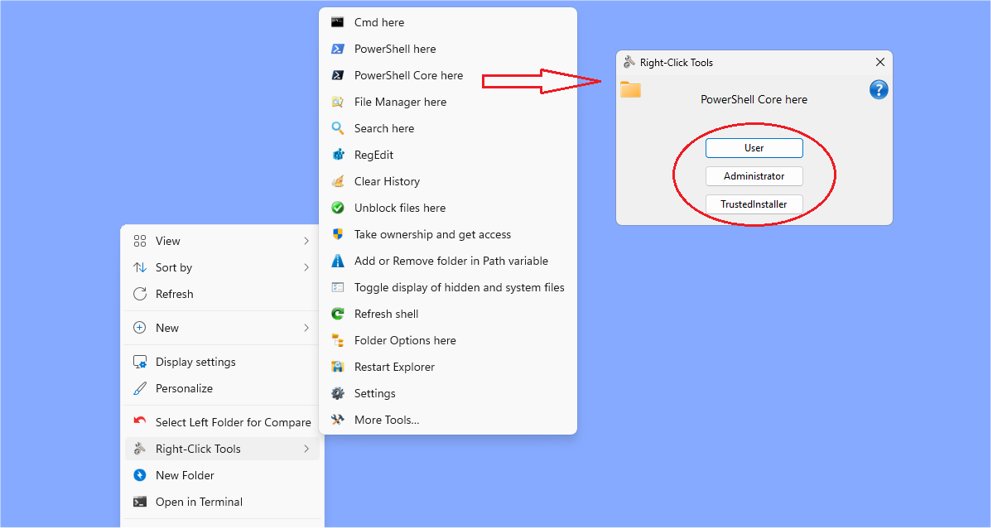
RightClickTools 2.0.4 has been released, enhancing the Windows Explorer context menu with a suite of powerful tools aimed at improving user efficiency and control. This versatile collection is designed for power users who seek to streamline their workflow, offering seamless integration with both modern and classic context menus in Windows 11. Users can customize their experience by choosing their preferred menu style, allowing for a tailored approach to system navigation.
One of the standout features of RightClickTools is its capability to operate under different security contexts—User, Administrator, and TrustedInstaller modes. This flexibility is particularly beneficial for system administrators and advanced users, as it allows for precise control over permission levels when executing tasks, ensuring that tools operate in the appropriate context for each specific function.
Additionally, RightClickTools comes with a built-in launcher that enables users to run utilities directly from external devices such as USB drives or network volumes, promoting portability and convenience for those who work across multiple systems or need to troubleshoot without leaving a trace.
The default configuration of RightClickTools provides an array of ready-to-use tools for various tasks, from file management to system diagnostics. Users who prefer a more personalized experience can modify settings and functionalities through INI files, maximizing the utility's effectiveness to suit individual preferences.
The tools available within RightClickTools include commands for launching programs as different users, conducting complex searches, clearing history, unblocking files, managing folder paths, toggling visibility of hidden files, refreshing the shell, and much more. Notably, it also features a screenshot tool for capturing images with a border for contrast.
Overall, RightClickTools 2.0.4 stands out as an essential utility for enhancing productivity in Windows. Its combination of versatility, ease of use, and extensive customization options make it a valuable asset for both seasoned professionals and those exploring advanced features.
In extension, the potential for RightClickTools can be further enhanced by integrating cloud-based functionalities, allowing users to save their customized settings and frequently used tools online. This would enable easy access across different devices without the need for local installations. Furthermore, as Windows continues to evolve, incorporating features that adapt to updates in the operating system could ensure that RightClickTools remains a relevant and indispensable tool for all Windows users
One of the standout features of RightClickTools is its capability to operate under different security contexts—User, Administrator, and TrustedInstaller modes. This flexibility is particularly beneficial for system administrators and advanced users, as it allows for precise control over permission levels when executing tasks, ensuring that tools operate in the appropriate context for each specific function.
Additionally, RightClickTools comes with a built-in launcher that enables users to run utilities directly from external devices such as USB drives or network volumes, promoting portability and convenience for those who work across multiple systems or need to troubleshoot without leaving a trace.
The default configuration of RightClickTools provides an array of ready-to-use tools for various tasks, from file management to system diagnostics. Users who prefer a more personalized experience can modify settings and functionalities through INI files, maximizing the utility's effectiveness to suit individual preferences.
The tools available within RightClickTools include commands for launching programs as different users, conducting complex searches, clearing history, unblocking files, managing folder paths, toggling visibility of hidden files, refreshing the shell, and much more. Notably, it also features a screenshot tool for capturing images with a border for contrast.
Overall, RightClickTools 2.0.4 stands out as an essential utility for enhancing productivity in Windows. Its combination of versatility, ease of use, and extensive customization options make it a valuable asset for both seasoned professionals and those exploring advanced features.
In extension, the potential for RightClickTools can be further enhanced by integrating cloud-based functionalities, allowing users to save their customized settings and frequently used tools online. This would enable easy access across different devices without the need for local installations. Furthermore, as Windows continues to evolve, incorporating features that adapt to updates in the operating system could ensure that RightClickTools remains a relevant and indispensable tool for all Windows users
RightClickTools 2.0.4 released
RightClickTools adds a right-click context menu to Windows Explorer, providing many valuable tools.