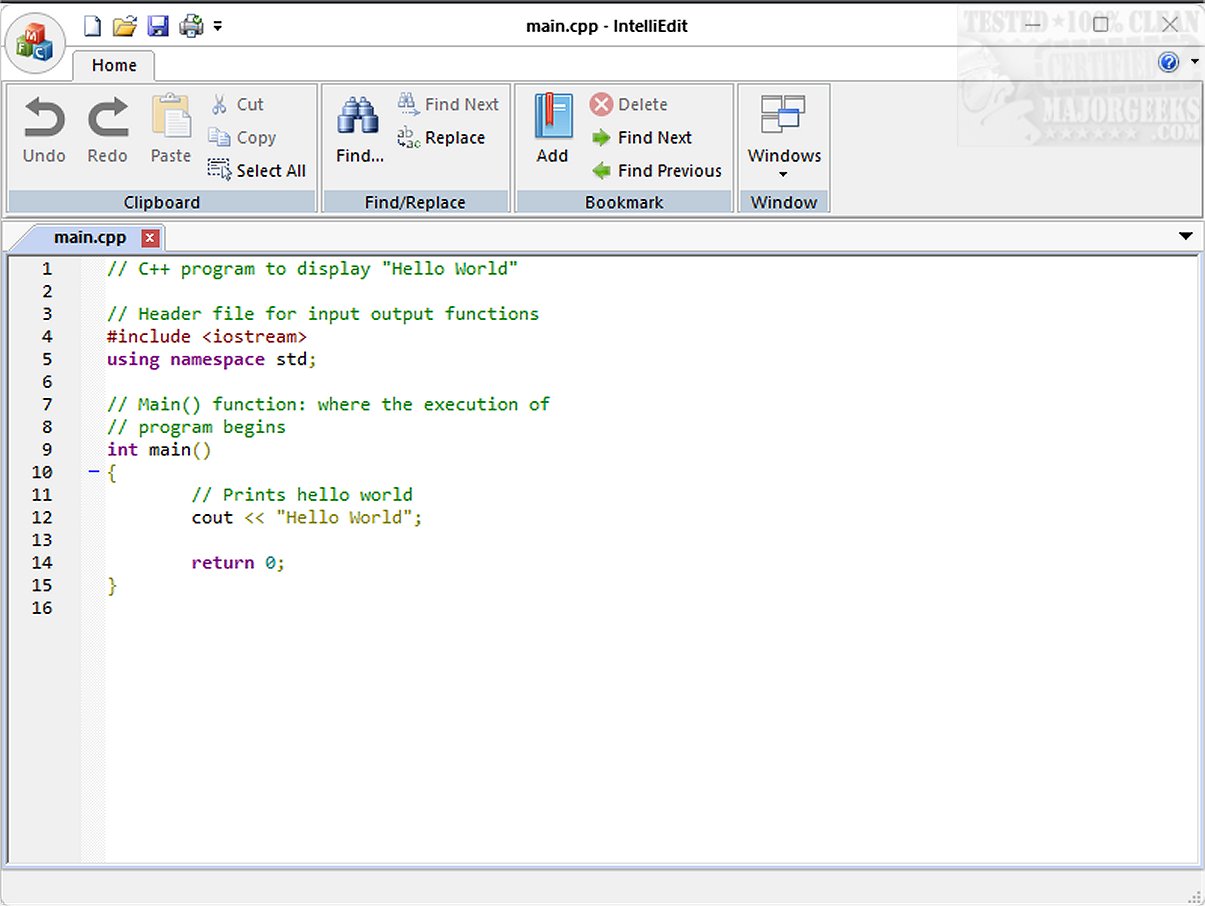
IntelliEdit 1.19 has been released, marking it as a robust text editor that serves as a superior alternative to the traditional Notepad. Built with a fast-editing engine, IntelliEdit supports a multitude of programming languages right from installation, making it suitable for both plain text writing and code development. Among its key features are syntax highlighting, advanced search-and-replace options utilizing regular expressions, and a convenient tabbed interface for managing multiple files simultaneously.
Despite its somewhat outdated appearance, the user interface of IntelliEdit is designed with functionality at its core, catering to users who prioritize efficiency over aesthetics. The editor provides a variety of practical tools that extend beyond the capabilities of standard text editors. One highlight is its bookmark feature, which allows users to mark specific lines within documents, facilitating easier navigation through lengthy texts.
IntelliEdit excels in coding environments, thanks to its integration with the Scintilla engine, granting it enhanced editing capabilities. It supports syntax highlighting for numerous programming languages, including but not limited to CMake, C/C++, JavaScript, PHP, Markdown, MATLAB, HTML, and R.
For those looking to dive deeper into IntelliEdit, the developer’s GitHub repository offers valuable resources and insights to help users maximize their experience with the editor.
Extended Summary:
IntelliEdit is designed for a diverse range of users, from casual writers to professional programmers, who require a reliable and feature-rich text editing environment. The tabbed interface not only reduces workspace clutter but also enhances productivity by allowing quick switching between files. Additionally, the advanced search-and-replace functionality, coupled with regular expressions, empowers users to perform complex text manipulations efficiently.
The bookmark feature is particularly advantageous for users dealing with extensive documents, as it allows them to quickly navigate to important sections without losing their place. Furthermore, IntelliEdit's support for various programming languages makes it an ideal choice for developers who need a versatile tool that can adapt to different coding tasks.
In addition to its core functionalities, future updates could further enhance IntelliEdit by incorporating features such as collaborative editing, cloud integration for file storage, and customizable themes for a more modern user interface. As IntelliEdit continues to evolve, it promises to remain an essential tool for anyone seeking a powerful, open-source text editor that combines practicality with a user-friendly experience
Despite its somewhat outdated appearance, the user interface of IntelliEdit is designed with functionality at its core, catering to users who prioritize efficiency over aesthetics. The editor provides a variety of practical tools that extend beyond the capabilities of standard text editors. One highlight is its bookmark feature, which allows users to mark specific lines within documents, facilitating easier navigation through lengthy texts.
IntelliEdit excels in coding environments, thanks to its integration with the Scintilla engine, granting it enhanced editing capabilities. It supports syntax highlighting for numerous programming languages, including but not limited to CMake, C/C++, JavaScript, PHP, Markdown, MATLAB, HTML, and R.
For those looking to dive deeper into IntelliEdit, the developer’s GitHub repository offers valuable resources and insights to help users maximize their experience with the editor.
Extended Summary:
IntelliEdit is designed for a diverse range of users, from casual writers to professional programmers, who require a reliable and feature-rich text editing environment. The tabbed interface not only reduces workspace clutter but also enhances productivity by allowing quick switching between files. Additionally, the advanced search-and-replace functionality, coupled with regular expressions, empowers users to perform complex text manipulations efficiently.
The bookmark feature is particularly advantageous for users dealing with extensive documents, as it allows them to quickly navigate to important sections without losing their place. Furthermore, IntelliEdit's support for various programming languages makes it an ideal choice for developers who need a versatile tool that can adapt to different coding tasks.
In addition to its core functionalities, future updates could further enhance IntelliEdit by incorporating features such as collaborative editing, cloud integration for file storage, and customizable themes for a more modern user interface. As IntelliEdit continues to evolve, it promises to remain an essential tool for anyone seeking a powerful, open-source text editor that combines practicality with a user-friendly experience
IntelliEdit 1.19 released
IntelliEdit is a versatile text editor that serves as an enhanced alternative to the standard Notepad. It features a fast-editing engine and supports a wide array of programming languages right out of the box, allowing users to write both plain text and code.