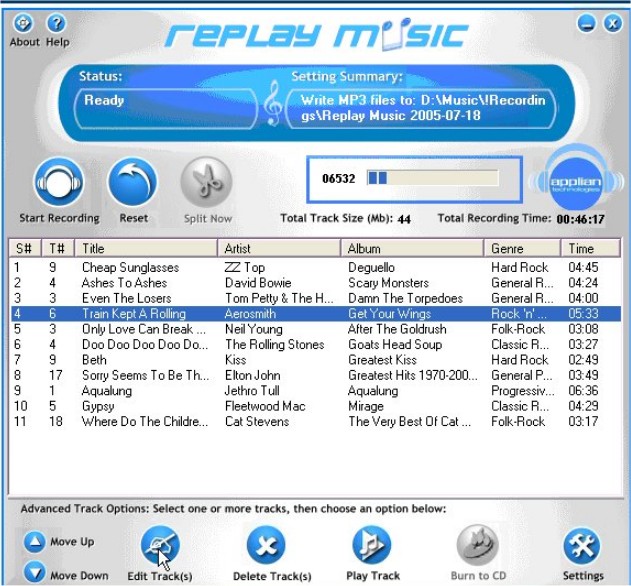
Replay Music version 2026.7.17.35 has been released, enhancing its capabilities as a premier streaming music recorder. This software allows users to capture MP3 files from virtually any streaming source, ensuring that each song is stored as a high-quality MP3 file. Utilizing advanced proprietary song recognition technology, Replay Music accurately identifies each track and automatically tags it with essential details such as the artist, song title, album, and genre.
The software's sophisticated track-splitting algorithm is touted as the best in the market, allowing it to effectively separate individual tracks without compromising the integrity of the audio. Unlike many other recording programs, which can truncate songs or introduce unwanted noise, Replay Music guarantees a complete recording of each song, preserving both the beginning and the end.
Once recorded, users have the flexibility to burn their MP3 files directly to CDs or DVDs, or transfer them to any MP3-compatible device, including smartphones and tablets. This versatility makes Replay Music a valuable tool for music enthusiasts who wish to create personalized collections of their favorite tracks.
In addition to its primary features, users may also find helpful guides on related topics, such as renaming sound input or output devices, adjusting audio balance in Windows 10 and 11, changing the default sound output device, and troubleshooting common sound issues.
As streaming music continues to evolve, Replay Music is likely to adapt and improve its features to meet the demands of its users, possibly integrating new functionalities such as support for more streaming platforms, enhanced audio quality options, and even more robust tagging capabilities. This ensures that Replay Music remains a relevant choice for anyone looking to capture and manage their digital music library effectively
The software's sophisticated track-splitting algorithm is touted as the best in the market, allowing it to effectively separate individual tracks without compromising the integrity of the audio. Unlike many other recording programs, which can truncate songs or introduce unwanted noise, Replay Music guarantees a complete recording of each song, preserving both the beginning and the end.
Once recorded, users have the flexibility to burn their MP3 files directly to CDs or DVDs, or transfer them to any MP3-compatible device, including smartphones and tablets. This versatility makes Replay Music a valuable tool for music enthusiasts who wish to create personalized collections of their favorite tracks.
In addition to its primary features, users may also find helpful guides on related topics, such as renaming sound input or output devices, adjusting audio balance in Windows 10 and 11, changing the default sound output device, and troubleshooting common sound issues.
As streaming music continues to evolve, Replay Music is likely to adapt and improve its features to meet the demands of its users, possibly integrating new functionalities such as support for more streaming platforms, enhanced audio quality options, and even more robust tagging capabilities. This ensures that Replay Music remains a relevant choice for anyone looking to capture and manage their digital music library effectively
Replay Music 2026.7.17.35 released
Replay Music is a unique streaming music recorder that captures MP3 files from any streaming source.