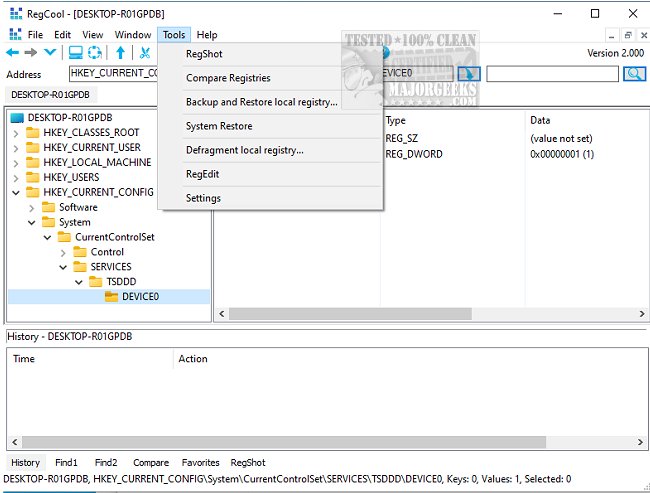
RegCool version 3.1.0.0 has been released, offering users a robust and user-friendly tool for managing Windows registry information. This Explorer-like application features a tree structure on the left side that displays registry keys, while the right side shows the specific values for those keys. One of its standout features is a Boolean search function that helps users find particular keys and values efficiently. Search results are presented clearly for easy review.
In addition to its search capabilities, RegCool includes options for comparing different registries, which can be particularly useful for users needing to track changes or manage multiple systems. The software is equipped with numerous powerful features that enhance its functionality, such as multiple undo/redo options, search and replace functions, registry comparisons, snapshot capabilities, and defragmentation. Users can also perform standard operations like cut, copy, paste, and drag-and-drop, making it a versatile tool for registry management.
Moreover, RegCool supports backup and restore functionalities, ensuring that users can safeguard their registry settings and easily revert to previous states if needed. Its intuitive design makes navigation simple, allowing both novice and experienced users to work efficiently with registry tasks.
In summary, RegCool is a comprehensive registry editing tool that combines a user-friendly interface with advanced features, making it an essential utility for anyone who needs to manage registry settings effectively.
Extension: Users interested in optimizing their Windows experience may also want to explore additional resources such as guides on backing up or restoring the Windows Registry, automating registry backups on Windows 10 and 11, and methods to open the Registry Editor. For those concerned about system security, there are tutorials available on how to disable the Registry Editor to prevent unauthorized access. RegCool stands out as a reliable solution for both routine registry maintenance and deeper system modifications
In addition to its search capabilities, RegCool includes options for comparing different registries, which can be particularly useful for users needing to track changes or manage multiple systems. The software is equipped with numerous powerful features that enhance its functionality, such as multiple undo/redo options, search and replace functions, registry comparisons, snapshot capabilities, and defragmentation. Users can also perform standard operations like cut, copy, paste, and drag-and-drop, making it a versatile tool for registry management.
Moreover, RegCool supports backup and restore functionalities, ensuring that users can safeguard their registry settings and easily revert to previous states if needed. Its intuitive design makes navigation simple, allowing both novice and experienced users to work efficiently with registry tasks.
In summary, RegCool is a comprehensive registry editing tool that combines a user-friendly interface with advanced features, making it an essential utility for anyone who needs to manage registry settings effectively.
Extension: Users interested in optimizing their Windows experience may also want to explore additional resources such as guides on backing up or restoring the Windows Registry, automating registry backups on Windows 10 and 11, and methods to open the Registry Editor. For those concerned about system security, there are tutorials available on how to disable the Registry Editor to prevent unauthorized access. RegCool stands out as a reliable solution for both routine registry maintenance and deeper system modifications
RegCool 3.1.0.0 released
RegCool is an Explorer-like search tool for editing information in your registry.