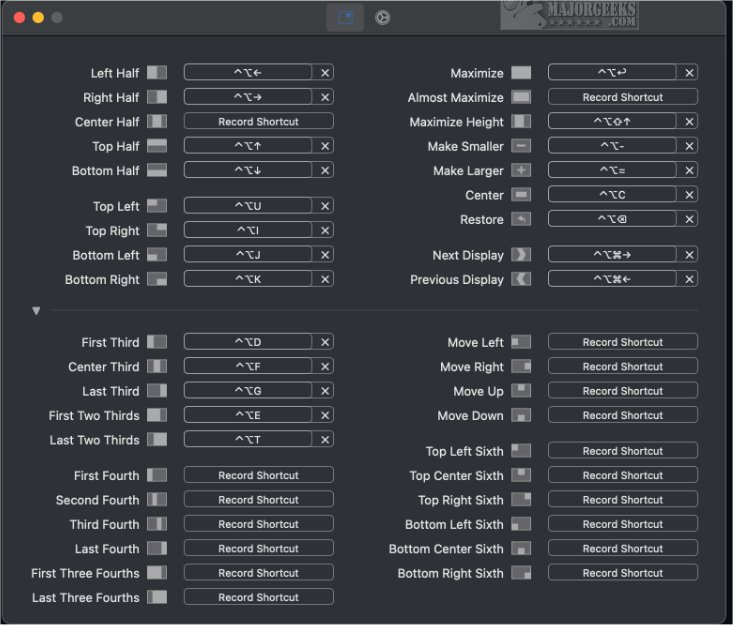
Rectangle 0.96 has been released, enhancing window management for macOS users. This application simplifies the process of moving and resizing windows, facilitating a more organized and efficient workspace. Users can manage their windows more effectively, which greatly improves multitasking and productivity, by utilizing convenient keyboard shortcuts and snap areas.
Rectangle allows for quick snapping of windows to designated screen areas, which is especially beneficial when multiple applications or documents are open. The setup process is user-friendly, offering a variety of preset shortcuts for immediate use. Users also have the flexibility to create custom hotkeys tailored to their preferences.
Understanding the keyboard shortcuts is straightforward, making it easy for users to navigate the application. For those unfamiliar with snap areas, the app provides a visual indicator—a footprint—when dragging a window to the edge of the screen, showing where the window will snap upon release. This feature streamlines the organization of multiple windows on the screen.
Additionally, Rectangle supports gesture recognition, enabling users to execute various window actions, such as maximizing, moving to corners, or resizing windows with ease. Once a window is unsnapped, it automatically returns to its original size and position, but users can also use a hotkey to restore it if needed.
Overall, Rectangle significantly enhances the macOS window management experience, making it a must-have tool for users looking to optimize their workflow. As users become familiar with the snap areas and shortcuts, they will likely find it challenging to navigate their Macs without the assistance of Rectangle, demonstrating its vital role in effective window management.
In future updates, further enhancements could include additional customization options for gestures, integration with more macOS features, and even smarter window management algorithms that adapt to user habits, making Rectangle an indispensable tool for power users
Rectangle allows for quick snapping of windows to designated screen areas, which is especially beneficial when multiple applications or documents are open. The setup process is user-friendly, offering a variety of preset shortcuts for immediate use. Users also have the flexibility to create custom hotkeys tailored to their preferences.
Understanding the keyboard shortcuts is straightforward, making it easy for users to navigate the application. For those unfamiliar with snap areas, the app provides a visual indicator—a footprint—when dragging a window to the edge of the screen, showing where the window will snap upon release. This feature streamlines the organization of multiple windows on the screen.
Additionally, Rectangle supports gesture recognition, enabling users to execute various window actions, such as maximizing, moving to corners, or resizing windows with ease. Once a window is unsnapped, it automatically returns to its original size and position, but users can also use a hotkey to restore it if needed.
Overall, Rectangle significantly enhances the macOS window management experience, making it a must-have tool for users looking to optimize their workflow. As users become familiar with the snap areas and shortcuts, they will likely find it challenging to navigate their Macs without the assistance of Rectangle, demonstrating its vital role in effective window management.
In future updates, further enhancements could include additional customization options for gestures, integration with more macOS features, and even smarter window management algorithms that adapt to user habits, making Rectangle an indispensable tool for power users
Rectangle 0.96 released
Rectangle, designed for macOS systems, simplifies the process of moving and resizing windows.