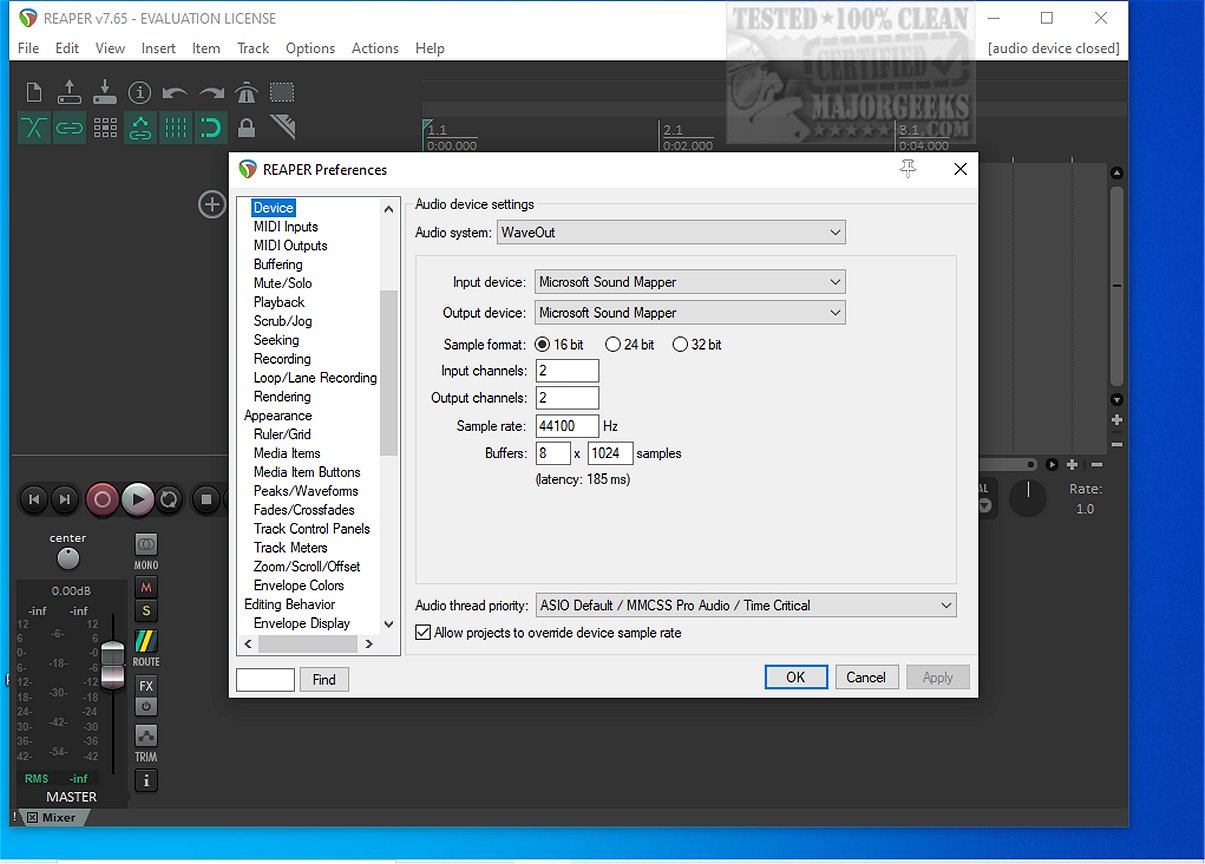
Reaper is a versatile digital audio workstation (DAW) that allows users to record, arrange, edit, and render multi-track waveform audio. The latest version, Reaper 7.79, continues to be a popular choice for audio professionals and enthusiasts alike, particularly due to its lightweight design and robust performance. Notably, it remains one of the few DAWs that offers a freeware version, making it accessible to a wider audience.
Key Features of Reaper
1. Driver Support: Reaper supports various audio drivers, including ASIO, Kernel Streaming, WaveOut, and DirectSound. This flexibility ensures that users can switch drivers seamlessly, which is particularly useful during critical mixing sessions.
2. File Compatibility: The software supports a range of file formats such as WAV, OGG, MP3, and MIDI, allowing for straightforward recording and playback without unnecessary complexity.
3. Unlimited Tracks: Users can arrange an unlimited number of items across multiple tracks without facing artificial limitations. This feature is ideal for projects that require extensive vocal layering or complex arrangements.
4. Plugin Support: Reaper is compatible with DirectX, VST, and Jesusonic plugins, offering extensive automation capabilities. The included JSFX tools are lightweight and efficient for quick fixes.
5. Automation Control: Per-track volume, pan, and envelope controls are easy to manage, with automation lanes that are reliable and consistent.
6. Customizable Interface: Although the default UI may feel outdated, Reaper offers extensive customization options, including color themes that allow users to personalize their workspace.
Who Benefits from Reaper?
Reaper is particularly well-suited for:
- Users seeking a lightweight and efficient audio workstation.
- Those who prioritize stability over flashy features.
- Individuals working on older hardware that requires a resource-efficient DAW.
- Users who enjoy tweaking settings for a tailored experience.
However, it may not appeal to:
- Users expecting a large library of built-in synths and loops.
- Those who prefer a polished interface straight out of the box.
- Individuals who dislike extensive customization options, as Reaper offers myriad settings.
Is Reaper Suitable for Beginners?
Yes, Reaper is beginner-friendly despite its initially dense menus. Once users grasp the basics, the logical workflow becomes apparent. Its lightweight nature also means that beginners can experiment without fear of performance issues stemming from excessive plugin use.
Conclusion
Overall, Reaper is a powerful, efficient DAW that emphasizes speed and stability while offering extensive plugin support and customization options. Users appreciate its ability to function well on various systems and its straightforward approach to audio production. However, the dated default interface and the potential for overwhelming customization can be drawbacks for some users. For assistance with setup or scripting, the MajorGeeks forums are a helpful resource for troubleshooting.
Future Considerations
As Reaper continues to evolve, its developers may focus on enhancing the user interface further, possibly incorporating more modern aesthetics while maintaining the software's lightweight efficiency. Additionally, expanding built-in content or improving onboarding tutorials could enhance the experience for newcomers. Overall, Reaper remains a top contender in the digital audio workstation landscape, appealing to both seasoned professionals and aspiring audio engineers
Key Features of Reaper
1. Driver Support: Reaper supports various audio drivers, including ASIO, Kernel Streaming, WaveOut, and DirectSound. This flexibility ensures that users can switch drivers seamlessly, which is particularly useful during critical mixing sessions.
2. File Compatibility: The software supports a range of file formats such as WAV, OGG, MP3, and MIDI, allowing for straightforward recording and playback without unnecessary complexity.
3. Unlimited Tracks: Users can arrange an unlimited number of items across multiple tracks without facing artificial limitations. This feature is ideal for projects that require extensive vocal layering or complex arrangements.
4. Plugin Support: Reaper is compatible with DirectX, VST, and Jesusonic plugins, offering extensive automation capabilities. The included JSFX tools are lightweight and efficient for quick fixes.
5. Automation Control: Per-track volume, pan, and envelope controls are easy to manage, with automation lanes that are reliable and consistent.
6. Customizable Interface: Although the default UI may feel outdated, Reaper offers extensive customization options, including color themes that allow users to personalize their workspace.
Who Benefits from Reaper?
Reaper is particularly well-suited for:
- Users seeking a lightweight and efficient audio workstation.
- Those who prioritize stability over flashy features.
- Individuals working on older hardware that requires a resource-efficient DAW.
- Users who enjoy tweaking settings for a tailored experience.
However, it may not appeal to:
- Users expecting a large library of built-in synths and loops.
- Those who prefer a polished interface straight out of the box.
- Individuals who dislike extensive customization options, as Reaper offers myriad settings.
Is Reaper Suitable for Beginners?
Yes, Reaper is beginner-friendly despite its initially dense menus. Once users grasp the basics, the logical workflow becomes apparent. Its lightweight nature also means that beginners can experiment without fear of performance issues stemming from excessive plugin use.
Conclusion
Overall, Reaper is a powerful, efficient DAW that emphasizes speed and stability while offering extensive plugin support and customization options. Users appreciate its ability to function well on various systems and its straightforward approach to audio production. However, the dated default interface and the potential for overwhelming customization can be drawbacks for some users. For assistance with setup or scripting, the MajorGeeks forums are a helpful resource for troubleshooting.
Future Considerations
As Reaper continues to evolve, its developers may focus on enhancing the user interface further, possibly incorporating more modern aesthetics while maintaining the software's lightweight efficiency. Additionally, expanding built-in content or improving onboarding tutorials could enhance the experience for newcomers. Overall, Reaper remains a top contender in the digital audio workstation landscape, appealing to both seasoned professionals and aspiring audio engineers
Reaper 7.79 released
REAPER is an application that lets you record, arrange, edit, and render multi-track waveform audio. The last freeware version also available.