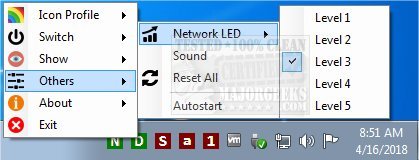
The addLEDs utility has released version 2.0.0.1, enhancing its functionality as a compact system tray indicator that visually represents the status of various keyboard locks, such as scroll, number, and caps lock. Unlike many standard key indicators, addLEDs offers additional features, including flashing notifications for network activity with adjustable sensitivity levels and disk activity indicators. Moreover, users can control the functionality of scroll, number, and caps lock keys via mouse clicks, making it particularly useful for those with malfunctioning keyboards.
In this latest version, users will also find enhanced customization options, allowing them to change indicator colors and adjust transparency levels for a more personalized experience. Whether you're dealing with a broken key or simply prefer a cleaner desktop appearance, addLEDs 2.0.0.1 provides a practical solution for managing keyboard functionality and monitoring system activity at a glance.
Future updates could further improve user experience by introducing more customization options, such as themes or sound notifications for key status changes, as well as expanded functionality to include visual indicators for additional system activities. This would make addLEDs an even more comprehensive tool for users looking to optimize their workflow and system monitoring
In this latest version, users will also find enhanced customization options, allowing them to change indicator colors and adjust transparency levels for a more personalized experience. Whether you're dealing with a broken key or simply prefer a cleaner desktop appearance, addLEDs 2.0.0.1 provides a practical solution for managing keyboard functionality and monitoring system activity at a glance.
Future updates could further improve user experience by introducing more customization options, such as themes or sound notifications for key status changes, as well as expanded functionality to include visual indicators for additional system activities. This would make addLEDs an even more comprehensive tool for users looking to optimize their workflow and system monitoring
addLEDs 2.0.0.1 released
addLEDs is a tiny systray indicator that provides at-a-glance views for scroll, number, caps lock and more.