The recently launched AUTO THEME 1.0.48 is a sophisticated PowerShell script designed to elevate your Windows experience by automatically adjusting the system theme based on the times of sunrise and sunset or at user-defined hours. This feature facilitates a smooth transition between light and dark themes, enhancing visibility and comfort according to changing lighting conditions.
How AUTO THEME Functions
AUTO THEME diverges from relying solely on conventional registry or system settings. Instead, it activates specific `.theme` files, which not only increases user customization options but also promotes compatibility across various systems. By focusing on individual theme files, users can easily tailor their interface without impacting overall system settings, allowing for effortless modifications that reflect personal preferences.
Background Operations
The script operates as a scheduled task in the background, autonomously updating the system theme without requiring user intervention. It generates temporary tasks aligned with forthcoming daylight events, ensuring that tasks for "Sunrise theme" and "Sunset theme" are routinely overwritten to keep the task list organized.
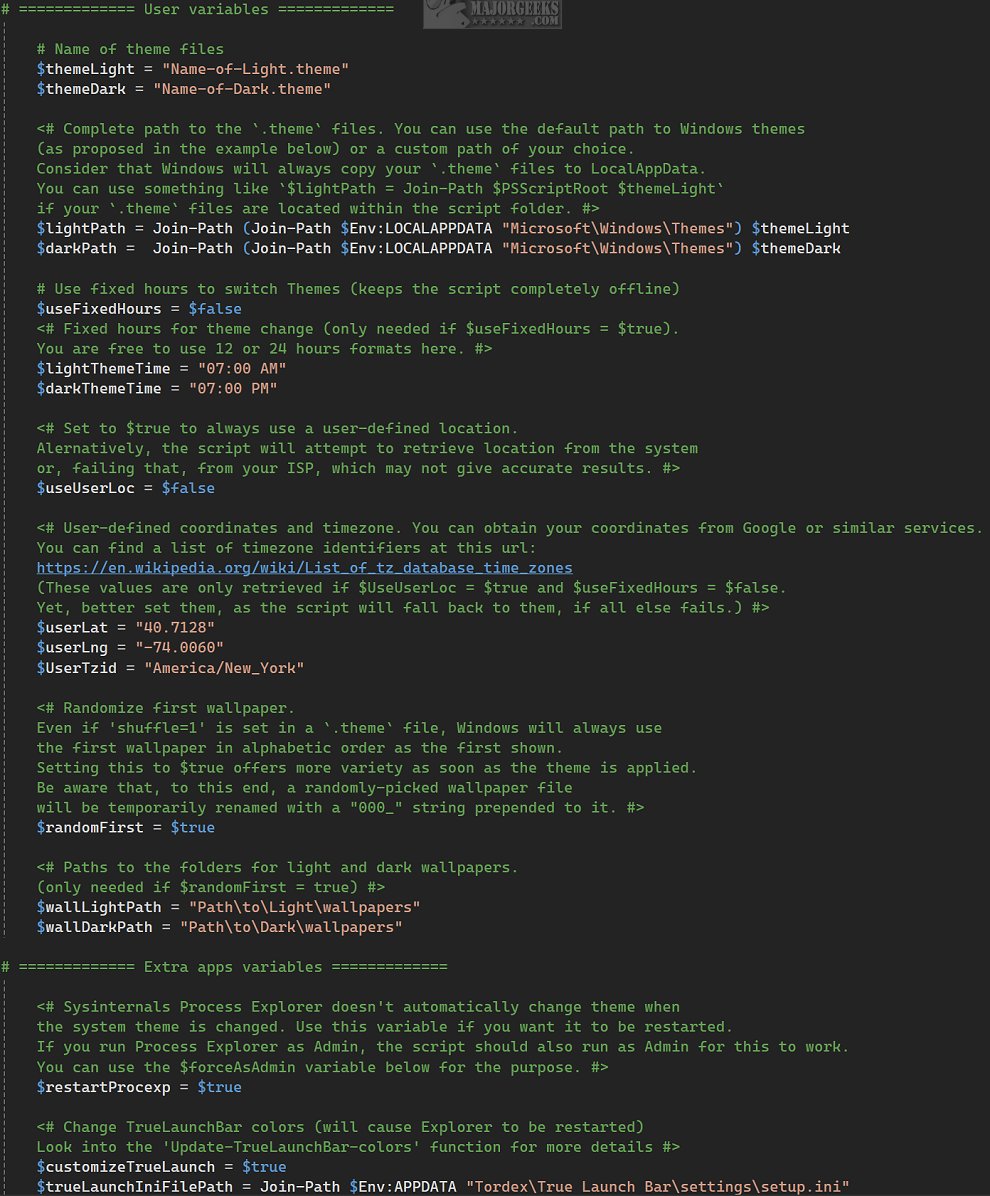
Users can configure the script using the Setup.ps1 file, which allows for the specification of preferred timings. Additional tasks can be added or modified through the Windows Task Scheduler. For immediate theme toggling, users can execute the command `./AutoTheme.ps1` directly from the terminal or via a desktop shortcut. Importantly, users should edit the Config.ps1 file to customize the script, as it contains all necessary configurations and explanations.
Offline Functionality
While AUTO THEME can connect to the internet for verifying location to provide accurate sunrise and sunset times, it also offers an offline mode that allows users to set fixed hours for theme changes.
Conclusion: The Geek Verdict
AUTO THEME offers significant advantages for users desiring an automated method for transforming themes and backgrounds in accordance with the time of day. This innovative tool enriches the user experience by synchronizing visual elements with changing light conditions, creating a visually dynamic atmosphere that evolves throughout the day. However, it may be somewhat complex for casual users due to the necessary configuration adjustments in the config files.
Extended Features and Future Updates
Future versions of AUTO THEME could introduce additional features such as customizable themes based on user preferences or seasonal changes, integration with smart home systems for synchronized lighting, and enhanced user guides to simplify the configuration process. Additionally, incorporating a user-friendly graphical interface could make it accessible to a broader audience, allowing even those with minimal technical expertise to enjoy the benefits of dynamic theming.
In summary, AUTO THEME is a powerful tool for enhancing your Windows interface, offering a blend of automation, customization, and adaptability that aligns with the natural rhythm of daylight
How AUTO THEME Functions
AUTO THEME diverges from relying solely on conventional registry or system settings. Instead, it activates specific `.theme` files, which not only increases user customization options but also promotes compatibility across various systems. By focusing on individual theme files, users can easily tailor their interface without impacting overall system settings, allowing for effortless modifications that reflect personal preferences.
Background Operations
The script operates as a scheduled task in the background, autonomously updating the system theme without requiring user intervention. It generates temporary tasks aligned with forthcoming daylight events, ensuring that tasks for "Sunrise theme" and "Sunset theme" are routinely overwritten to keep the task list organized.
Users can configure the script using the Setup.ps1 file, which allows for the specification of preferred timings. Additional tasks can be added or modified through the Windows Task Scheduler. For immediate theme toggling, users can execute the command `./AutoTheme.ps1` directly from the terminal or via a desktop shortcut. Importantly, users should edit the Config.ps1 file to customize the script, as it contains all necessary configurations and explanations.
Offline Functionality
While AUTO THEME can connect to the internet for verifying location to provide accurate sunrise and sunset times, it also offers an offline mode that allows users to set fixed hours for theme changes.
Conclusion: The Geek Verdict
AUTO THEME offers significant advantages for users desiring an automated method for transforming themes and backgrounds in accordance with the time of day. This innovative tool enriches the user experience by synchronizing visual elements with changing light conditions, creating a visually dynamic atmosphere that evolves throughout the day. However, it may be somewhat complex for casual users due to the necessary configuration adjustments in the config files.
Extended Features and Future Updates
Future versions of AUTO THEME could introduce additional features such as customizable themes based on user preferences or seasonal changes, integration with smart home systems for synchronized lighting, and enhanced user guides to simplify the configuration process. Additionally, incorporating a user-friendly graphical interface could make it accessible to a broader audience, allowing even those with minimal technical expertise to enjoy the benefits of dynamic theming.
In summary, AUTO THEME is a powerful tool for enhancing your Windows interface, offering a blend of automation, customization, and adaptability that aligns with the natural rhythm of daylight
AUTO THEME 1.0.48 released
AUTO THEME is an advanced PowerShell script designed to enhance your Windows experience by automatically changing the system theme based on sunrise and sunset times, or according to specific hours that you configure.