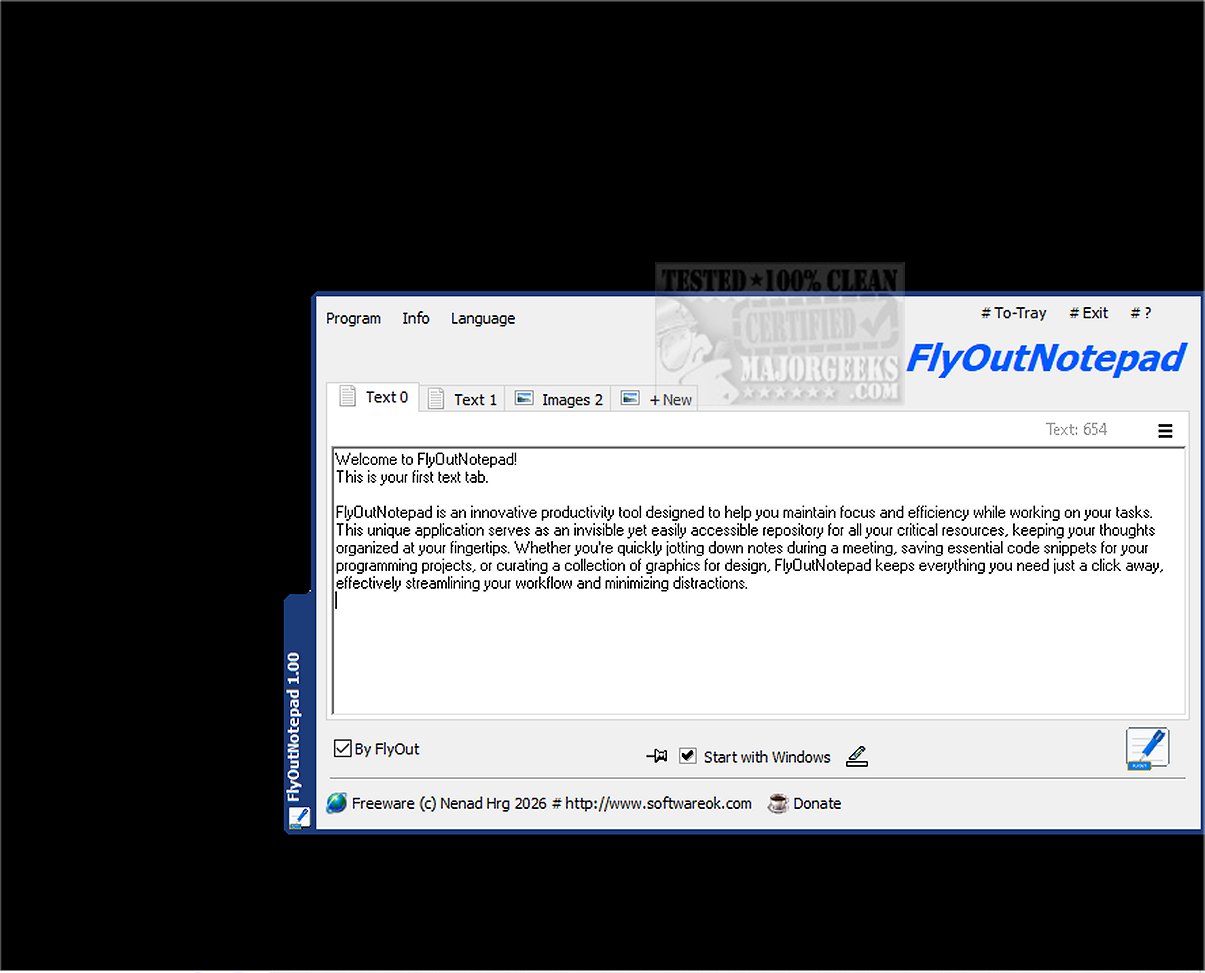
FlyOutNotepad has been launched as version 1.05, introducing a comprehensive tool tailored for the efficient management of text, code snippets, and graphics. Its design focuses on enabling users to transfer information swiftly between various applications, thereby enhancing productivity.
This innovative application acts as an invisible yet conveniently accessible repository for keeping essential resources organized. It is ideal for situations such as taking notes during meetings, saving critical code snippets for programming tasks, or compiling graphics for design projects. FlyOutNotepad helps streamline workflows, allowing users to concentrate on their tasks without distractions.
Key Features:
1. Easy Docking: FlyOutNotepad can dock to any edge of your screen, making it adaptable to your workspace without consuming much screen space. The application supports bidirectional Drag & Drop functionality, facilitating easy movement of content between FlyOutNotepad and other software.
2. Organized Note Management: With 20 tabs available, users can categorize and manage their notes, snippets, and graphics efficiently. The tabbed interface allows for quick and intuitive switching between different projects or topics. Additionally, an auto-save feature ensures that work is consistently saved, providing peace of mind.
3. Portability Options: FlyOutNotepad saves settings in the user directory by default, following Windows conventions. For those preferring a portable version, users can activate this mode by renaming the executable file. This feature allows users to run FlyOutNotepad from a USB stick or other removable media efficiently.
4. Performance-Oriented Design: Developed in C++ using the Windows Template Library (WTL), FlyOutNotepad ensures a fast and lightweight user experience, enhancing daily productivity without compromising system resources.
Conclusion and Future Prospects:
FlyOutNotepad 1.05 is designed for developers, designers, and anyone who seeks a streamlined approach to note-taking and resource organization. By providing tools that optimize workflows and boost efficiency, it positions itself as an essential application for modern productivity needs. Future updates may include enhancements such as cloud syncing, cross-platform compatibility, and additional customization options to further elevate user experience and functionality
This innovative application acts as an invisible yet conveniently accessible repository for keeping essential resources organized. It is ideal for situations such as taking notes during meetings, saving critical code snippets for programming tasks, or compiling graphics for design projects. FlyOutNotepad helps streamline workflows, allowing users to concentrate on their tasks without distractions.
Key Features:
1. Easy Docking: FlyOutNotepad can dock to any edge of your screen, making it adaptable to your workspace without consuming much screen space. The application supports bidirectional Drag & Drop functionality, facilitating easy movement of content between FlyOutNotepad and other software.
2. Organized Note Management: With 20 tabs available, users can categorize and manage their notes, snippets, and graphics efficiently. The tabbed interface allows for quick and intuitive switching between different projects or topics. Additionally, an auto-save feature ensures that work is consistently saved, providing peace of mind.
3. Portability Options: FlyOutNotepad saves settings in the user directory by default, following Windows conventions. For those preferring a portable version, users can activate this mode by renaming the executable file. This feature allows users to run FlyOutNotepad from a USB stick or other removable media efficiently.
4. Performance-Oriented Design: Developed in C++ using the Windows Template Library (WTL), FlyOutNotepad ensures a fast and lightweight user experience, enhancing daily productivity without compromising system resources.
Conclusion and Future Prospects:
FlyOutNotepad 1.05 is designed for developers, designers, and anyone who seeks a streamlined approach to note-taking and resource organization. By providing tools that optimize workflows and boost efficiency, it positions itself as an essential application for modern productivity needs. Future updates may include enhancements such as cloud syncing, cross-platform compatibility, and additional customization options to further elevate user experience and functionality
FlyOutNotepad 1.05 released
FlyOutNotepad is a powerful tool specifically designed to seamlessly manage text, code snippets, and graphics, allowing you to transfer information between various programs at remarkable speeds.