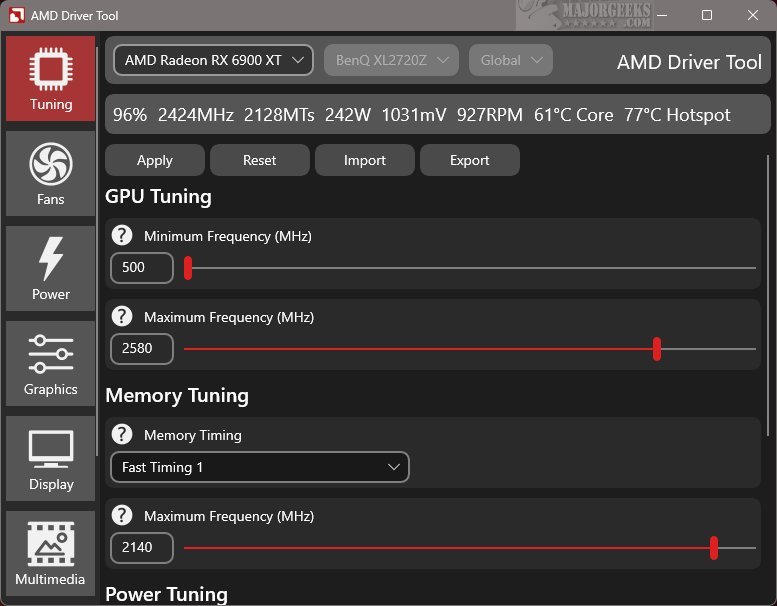
RadeonTuner 0.60.0.0 has been released as a simplified and user-friendly alternative to the more complex AMD Radeon Adrenalin Edition software. It aims to provide essential tools for users to easily modify display settings, optimize GPU and fan performance, and manage gaming graphics options without the clutter of unnecessary features.
What is RadeonTuner?
RadeonTuner is designed with an intuitive interface that makes navigation straightforward. Key functions are prominently displayed on the left side of the screen, allowing users to quickly access desired settings. The interface also indicates the currently selected AMD GPU model, which is beneficial for users with multiple graphics cards, ensuring that any adjustments are made to the intended device.
What Can You Do with RadeonTuner?
RadeonTuner allows users to make fundamental adjustments such as altering clock speeds, fan curves, and power limits, as well as customizing graphics settings for games and display preferences. A standout feature is the ability to import and export settings, which helps maintain user preferences even after updates or driver installations, reducing the chances of reverting to default settings.
Moreover, RadeonTuner is particularly useful for users who prefer to install GPU drivers independently of the full Adrenalin suite. By downloading the latest driver from the official AMD website, users can install it and utilize RadeonTuner for customized settings.
Geek Verdict
RadeonTuner emerges as a valuable tool for those who wish to control their AMD GPU without the complexities often found in official software. This lightweight application eliminates unnecessary background processes and seldom-used features, resulting in a streamlined and efficient user experience. By adopting RadeonTuner, users can enhance their gaming and graphics experience with ease and simplicity.
Extended Features and Future Potential
In future updates, RadeonTuner could further expand its functionalities by incorporating advanced monitoring tools, allowing users to track performance metrics in real-time. Additionally, integration with popular gaming platforms could provide personalized profiles based on individual gaming preferences. With user feedback, future versions may also include enhanced customization options, such as advanced overclocking features and improved compatibility with a broader range of AMD graphics cards. This roadmap for growth positions RadeonTuner as not just a tool for today, but as a continually evolving platform for enhancing the gaming experience
What is RadeonTuner?
RadeonTuner is designed with an intuitive interface that makes navigation straightforward. Key functions are prominently displayed on the left side of the screen, allowing users to quickly access desired settings. The interface also indicates the currently selected AMD GPU model, which is beneficial for users with multiple graphics cards, ensuring that any adjustments are made to the intended device.
What Can You Do with RadeonTuner?
RadeonTuner allows users to make fundamental adjustments such as altering clock speeds, fan curves, and power limits, as well as customizing graphics settings for games and display preferences. A standout feature is the ability to import and export settings, which helps maintain user preferences even after updates or driver installations, reducing the chances of reverting to default settings.
Moreover, RadeonTuner is particularly useful for users who prefer to install GPU drivers independently of the full Adrenalin suite. By downloading the latest driver from the official AMD website, users can install it and utilize RadeonTuner for customized settings.
Geek Verdict
RadeonTuner emerges as a valuable tool for those who wish to control their AMD GPU without the complexities often found in official software. This lightweight application eliminates unnecessary background processes and seldom-used features, resulting in a streamlined and efficient user experience. By adopting RadeonTuner, users can enhance their gaming and graphics experience with ease and simplicity.
Extended Features and Future Potential
In future updates, RadeonTuner could further expand its functionalities by incorporating advanced monitoring tools, allowing users to track performance metrics in real-time. Additionally, integration with popular gaming platforms could provide personalized profiles based on individual gaming preferences. With user feedback, future versions may also include enhanced customization options, such as advanced overclocking features and improved compatibility with a broader range of AMD graphics cards. This roadmap for growth positions RadeonTuner as not just a tool for today, but as a continually evolving platform for enhancing the gaming experience
RadeonTuner 0.60.0.0 released
RadeonTuner serves as a streamlined and user-friendly alternative to the comprehensive AMD Radeon Adrenalin Edition suite. Its primary purpose is to provide essential tools that let users easily adjust display settings, fine-tune GPU and fan performance, and manage various gaming graphics options.