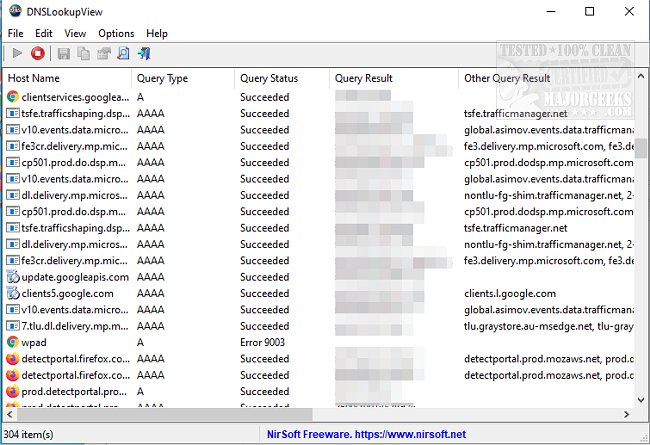
The latest release of DNSLookupView, version 1.21, provides users with the ability to monitor and analyze DNS queries made through the Windows DNS Client service. This tool is particularly beneficial for users looking to diagnose potential security threats or troubleshoot DNS configuration issues that could affect website connectivity. The user interface is designed to be intuitive for those familiar with the developer's previous software products.
DNSLookupView displays essential information for each DNS query processed, including the host name, query type (such as A or AAAA records), query status (whether the query succeeded or encountered an error), the query result, a timestamp, the unique identifier (ID), and the name of the process that initiated the DNS request.
The utility operates by leveraging Windows event tracing, specifically using the 'Microsoft-Windows-DNS-Client' provider, with the relevant event ID being 3008. This allows for detailed tracking of every DNS query handled by the Windows DNS Client service.
In addition to monitoring DNS queries, the tool can be paired with various troubleshooting guides, such as instructions for flushing the DNS cache, resetting Winsock, and adjusting TCP/IP settings to enhance network performance on Windows 10 and 11.
Moving forward, users can expect future updates to further improve functionality and user experience, as well as additional features that may enhance the tool’s ability to diagnose and resolve complex network issues. Overall, DNSLookupView stands out as an essential resource for IT professionals and network administrators aiming for effective DNS management and security oversight
DNSLookupView displays essential information for each DNS query processed, including the host name, query type (such as A or AAAA records), query status (whether the query succeeded or encountered an error), the query result, a timestamp, the unique identifier (ID), and the name of the process that initiated the DNS request.
The utility operates by leveraging Windows event tracing, specifically using the 'Microsoft-Windows-DNS-Client' provider, with the relevant event ID being 3008. This allows for detailed tracking of every DNS query handled by the Windows DNS Client service.
In addition to monitoring DNS queries, the tool can be paired with various troubleshooting guides, such as instructions for flushing the DNS cache, resetting Winsock, and adjusting TCP/IP settings to enhance network performance on Windows 10 and 11.
Moving forward, users can expect future updates to further improve functionality and user experience, as well as additional features that may enhance the tool’s ability to diagnose and resolve complex network issues. Overall, DNSLookupView stands out as an essential resource for IT professionals and network administrators aiming for effective DNS management and security oversight
DNSLookupView 1.21 released
DNSLookupView permits you to monitor the details of all DNS queries sent via the Windows DNS Client service.