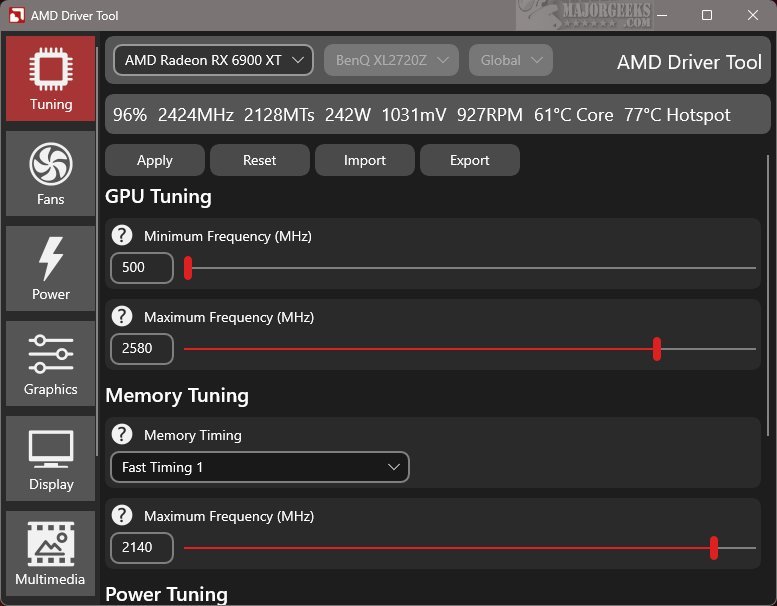
RadeonTuner is a new software tool designed as a simplified and user-friendly alternative to the extensive AMD Radeon Adrenalin Edition suite. Its main function is to provide essential features that allow users to easily adjust display settings, optimize GPU and fan performance, and manage various graphics options for gaming.
What is RadeonTuner?
RadeonTuner is intended for users who prefer a more straightforward approach to managing their AMD graphics settings. Unlike the more comprehensive Adrenalin suite, RadeonTuner focuses on essential adjustments, making it easier for users to navigate and configure their GPU settings without the complexity of numerous menus.
Intuitive, User-Friendly Interface
RadeonTuner boasts an intuitive interface with key functions prominently displayed on the left side, facilitating quick access to specific settings. The interface also indicates the currently selected AMD GPU model at the top, which is particularly useful for users with multiple graphics cards, ensuring that modifications are applied to the correct device.
What Can You Do with RadeonTuner?
RadeonTuner enables users to perform fundamental adjustments, such as modifying clock speeds, fan curves, and power limits, as well as customizing graphics settings for games and display preferences. A standout feature allows users to import and export settings, ensuring that configurations can be easily reapplied after updates or driver installations, which helps avoid reverting to default settings.
This tool is especially advantageous for users who want to install the GPU driver independently of the full Adrenalin suite. By downloading the latest driver from the official AMD website, users can utilize RadeonTuner to effectively customize their settings.
Geek Verdict
RadeonTuner is an essential tool for users who wish to manage their AMD GPU settings without the complications often associated with official software. It offers a lightweight and straightforward experience, eliminating unnecessary background services and seldom-used features. Users can enjoy a more efficient and manageable way to enhance their gaming and graphics experience with RadeonTuner.
Future Directions
As RadeonTuner continues to evolve, future updates may introduce additional features such as advanced overclocking options, further customization for specific games, and improved compatibility with new GPU models. These enhancements could strengthen its position as a go-to solution for gamers and PC enthusiasts looking for a streamlined graphics management tool. Moreover, community feedback and suggestions could play a significant role in shaping the development of new functionalities, ensuring that RadeonTuner meets the needs of its user base effectively
What is RadeonTuner?
RadeonTuner is intended for users who prefer a more straightforward approach to managing their AMD graphics settings. Unlike the more comprehensive Adrenalin suite, RadeonTuner focuses on essential adjustments, making it easier for users to navigate and configure their GPU settings without the complexity of numerous menus.
Intuitive, User-Friendly Interface
RadeonTuner boasts an intuitive interface with key functions prominently displayed on the left side, facilitating quick access to specific settings. The interface also indicates the currently selected AMD GPU model at the top, which is particularly useful for users with multiple graphics cards, ensuring that modifications are applied to the correct device.
What Can You Do with RadeonTuner?
RadeonTuner enables users to perform fundamental adjustments, such as modifying clock speeds, fan curves, and power limits, as well as customizing graphics settings for games and display preferences. A standout feature allows users to import and export settings, ensuring that configurations can be easily reapplied after updates or driver installations, which helps avoid reverting to default settings.
This tool is especially advantageous for users who want to install the GPU driver independently of the full Adrenalin suite. By downloading the latest driver from the official AMD website, users can utilize RadeonTuner to effectively customize their settings.
Geek Verdict
RadeonTuner is an essential tool for users who wish to manage their AMD GPU settings without the complications often associated with official software. It offers a lightweight and straightforward experience, eliminating unnecessary background services and seldom-used features. Users can enjoy a more efficient and manageable way to enhance their gaming and graphics experience with RadeonTuner.
Future Directions
As RadeonTuner continues to evolve, future updates may introduce additional features such as advanced overclocking options, further customization for specific games, and improved compatibility with new GPU models. These enhancements could strengthen its position as a go-to solution for gamers and PC enthusiasts looking for a streamlined graphics management tool. Moreover, community feedback and suggestions could play a significant role in shaping the development of new functionalities, ensuring that RadeonTuner meets the needs of its user base effectively
RadeonTuner 0.50.0.0 released
RadeonTuner serves as a streamlined and user-friendly alternative to the comprehensive AMD Radeon Adrenalin Edition suite. Its primary purpose is to provide essential tools that let users easily adjust display settings, fine-tune GPU and fan performance, and manage various gaming graphics options.