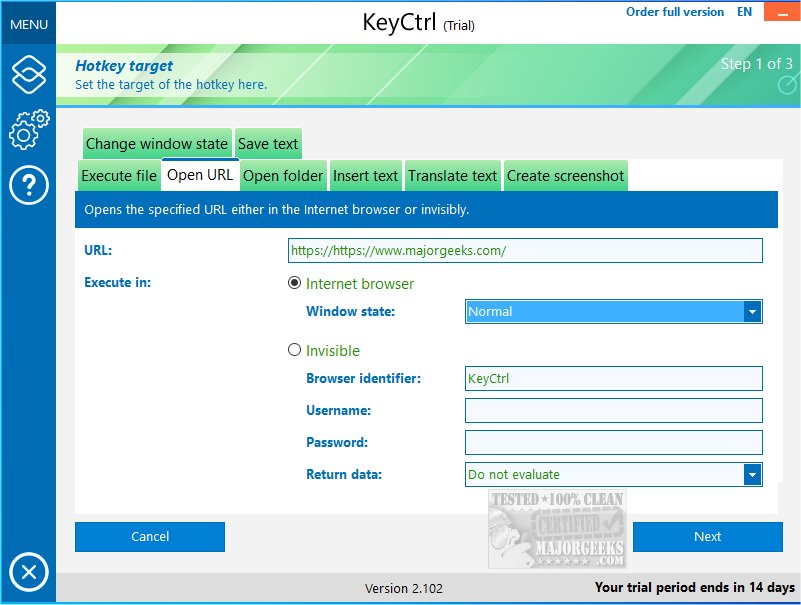
ASCOMP has announced the release of KeyCtrl 2.202, a powerful tool designed to enhance productivity by allowing users to create custom hotkeys tailored to their specific needs. This software goes beyond basic keyboard shortcuts like Ctrl + C and Ctrl + V, which are fundamental for copying and pasting, and provides users with a more efficient way to manage their daily tasks.
With ASCOMP KeyCtrl, users can save significant time by automating repetitive tasks. For example, frequently used phrases or paragraphs can be inserted into emails or documents with simple keystrokes. Additionally, users can quickly translate content from websites or take screenshots without navigating through menus, thereby streamlining their workflow. The software also allows users to create shortcuts that lead directly to their most-used folders in Windows Explorer, eliminating the hassle of multiple directory navigations.
The user-friendly design of ASCOMP KeyCtrl, combined with advanced features, makes it suitable for both casual users and professionals. One notable feature is the ability to activate certain hotkeys only when specific windows or processes are open, providing greater control and versatility for more complex tasks.
In summary, ASCOMP KeyCtrl is a valuable tool for anyone looking to improve their efficiency and streamline their computing experience. By automating routine actions and enabling the creation of custom hotkeys, users can significantly boost their productivity while minimizing time spent on repetitive tasks.
Moreover, expanding support for additional languages and local keyboard layouts could make ASCOMP KeyCtrl accessible to a broader audience, allowing users worldwide to benefit from personalized shortcuts. The potential for cloud synchronization would also enable users to access their custom hotkeys across multiple devices, ensuring consistency in productivity regardless of where they are working.
Overall, ASCOMP KeyCtrl not only simplifies daily tasks but also has the potential to evolve into an indispensable tool for enhancing productivity in our increasingly digital world
With ASCOMP KeyCtrl, users can save significant time by automating repetitive tasks. For example, frequently used phrases or paragraphs can be inserted into emails or documents with simple keystrokes. Additionally, users can quickly translate content from websites or take screenshots without navigating through menus, thereby streamlining their workflow. The software also allows users to create shortcuts that lead directly to their most-used folders in Windows Explorer, eliminating the hassle of multiple directory navigations.
The user-friendly design of ASCOMP KeyCtrl, combined with advanced features, makes it suitable for both casual users and professionals. One notable feature is the ability to activate certain hotkeys only when specific windows or processes are open, providing greater control and versatility for more complex tasks.
In summary, ASCOMP KeyCtrl is a valuable tool for anyone looking to improve their efficiency and streamline their computing experience. By automating routine actions and enabling the creation of custom hotkeys, users can significantly boost their productivity while minimizing time spent on repetitive tasks.
Extension
Beyond its current capabilities, future iterations of ASCOMP KeyCtrl could incorporate features such as machine learning to analyze user behavior and suggest optimal hotkeys based on frequently performed actions. Additionally, integration with third-party applications could further enhance its functionality, enabling users to create shortcuts that work seamlessly across different software platforms.Moreover, expanding support for additional languages and local keyboard layouts could make ASCOMP KeyCtrl accessible to a broader audience, allowing users worldwide to benefit from personalized shortcuts. The potential for cloud synchronization would also enable users to access their custom hotkeys across multiple devices, ensuring consistency in productivity regardless of where they are working.
Overall, ASCOMP KeyCtrl not only simplifies daily tasks but also has the potential to evolve into an indispensable tool for enhancing productivity in our increasingly digital world
ASCOMP KeyCtrl 2.202 released
ASCOMP KeyCtrl streamlines your daily tasks by allowing you to create personalized hotkeys tailored to your needs.