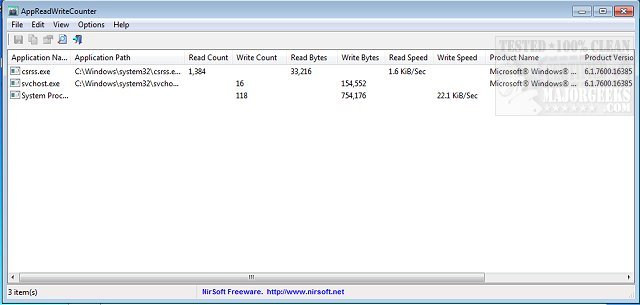
The AppReadWriteCounter has released version 1.46, which is a portable utility that allows users to monitor and display real-time file read and write operations for all applications currently running on their system. Every application on a computer performs read and write tasks to function properly, and this tool provides valuable insights into these operations.
Users can view an extensive array of information, including the total number of bytes read and written, the number of ongoing read and write operations, and the calculated read/write speeds. Additionally, the application displays pertinent details such as the product name and version of the software responsible for these file operations. This feature is particularly useful for users looking to optimize their system's performance and understand how applications interact with the hard disk.
Furthermore, the utility can be beneficial for troubleshooting issues related to system performance, as it allows users to identify which applications may be consuming excessive resources during read/write processes.
In addition to AppReadWriteCounter, users may find it helpful to explore related topics such as restoring default services in various Windows versions, identifying running processes or services, saving a list of active processes using TaskList, and customizing process information displayed in Task Manager. These resources can enhance users' understanding of system operations and facilitate more effective management of their computing environment.
In conclusion, AppReadWriteCounter 1.46 serves as a powerful tool for users who wish to gain insights into their applications’ file operations, helping them manage their system's efficiency and performance effectively
Users can view an extensive array of information, including the total number of bytes read and written, the number of ongoing read and write operations, and the calculated read/write speeds. Additionally, the application displays pertinent details such as the product name and version of the software responsible for these file operations. This feature is particularly useful for users looking to optimize their system's performance and understand how applications interact with the hard disk.
Furthermore, the utility can be beneficial for troubleshooting issues related to system performance, as it allows users to identify which applications may be consuming excessive resources during read/write processes.
In addition to AppReadWriteCounter, users may find it helpful to explore related topics such as restoring default services in various Windows versions, identifying running processes or services, saving a list of active processes using TaskList, and customizing process information displayed in Task Manager. These resources can enhance users' understanding of system operations and facilitate more effective management of their computing environment.
In conclusion, AppReadWriteCounter 1.46 serves as a powerful tool for users who wish to gain insights into their applications’ file operations, helping them manage their system's efficiency and performance effectively
AppReadWriteCounter 1.46 released
AppReadWriteCounter is a portable utility designed to count and display the current file read/write operations for all running applications.