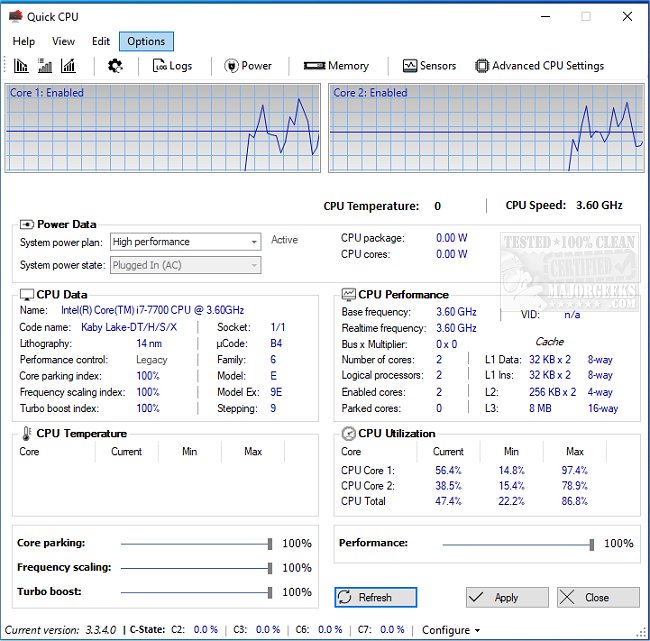
Quick CPU version 6.6.0.0 has been released, offering users an exceptional tool for fine-tuning and monitoring a wide array of critical CPU and system parameters. This software is designed to help you unlock your PC's full potential, making it ideal for both power users and those seeking a smooth computing experience during demanding tasks. Quick CPU allows you to monitor and optimize your CPU's performance with features like real-time hardware monitoring, advanced CPU tuning, and customizable performance profiles.
Key features include tracking CPU temperature, core utilization, power consumption, and system memory. Users can adjust settings related to Core Parking, Turbo Boost, and Frequency Scaling to balance between speed and power conservation. Quick CPU offers preset performance modes—Minimal, Balanced, and Maximum—allowing beginners to start optimizing without the risk of complex adjustments. The tool also includes custom alerts to notify users of any changes before they are applied, ensuring control over adjustments.
For gamers, Quick CPU helps eliminate lag by keeping processors optimized for performance, while content creators benefit from smoother rendering and editing by maximizing PC capabilities during intensive tasks. Laptop users can extend battery life by managing core activities, switching to high performance when plugged in and conserving power when on the go.
Despite its advanced options, which may appear daunting to novices, Quick CPU provides an intuitive interface with customizable panels and color themes that cater to users of all skill levels. Its compatibility with a range of Intel and AMD CPUs enhances its versatility. However, it does not support macOS or Linux systems.
Quick CPU stands out because it merges expert-level functionality with a user-friendly design, offering comprehensive monitoring, customization options, and preset modes for safe optimization. In conclusion, Quick CPU is not just a monitoring tool but a gateway to unleashing your system's capabilities, whether for gaming, energy efficiency, or technical tinkering. Download Quick CPU today to take control of your CPU performance and experience the difference it can make in your computing experience
Key features include tracking CPU temperature, core utilization, power consumption, and system memory. Users can adjust settings related to Core Parking, Turbo Boost, and Frequency Scaling to balance between speed and power conservation. Quick CPU offers preset performance modes—Minimal, Balanced, and Maximum—allowing beginners to start optimizing without the risk of complex adjustments. The tool also includes custom alerts to notify users of any changes before they are applied, ensuring control over adjustments.
For gamers, Quick CPU helps eliminate lag by keeping processors optimized for performance, while content creators benefit from smoother rendering and editing by maximizing PC capabilities during intensive tasks. Laptop users can extend battery life by managing core activities, switching to high performance when plugged in and conserving power when on the go.
Despite its advanced options, which may appear daunting to novices, Quick CPU provides an intuitive interface with customizable panels and color themes that cater to users of all skill levels. Its compatibility with a range of Intel and AMD CPUs enhances its versatility. However, it does not support macOS or Linux systems.
Quick CPU stands out because it merges expert-level functionality with a user-friendly design, offering comprehensive monitoring, customization options, and preset modes for safe optimization. In conclusion, Quick CPU is not just a monitoring tool but a gateway to unleashing your system's capabilities, whether for gaming, energy efficiency, or technical tinkering. Download Quick CPU today to take control of your CPU performance and experience the difference it can make in your computing experience
Quick CPU 6.6.0.0 released
Quick CPU enables fine-tuning and monitoring of a myriad of essential CPU and system parameters.