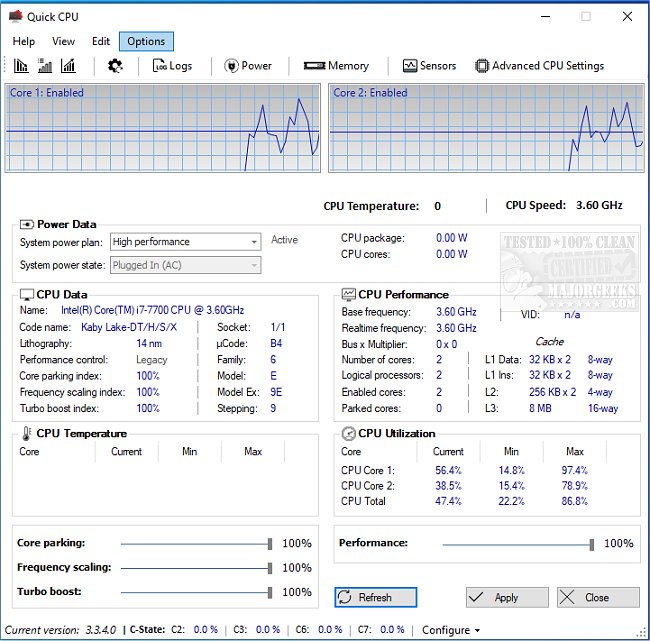
Quick CPU has released version 6.5.0.0, a powerful tool for fine-tuning and monitoring essential CPU and system parameters, designed for users who want to optimize their computer's performance. This software provides comprehensive control over CPU performance, making it ideal for gamers, content creators, and everyday users alike. With features such as real-time hardware monitoring, advanced CPU tuning, and customizable performance modes, Quick CPU empowers users to maximize their systems' capabilities while ensuring smooth operation during demanding tasks.
Key features include the ability to monitor vital metrics like CPU temperature and utilization, adjust core activity through Core Parking and Turbo Boost, and switch between performance profiles to suit different needs. The interface is highly customizable, allowing users to tailor their experience, and the application provides custom alerts to keep users informed of changes. For those with advanced knowledge, Quick CPU offers deeper control over settings like C-State Residency and Speed Shift, while still being accessible to beginners through its preset modes.
This tool significantly benefits various user groups: gamers can reduce lag, content creators can enhance production efficiency, and laptop users can extend battery life by managing CPU cores efficiently. While Quick CPU excels in providing detailed control and monitoring, it does have some limitations, such as being less user-friendly for first-time users when navigating advanced options and lacking support for macOS or Linux systems.
In summary, Quick CPU stands out as a versatile solution for CPU and system optimization, merging expert-level functionality with an intuitive design. It's an essential tool for anyone looking to unlock their computer's full potential, whether for performance enhancement or energy efficiency. With its rich features and user-friendly interface, Quick CPU is the key to taking control of your system's performance. Don't let your computer's capabilities remain untapped; download Quick CPU today to start optimizing your experience
Key features include the ability to monitor vital metrics like CPU temperature and utilization, adjust core activity through Core Parking and Turbo Boost, and switch between performance profiles to suit different needs. The interface is highly customizable, allowing users to tailor their experience, and the application provides custom alerts to keep users informed of changes. For those with advanced knowledge, Quick CPU offers deeper control over settings like C-State Residency and Speed Shift, while still being accessible to beginners through its preset modes.
This tool significantly benefits various user groups: gamers can reduce lag, content creators can enhance production efficiency, and laptop users can extend battery life by managing CPU cores efficiently. While Quick CPU excels in providing detailed control and monitoring, it does have some limitations, such as being less user-friendly for first-time users when navigating advanced options and lacking support for macOS or Linux systems.
In summary, Quick CPU stands out as a versatile solution for CPU and system optimization, merging expert-level functionality with an intuitive design. It's an essential tool for anyone looking to unlock their computer's full potential, whether for performance enhancement or energy efficiency. With its rich features and user-friendly interface, Quick CPU is the key to taking control of your system's performance. Don't let your computer's capabilities remain untapped; download Quick CPU today to start optimizing your experience
Quick CPU 6.5.0.0 released
Quick CPU enables fine-tuning and monitoring of a myriad of essential CPU and system parameters.