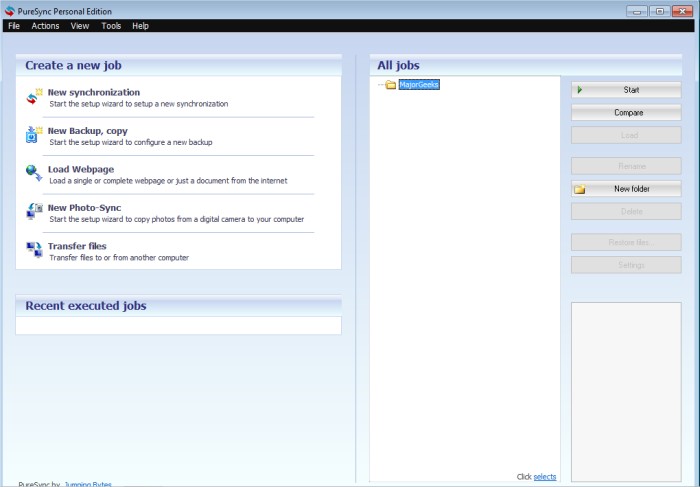
PureSync 8.5.2 has been released, enhancing its capabilities as a robust file synchronization and backup tool. This utility allows users to efficiently compare, synchronize, and back up files, making it an essential tool for anyone looking to manage their data effectively.
The software is user-friendly, featuring a straightforward interface that supports drag-and-drop functionality. This ensures that users can easily navigate through the backup process, aided by a wizard that guides them step-by-step to minimize the risk of errors. PureSync also provides advanced features such as conflict detection, which helps users manage multiple backups of files and folders effectively. Users have complete control over synchronization direction, allowing for tailored backup solutions based on individual needs.
One standout feature of PureSync is its Foto-Sync capability, specifically designed for digital cameras. This allows users to transfer only new photos from their camera, preventing the duplication of previously backed-up images.
Key features of PureSync include:
- User-friendly handling
- Synchronization and comparison of files
- Backup and restoration capabilities
- Support for subfolders and multiple folders
- Automatic synchronization and backups
- Advanced filtering options (e.g., by date or size)
- Use of environment variables in paths
- Customizable path information with date and time placeholders
- Ability to download web pages and files from the internet
- Recovery point comparison
- Efficient file transfer features
In addition to these functionalities, PureSync is comparable to other backup solutions, such as Google Drive backup, Windows Registry backup and restoration, and automatic registry backups on Windows 10 and 11. The release of PureSync 8.5.2 solidifies its position as a versatile tool for data management, catering to both casual users and professionals.
As data management needs continue to evolve, future updates to PureSync may further enhance its capabilities, potentially incorporating cloud integration or advanced security features to protect sensitive data
The software is user-friendly, featuring a straightforward interface that supports drag-and-drop functionality. This ensures that users can easily navigate through the backup process, aided by a wizard that guides them step-by-step to minimize the risk of errors. PureSync also provides advanced features such as conflict detection, which helps users manage multiple backups of files and folders effectively. Users have complete control over synchronization direction, allowing for tailored backup solutions based on individual needs.
One standout feature of PureSync is its Foto-Sync capability, specifically designed for digital cameras. This allows users to transfer only new photos from their camera, preventing the duplication of previously backed-up images.
Key features of PureSync include:
- User-friendly handling
- Synchronization and comparison of files
- Backup and restoration capabilities
- Support for subfolders and multiple folders
- Automatic synchronization and backups
- Advanced filtering options (e.g., by date or size)
- Use of environment variables in paths
- Customizable path information with date and time placeholders
- Ability to download web pages and files from the internet
- Recovery point comparison
- Efficient file transfer features
In addition to these functionalities, PureSync is comparable to other backup solutions, such as Google Drive backup, Windows Registry backup and restoration, and automatic registry backups on Windows 10 and 11. The release of PureSync 8.5.2 solidifies its position as a versatile tool for data management, catering to both casual users and professionals.
As data management needs continue to evolve, future updates to PureSync may further enhance its capabilities, potentially incorporating cloud integration or advanced security features to protect sensitive data
PureSync 8.5.2 released
PureSync is designed to be a file synchronizer and backup tool allowing you to compare, synchronize, and backup your files.