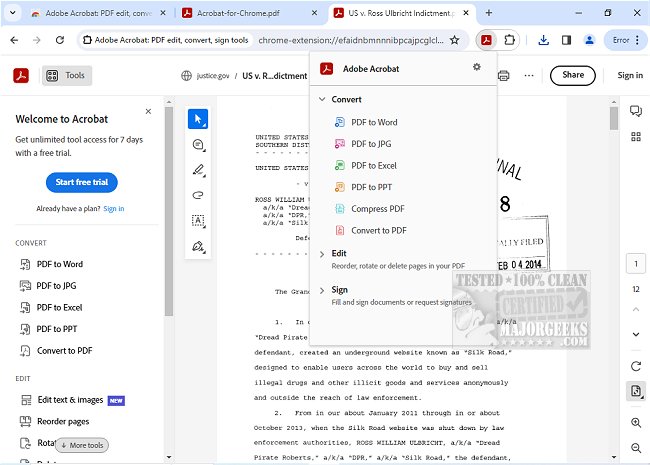
Adobe has released version 26.8.1.1 of Adobe Acrobat for Chrome, which integrates powerful PDF tools directly into the Chrome browser. This extension allows users to efficiently view, fill out, comment on, sign, convert, and compress PDF files without needing to leave their browser.
Adobe Acrobat is a popular solution for handling PDFs, offering a variety of features that enhance productivity. With this Chrome extension, users can easily add comments, sticky notes, and highlights to their PDFs at no cost. For more advanced functionalities, users can export PDFs, create new documents, merge multiple files, organize their PDFs, and reduce file sizes, among other tasks.
To use Adobe Acrobat for Chrome, users simply need to install the extension, pin it for easy access, and open any PDF in their browser. They can then select from a range of Acrobat tools to enhance their PDF experience. The extension provides seamless options for downloading or printing PDFs, and users can sign in to store their documents online, ensuring quick access from any location.
The Adobe Acrobat for Chrome extension also allows users to annotate PDFs with notes, text, and drawings. For those who need to complete forms, they can use the Acrobat form filler feature to fill out and sign documents directly from their desktops by opening them in Adobe Acrobat Reader. Users can electronically sign documents with their signatures or initials, making it easier to manage paperwork online.
In summary, Adobe Acrobat for Chrome offers a user-friendly solution for various PDF tasks, integrating essential tools that streamline workflows and enhance productivity. With its array of features, users can work with PDFs like never before, making it an invaluable tool for anyone who frequently deals with PDF documents.
In addition to the current offerings, future updates may further enhance functionality, potentially including advanced collaboration tools, improved integration with other applications, and enhanced mobile capabilities, allowing users to edit and manage PDFs on the go
Adobe Acrobat is a popular solution for handling PDFs, offering a variety of features that enhance productivity. With this Chrome extension, users can easily add comments, sticky notes, and highlights to their PDFs at no cost. For more advanced functionalities, users can export PDFs, create new documents, merge multiple files, organize their PDFs, and reduce file sizes, among other tasks.
To use Adobe Acrobat for Chrome, users simply need to install the extension, pin it for easy access, and open any PDF in their browser. They can then select from a range of Acrobat tools to enhance their PDF experience. The extension provides seamless options for downloading or printing PDFs, and users can sign in to store their documents online, ensuring quick access from any location.
The Adobe Acrobat for Chrome extension also allows users to annotate PDFs with notes, text, and drawings. For those who need to complete forms, they can use the Acrobat form filler feature to fill out and sign documents directly from their desktops by opening them in Adobe Acrobat Reader. Users can electronically sign documents with their signatures or initials, making it easier to manage paperwork online.
In summary, Adobe Acrobat for Chrome offers a user-friendly solution for various PDF tasks, integrating essential tools that streamline workflows and enhance productivity. With its array of features, users can work with PDFs like never before, making it an invaluable tool for anyone who frequently deals with PDF documents.
In addition to the current offerings, future updates may further enhance functionality, potentially including advanced collaboration tools, improved integration with other applications, and enhanced mobile capabilities, allowing users to edit and manage PDFs on the go
Adobe Acrobat for Chrome 26.8.1.1 released
Access Adobe Acrobat PDF tools in Chrome; view, fill, comment, sign, convert, and compress tools available.