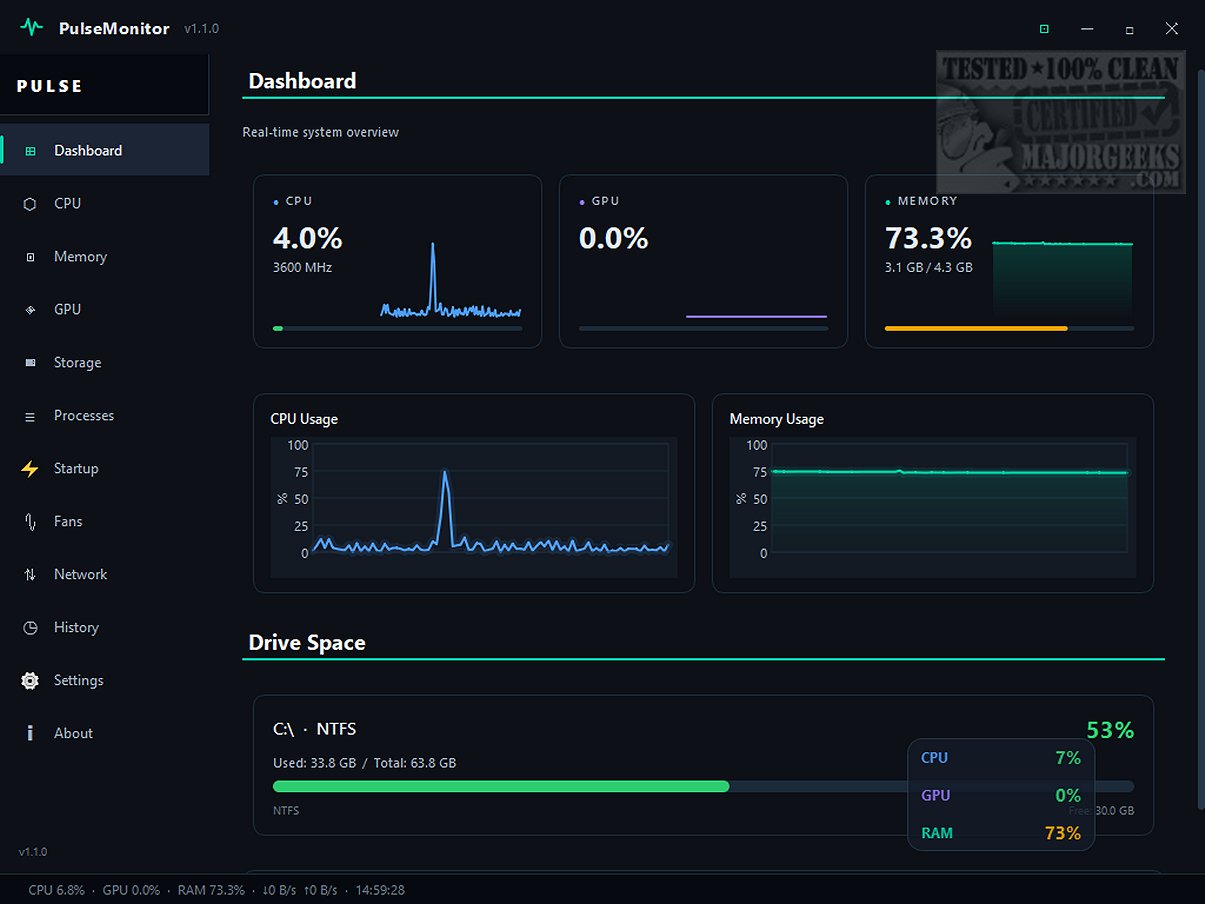
PulseMonitor has launched its latest version, 1.1.0, providing users with an efficient solution to monitor critical system metrics such as CPU, GPU, RAM, and disk usage in real time. The application boasts a sleek, minimalist desktop overlay that ensures essential performance metrics are readily available without overwhelming your workspace.
Proactive Monitoring for Enhanced Performance
Designed as a lightweight application, PulseMonitor aids users in tracking the load on their CPU, GPU, and RAM. This proactive monitoring capability enables users to identify potential issues before they escalate into system slowdowns or overheating, thus ensuring a smoother computing experience. The interface is modern and user-friendly, displaying real-time insights on various performance metrics, including CPU usage, memory consumption, storage activity, and network performance. For those seeking in-depth analysis, a comprehensive menu on the left side of the interface allows for deeper exploration of system statistics.
Real-Time GPU Monitoring
One of the standout features of PulseMonitor is its ability to monitor graphics card performance in real time, providing users with insights into GPU utilization. If users notice unusually low GPU usage during demanding tasks, this may indicate underlying issues or bottlenecks that need to be addressed.
Integrated Startup and Process Managers
In addition to performance monitoring, PulseMonitor includes built-in startup and process managers. These tools are invaluable for troubleshooting applications that may freeze, excessively consume RAM, or unexpectedly spike CPU usage. The process manager allows for quick termination of problematic processes, while safety warnings prevent the accidental termination of critical Windows processes, maintaining system stability. The startup manager provides a clear overview of applications set to launch at Windows startup, enabling users to disable those that are unnecessary, thereby optimizing system performance.
The Ultimate Tool for System Monitoring
In summary, PulseMonitor is a powerful, portable tool for real-time monitoring of vital system statistics like CPU, GPU, RAM, and disk usage. Its minimalist desktop overlay delivers crucial performance insights at a glance, helping users maintain a tidy and distraction-free workspace. With its combination of proactive monitoring, real-time GPU analysis, and integrated management tools, PulseMonitor empowers users to stay on top of their system’s performance effortlessly.
Future Enhancements and Community Feedback
As PulseMonitor continues to evolve, user feedback will be invaluable in shaping future updates. Potential enhancements could include more customizable dashboard options, support for additional hardware metrics, and expanded reporting features. Engaging with the community can lead to a more robust application that meets the diverse needs of users.
Similar Resources
For those looking to further explore their computer's hardware, the following resources are recommended:
- How to Identify the Hardware in Your Computer
- How to Find the Serial Number of Your Windows PC
- How to Find Motherboard Manufacturer, Model, Serial Number, and Version
- Three Ways to Find Out How Many Cores Your CPU Has
- How to Identify My Intel Processor and Generation
- How to Check Your Memory (RAM) Speed, Available Slots, and More.
Stay tuned for more updates and continue to optimize your computing experience with PulseMonitor
Proactive Monitoring for Enhanced Performance
Designed as a lightweight application, PulseMonitor aids users in tracking the load on their CPU, GPU, and RAM. This proactive monitoring capability enables users to identify potential issues before they escalate into system slowdowns or overheating, thus ensuring a smoother computing experience. The interface is modern and user-friendly, displaying real-time insights on various performance metrics, including CPU usage, memory consumption, storage activity, and network performance. For those seeking in-depth analysis, a comprehensive menu on the left side of the interface allows for deeper exploration of system statistics.
Real-Time GPU Monitoring
One of the standout features of PulseMonitor is its ability to monitor graphics card performance in real time, providing users with insights into GPU utilization. If users notice unusually low GPU usage during demanding tasks, this may indicate underlying issues or bottlenecks that need to be addressed.
Integrated Startup and Process Managers
In addition to performance monitoring, PulseMonitor includes built-in startup and process managers. These tools are invaluable for troubleshooting applications that may freeze, excessively consume RAM, or unexpectedly spike CPU usage. The process manager allows for quick termination of problematic processes, while safety warnings prevent the accidental termination of critical Windows processes, maintaining system stability. The startup manager provides a clear overview of applications set to launch at Windows startup, enabling users to disable those that are unnecessary, thereby optimizing system performance.
The Ultimate Tool for System Monitoring
In summary, PulseMonitor is a powerful, portable tool for real-time monitoring of vital system statistics like CPU, GPU, RAM, and disk usage. Its minimalist desktop overlay delivers crucial performance insights at a glance, helping users maintain a tidy and distraction-free workspace. With its combination of proactive monitoring, real-time GPU analysis, and integrated management tools, PulseMonitor empowers users to stay on top of their system’s performance effortlessly.
Future Enhancements and Community Feedback
As PulseMonitor continues to evolve, user feedback will be invaluable in shaping future updates. Potential enhancements could include more customizable dashboard options, support for additional hardware metrics, and expanded reporting features. Engaging with the community can lead to a more robust application that meets the diverse needs of users.
Similar Resources
For those looking to further explore their computer's hardware, the following resources are recommended:
- How to Identify the Hardware in Your Computer
- How to Find the Serial Number of Your Windows PC
- How to Find Motherboard Manufacturer, Model, Serial Number, and Version
- Three Ways to Find Out How Many Cores Your CPU Has
- How to Identify My Intel Processor and Generation
- How to Check Your Memory (RAM) Speed, Available Slots, and More.
Stay tuned for more updates and continue to optimize your computing experience with PulseMonitor
PulseMonitor 1.1.0 released
PulseMonitor lets you monitor CPU, GPU, RAM, and disk statistics in real time. It features a sleek, minimalist desktop overlay that provides essential performance metrics without cluttering your workspace.