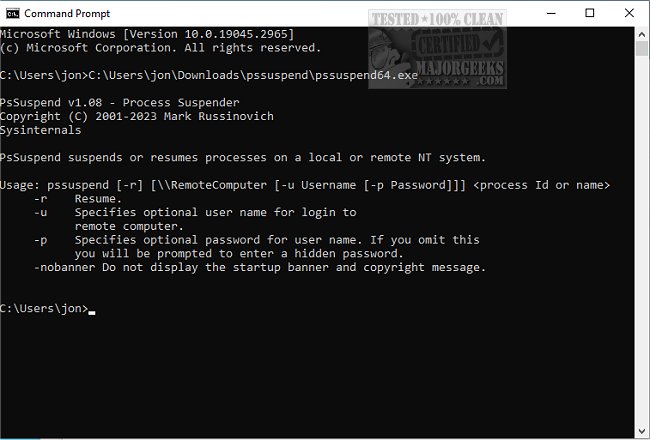
The recently released PsSuspend 1.09 is an efficient Command Line utility designed for suspending processes on both local and remote systems. This tool is particularly useful when you encounter a process that monopolizes system resources—such as CPU, disk, or network bandwidth. Instead of terminating the process, which can lead to data loss or corruption, PsSuspend allows you to temporarily pause the process, enabling other processes to utilize the resources.
To use PsSuspend, you simply need the process ID (PID) of the target process to suspend or resume it. If you wish to manage multiple instances of a process, you can easily do so by specifying the process name. This functionality simplifies the management of processes, particularly when dealing with applications that spawn multiple instances.
For cases where you need to reactivate suspended processes, the command line tool includes an easy-to-use option: the `-r` switch allows for quick resumption of selected processes. PsSuspend is an integral part of the PsTools suite, which is widely recognized for its capabilities in system management.
Usage Instructions:
- `-`: Displays supported options.
- `-r`: Resumes processes that are currently suspended.
- `\\computer`: Designates the remote computer where the target process is running. The remote system must be part of the NT network neighborhood.
- `-u username`: Required for executing commands on a remote system where the current account lacks administrative privileges. This option allows you to log in as an administrator.
- `-p password`: Enables you to specify the password in the command line for batch processing. If omitted, PsSuspend will prompt for it without displaying the input.
- `process id`: Indicates the specific process ID you wish to suspend or resume.
- `process name`: Specifies the name of the process or processes to be suspended or resumed.
Additional Resources: For users looking to enhance their system management skills, consider exploring related topics such as restoring default services in Windows, identifying processes, or various methods to open Task Manager in Windows operating systems.
Conclusion: With the new capabilities introduced in PsSuspend 1.09, users have a powerful tool at their disposal for managing process resources effectively, ensuring optimal system performance while maintaining process integrity. Whether managing local tasks or remote processes, PsSuspend streamlines system administration tasks with ease
To use PsSuspend, you simply need the process ID (PID) of the target process to suspend or resume it. If you wish to manage multiple instances of a process, you can easily do so by specifying the process name. This functionality simplifies the management of processes, particularly when dealing with applications that spawn multiple instances.
For cases where you need to reactivate suspended processes, the command line tool includes an easy-to-use option: the `-r` switch allows for quick resumption of selected processes. PsSuspend is an integral part of the PsTools suite, which is widely recognized for its capabilities in system management.
Usage Instructions:
pssuspend [- ] [-r] [\\computer [-u username] [-p password]]Parameters:
- `-`: Displays supported options.
- `-r`: Resumes processes that are currently suspended.
- `\\computer`: Designates the remote computer where the target process is running. The remote system must be part of the NT network neighborhood.
- `-u username`: Required for executing commands on a remote system where the current account lacks administrative privileges. This option allows you to log in as an administrator.
- `-p password`: Enables you to specify the password in the command line for batch processing. If omitted, PsSuspend will prompt for it without displaying the input.
- `process id`: Indicates the specific process ID you wish to suspend or resume.
- `process name`: Specifies the name of the process or processes to be suspended or resumed.
Additional Resources: For users looking to enhance their system management skills, consider exploring related topics such as restoring default services in Windows, identifying processes, or various methods to open Task Manager in Windows operating systems.
Conclusion: With the new capabilities introduced in PsSuspend 1.09, users have a powerful tool at their disposal for managing process resources effectively, ensuring optimal system performance while maintaining process integrity. Whether managing local tasks or remote processes, PsSuspend streamlines system administration tasks with ease
PsSuspend 1.09 released
PsSuspend is a Command Line tool that allows you to suspend processes on the local or a remote system.