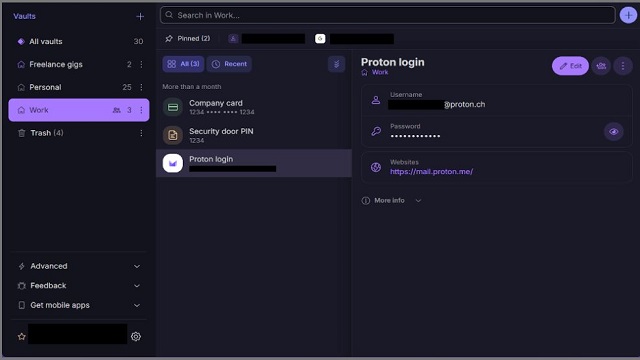
Proton Pass 1.43.1 has been released, enhancing its status as an open-source password and identity manager developed by Proton AG in Switzerland. This tool is designed to securely store all your logins, two-factor authentication (2FA) codes, email aliases, secure notes, and files using end-to-end encryption. It is particularly appealing to users who prioritize privacy and dislike frequent upselling tactics commonly found in other password management solutions.
What Proton Pass Offers:
Proton Pass stands out from typical password managers due to its comprehensive features, including built-in email aliasing, which allows users to create temporary email addresses for various online services. This feature is especially useful for protecting your primary email from leaks during data breaches. The ease of use is another highlight, as logins autofill smoothly across major browsers and devices (Windows, macOS, Linux, Android, and iOS), ensuring a streamlined experience with minimal lag.
Key Features:
- Full Data Encryption: Proton Pass secures all stored data, including URLs and usernames, ensuring that metadata remains private.
- Email Aliasing: This feature enables users to generate throwaway emails, safeguarding their actual inboxes from spam and unwanted communications.
- Integrated 2FA Authenticator: Users can manage 2FA codes within Proton Pass itself, eliminating the need for separate applications.
- Flexible Item Storage: Beyond passwords, users can securely store a variety of sensitive information, making it a versatile identity vault.
- Secure Sharing: Passwords and notes can be shared securely, even with non-Proton users.
- Paid Features: Premium options include passkeys, additional vaults and aliases, password health checks, dark-web monitoring, and advanced anti-takeover protection through Proton Sentinel.
Areas for Improvement:
While the free version of Proton Pass is robust, it lacks features like dark-web alerts and advanced security checks unless users opt for the paid subscription. Support options are limited to email and a knowledge base, which may not provide immediate assistance. Additionally, while the pricing is justifiable given its focus on privacy, it may not be the most budget-friendly option available.
Conclusion:
Overall, Proton Pass emerges as a reliable, privacy-centric password manager that excels in security and functionality. Its unique features, such as email aliasing and a built-in authenticator, set it apart from basic password storage solutions. However, some users might find the support and pricing aspects less convenient. For those interested in a secure, privacy-first approach to managing their passwords and identities, Proton Pass is certainly worth considering.
For further inquiries or feedback, users are encouraged to participate in discussions on the Major Geeks Forums, where community members are ready to assist
What Proton Pass Offers:
Proton Pass stands out from typical password managers due to its comprehensive features, including built-in email aliasing, which allows users to create temporary email addresses for various online services. This feature is especially useful for protecting your primary email from leaks during data breaches. The ease of use is another highlight, as logins autofill smoothly across major browsers and devices (Windows, macOS, Linux, Android, and iOS), ensuring a streamlined experience with minimal lag.
Key Features:
- Full Data Encryption: Proton Pass secures all stored data, including URLs and usernames, ensuring that metadata remains private.
- Email Aliasing: This feature enables users to generate throwaway emails, safeguarding their actual inboxes from spam and unwanted communications.
- Integrated 2FA Authenticator: Users can manage 2FA codes within Proton Pass itself, eliminating the need for separate applications.
- Flexible Item Storage: Beyond passwords, users can securely store a variety of sensitive information, making it a versatile identity vault.
- Secure Sharing: Passwords and notes can be shared securely, even with non-Proton users.
- Paid Features: Premium options include passkeys, additional vaults and aliases, password health checks, dark-web monitoring, and advanced anti-takeover protection through Proton Sentinel.
Areas for Improvement:
While the free version of Proton Pass is robust, it lacks features like dark-web alerts and advanced security checks unless users opt for the paid subscription. Support options are limited to email and a knowledge base, which may not provide immediate assistance. Additionally, while the pricing is justifiable given its focus on privacy, it may not be the most budget-friendly option available.
Conclusion:
Overall, Proton Pass emerges as a reliable, privacy-centric password manager that excels in security and functionality. Its unique features, such as email aliasing and a built-in authenticator, set it apart from basic password storage solutions. However, some users might find the support and pricing aspects less convenient. For those interested in a secure, privacy-first approach to managing their passwords and identities, Proton Pass is certainly worth considering.
For further inquiries or feedback, users are encouraged to participate in discussions on the Major Geeks Forums, where community members are ready to assist
Proton Pass 1.43.1 released
Proton Pass is an Open Source password/identity manager that keeps all your logins, 2FA codes, email aliases, secure notes, and files locked down with end-to-end encryption.