PrivacyRoot has launched the latest version of its file deletion software, PrivacyRoot Secure Delete 221, which enables users to permanently erase files and folders from their computers without sending them to the recycle bin. This tool is designed for those who prioritize data security and wish to ensure that deleted files cannot be recovered.
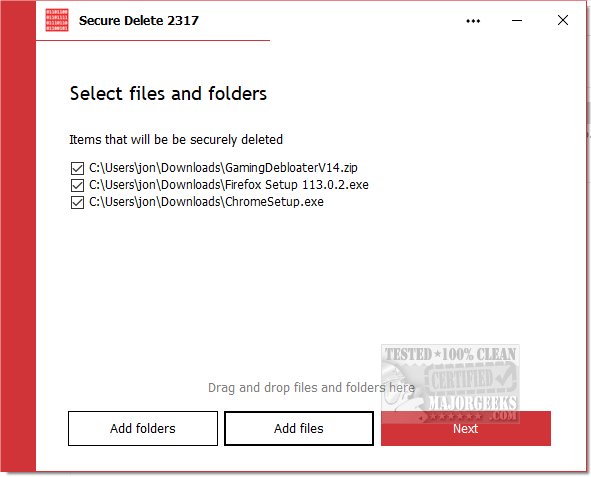
PrivacyRoot Secure Delete offers various security levels for the deletion process, allowing users to select the desired level of thoroughness. Higher security settings provide more effective erasure but may take longer to complete. Users can utilize the software in three straightforward ways: by dragging and dropping files into the application, adding files via a button on the main screen, or using the "Send To" function directly from Windows Explorer.
The software operates through a user-friendly, step-by-step process, allowing users to pause or stop the deletion at any time. Importantly, once the deletion is finalized, the data is irretrievable, emphasizing the need for users to maintain backups of important information.
PrivacyRoot Secure Delete boasts a simple interface that caters to users of all skill levels, ensuring that even those who are not tech-savvy can effectively secure their data. Despite its ease of use, the program employs advanced algorithms for secure data destruction, offering robust protection against potential data breaches.
In addition to its primary function, users interested in data management may also explore related topics, such as utilizing Storage Sense to automatically remove junk files in Windows or employing PowerShell and Cipher for secure file deletions. Moreover, users facing issues with file deletion or managing Windows activity history can find helpful resources and guides to assist them.
Overall, PrivacyRoot Secure Delete 221 is an effective solution for individuals and organizations looking to maintain their privacy and secure sensitive information through reliable file deletion methods
PrivacyRoot Secure Delete offers various security levels for the deletion process, allowing users to select the desired level of thoroughness. Higher security settings provide more effective erasure but may take longer to complete. Users can utilize the software in three straightforward ways: by dragging and dropping files into the application, adding files via a button on the main screen, or using the "Send To" function directly from Windows Explorer.
The software operates through a user-friendly, step-by-step process, allowing users to pause or stop the deletion at any time. Importantly, once the deletion is finalized, the data is irretrievable, emphasizing the need for users to maintain backups of important information.
PrivacyRoot Secure Delete boasts a simple interface that caters to users of all skill levels, ensuring that even those who are not tech-savvy can effectively secure their data. Despite its ease of use, the program employs advanced algorithms for secure data destruction, offering robust protection against potential data breaches.
In addition to its primary function, users interested in data management may also explore related topics, such as utilizing Storage Sense to automatically remove junk files in Windows or employing PowerShell and Cipher for secure file deletions. Moreover, users facing issues with file deletion or managing Windows activity history can find helpful resources and guides to assist them.
Overall, PrivacyRoot Secure Delete 221 is an effective solution for individuals and organizations looking to maintain their privacy and secure sensitive information through reliable file deletion methods
PrivacyRoot Secure Delete 221 released
PrivacyRoot Secure Delete lets you securely erase files and folders permanently from your machine without going to the recycle bin.