PrivacyRoot has released the Clean Space 721, a tool designed to free up storage space on your drive by removing unnecessary files while ensuring your privacy by making deleted files unrecoverable. The software is user-friendly and can be run in Administrator mode for optimal performance, which it suggests to users during the initial setup.
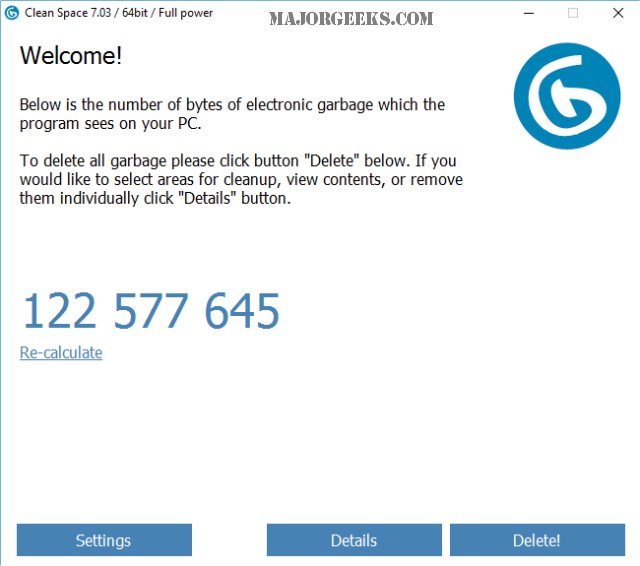
Upon startup, Clean Space quickly scans for files eligible for deletion, providing a count of these files and the option to recalculate if you’ve left the program open for a while. A detailed tab categorizes the files found, including those from Windows 10, various applications like Media Player, Skype, OneDrive, and browsers such as Chrome and Internet Explorer. Users can customize their cleaning preferences by unchecking specific items, such as cookies or address history, if they wish to retain them.
When compared to other cleaning tools like CCleaner and Wise Disk Cleaner, Clean Space performs similarly to CCleaner, detecting a comparable amount of junk files. However, it differentiates itself by offering a more streamlined experience without the additional features and bloat that have been associated with CCleaner in recent updates. While it does not include a registry cleaner or startup manager, Clean Space is ideal for users focused solely on removing junk files without the complexity of navigating through a cluttered interface.
In summary, PrivacyRoot Clean Space 721 is a straightforward and effective solution for users looking to declutter their computers safely and efficiently. Its simplicity makes it a preferred choice for those who prioritize ease of use over a multitude of functionalities.
For extended usability, users could consider combining Clean Space's capabilities with other tools for comprehensive system maintenance, or explore user reviews for insights on long-term performance and updates. Additionally, users may want to stay informed about future versions and enhancements that could further improve the software's functionality and efficiency
Upon startup, Clean Space quickly scans for files eligible for deletion, providing a count of these files and the option to recalculate if you’ve left the program open for a while. A detailed tab categorizes the files found, including those from Windows 10, various applications like Media Player, Skype, OneDrive, and browsers such as Chrome and Internet Explorer. Users can customize their cleaning preferences by unchecking specific items, such as cookies or address history, if they wish to retain them.
When compared to other cleaning tools like CCleaner and Wise Disk Cleaner, Clean Space performs similarly to CCleaner, detecting a comparable amount of junk files. However, it differentiates itself by offering a more streamlined experience without the additional features and bloat that have been associated with CCleaner in recent updates. While it does not include a registry cleaner or startup manager, Clean Space is ideal for users focused solely on removing junk files without the complexity of navigating through a cluttered interface.
In summary, PrivacyRoot Clean Space 721 is a straightforward and effective solution for users looking to declutter their computers safely and efficiently. Its simplicity makes it a preferred choice for those who prioritize ease of use over a multitude of functionalities.
For extended usability, users could consider combining Clean Space's capabilities with other tools for comprehensive system maintenance, or explore user reviews for insights on long-term performance and updates. Additionally, users may want to stay informed about future versions and enhancements that could further improve the software's functionality and efficiency
PrivacyRoot Clean Space 721 released
PrivacyRoot Clean Space can remove unneeded files that waste space on your drive and protect your privacy by making deleted files unrecoverable.