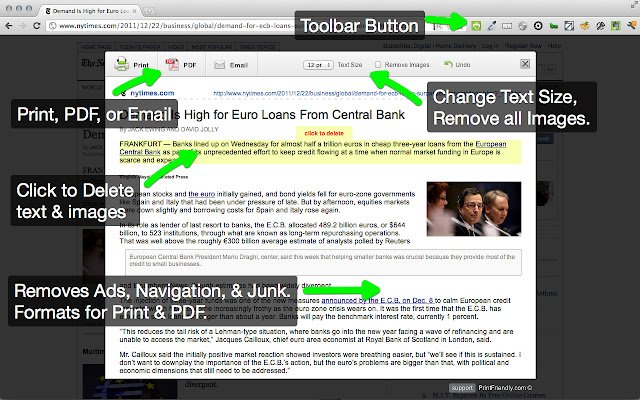
The latest version 7.2.0 of Print Friendly & PDF has been released for popular web browsers including Chrome, Firefox, Edge, and Safari. This tool is designed to enhance the printing experience by cleaning and formatting web pages, effectively removing ads, navigation elements, and other unnecessary content. This results in more efficient use of paper and ink when printing.
Key features of Print Friendly & PDF include a Print Preview option that optimizes content for printing, and an Edit Before Printing feature that allows users to selectively choose what to print by removing unwanted images and text. Users have the option to print immediately or save the content as a PDF for later use.
For new users, the process is straightforward: simply copy and paste a URL into PrintFriendly.com. Regular users can streamline their experience by adding the tool to their browser for one-click access to print-friendly pages. Additionally, developers and bloggers can integrate a print-friendly button into their websites or blogs to enhance usability for their visitors.
In addition to Print Friendly & PDF, users might find helpful articles related to PDF management, such as enabling two-page view in Google Chrome, preventing Microsoft Edge from opening PDF and HTML files automatically, and managing the XPS Viewer app in Windows 10.
This release reflects a commitment to improving user experience by simplifying the printing process and providing flexibility in how content is printed or saved
Key features of Print Friendly & PDF include a Print Preview option that optimizes content for printing, and an Edit Before Printing feature that allows users to selectively choose what to print by removing unwanted images and text. Users have the option to print immediately or save the content as a PDF for later use.
For new users, the process is straightforward: simply copy and paste a URL into PrintFriendly.com. Regular users can streamline their experience by adding the tool to their browser for one-click access to print-friendly pages. Additionally, developers and bloggers can integrate a print-friendly button into their websites or blogs to enhance usability for their visitors.
In addition to Print Friendly & PDF, users might find helpful articles related to PDF management, such as enabling two-page view in Google Chrome, preventing Microsoft Edge from opening PDF and HTML files automatically, and managing the XPS Viewer app in Windows 10.
This release reflects a commitment to improving user experience by simplifying the printing process and providing flexibility in how content is printed or saved
Print Friendly and PDF for Chrome, Firefox, Edge, and Safari 7.2.0 released
Print Friendly & PDF for Chrome, Firefox, Edge, and Safari cleans and formats web pages for the perfect print experience.
Print Friendly and PDF for Chrome, Firefox, Edge, and Safari 7.2.0 released @ MajorGeeks