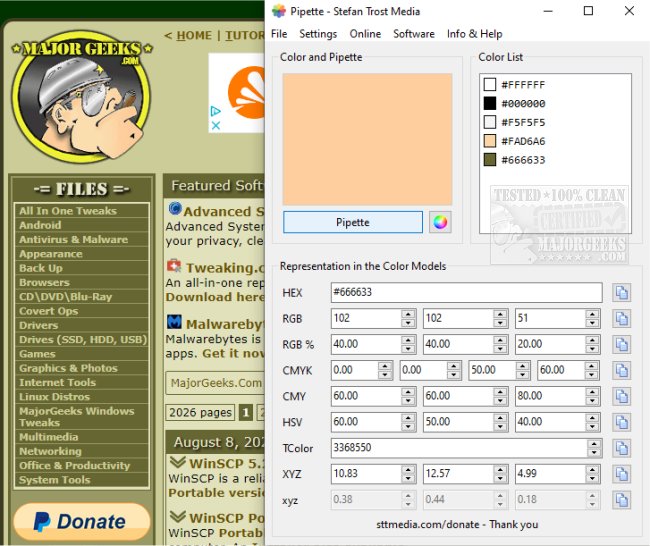
Pipette 26.7.31 has been released, enhancing the way users can interact with colors from various sources such as websites and images. This portable application allows users to easily pick, identify, copy, and save colors, offering a comprehensive range of information about the selected color, including values in RGB, CMY, CMYK, HSV, TColor, and XYZ formats.
The user-friendly interface facilitates seamless copying of color values to the clipboard for use in other projects. Furthermore, Pipette automatically saves the selected colors within its color list, ensuring users can access their chosen colors the next time they start the application. To utilize Pipette, users simply click the designated button to activate a crosshair cursor, allowing them to select their desired color. Once a color is clicked, the corresponding values are displayed in the appropriate fields.
In addition to its core functionality, Pipette includes links to other software developed by the same author and provides color charts for reference. Donations are welcomed on the author's website to support ongoing development.
This latest version of Pipette is particularly beneficial for designers, developers, and anyone working with digital media who needs a reliable tool for color identification and management. As color accuracy is crucial in many creative fields, Pipette serves as an essential resource for ensuring the correct color values are utilized in various projects.
Overall, Pipette's 26.7.31 update solidifies its role as an indispensable tool for color management, with potential future expansions that could include enhanced color blending options, integration with design software, or even community-driven color palettes, further enriching the user experience
The user-friendly interface facilitates seamless copying of color values to the clipboard for use in other projects. Furthermore, Pipette automatically saves the selected colors within its color list, ensuring users can access their chosen colors the next time they start the application. To utilize Pipette, users simply click the designated button to activate a crosshair cursor, allowing them to select their desired color. Once a color is clicked, the corresponding values are displayed in the appropriate fields.
In addition to its core functionality, Pipette includes links to other software developed by the same author and provides color charts for reference. Donations are welcomed on the author's website to support ongoing development.
This latest version of Pipette is particularly beneficial for designers, developers, and anyone working with digital media who needs a reliable tool for color identification and management. As color accuracy is crucial in many creative fields, Pipette serves as an essential resource for ensuring the correct color values are utilized in various projects.
Overall, Pipette's 26.7.31 update solidifies its role as an indispensable tool for color management, with potential future expansions that could include enhanced color blending options, integration with design software, or even community-driven color palettes, further enriching the user experience
Pipette 26.7.31 released
Pipette lets you pick, identify, copy, and save colors from websites, images, etc., from a portable app.