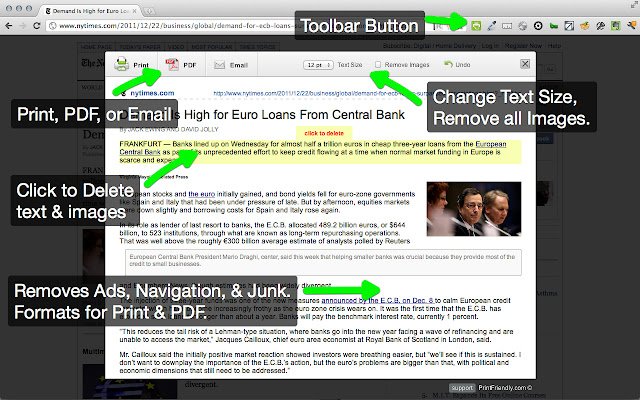
The latest release of Print Friendly & PDF version 7.0.4 is now available for major web browsers including Chrome, Firefox, Edge, and Safari. This tool is designed to enhance the printing experience by cleaning and formatting web pages, effectively removing advertisements, navigation elements, and other unnecessary content. This results in significant savings on paper and ink when printing.
Key features of Print Friendly & PDF include a Print Preview option that optimizes content for printing, and an Edit Before Printing feature that allows users to customize what will be printed by removing unwanted images and text. Users can choose to print immediately or save the content as a PDF for later use.
To utilize Print Friendly & PDF, new users can simply copy and paste a URL at PrintFriendly.com, while regular users can streamline the process by adding the tool to their browser for quick access. Developers and bloggers can enhance their websites by incorporating the print-friendly button to allow visitors to create optimized print versions of their content.
In addition to this, the release includes helpful tips such as enabling two-page views for PDF documents in Google Chrome, managing PDF and HTML files in Microsoft Edge, and instructions for adding or removing the XPS Viewer App in Windows 10.
As web content continues to grow, tools like Print Friendly & PDF are essential for providing a user-friendly printing experience that conserves resources while maintaining quality. Future updates may include additional features to further enhance usability and efficiency for a wider range of users
Key features of Print Friendly & PDF include a Print Preview option that optimizes content for printing, and an Edit Before Printing feature that allows users to customize what will be printed by removing unwanted images and text. Users can choose to print immediately or save the content as a PDF for later use.
To utilize Print Friendly & PDF, new users can simply copy and paste a URL at PrintFriendly.com, while regular users can streamline the process by adding the tool to their browser for quick access. Developers and bloggers can enhance their websites by incorporating the print-friendly button to allow visitors to create optimized print versions of their content.
In addition to this, the release includes helpful tips such as enabling two-page views for PDF documents in Google Chrome, managing PDF and HTML files in Microsoft Edge, and instructions for adding or removing the XPS Viewer App in Windows 10.
As web content continues to grow, tools like Print Friendly & PDF are essential for providing a user-friendly printing experience that conserves resources while maintaining quality. Future updates may include additional features to further enhance usability and efficiency for a wider range of users
Print Friendly and PDF for Chrome, Firefox, Edge, and Safari 7.0.4 released
Print Friendly & PDF for Chrome, Firefox, Edge, and Safari cleans and formats web pages for the perfect print experience.
Print Friendly and PDF for Chrome, Firefox, Edge, and Safari 7.0.4 released @ MajorGeeks