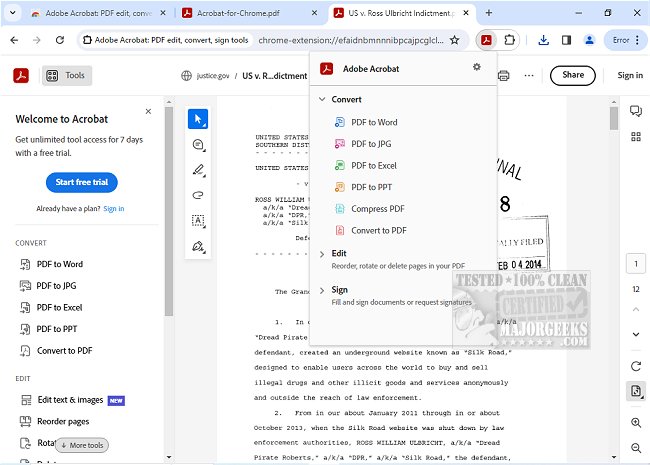
Adobe has released version 26.7.1.1 of Adobe Acrobat for Chrome, enhancing users' ability to manage PDF documents directly within their browser. This extension provides a comprehensive suite of tools for viewing, filling out, commenting on, signing, converting, and compressing PDF files. The integration of Adobe Acrobat into Google Chrome significantly boosts the PDF viewing experience, allowing users to add comments, sticky notes, text, and highlights for free.
For those seeking advanced functionalities, the extension includes options to export and import PDF files, create new PDFs, merge multiple documents, organize pages, and reduce file sizes. Installation is straightforward: users simply need to add the extension, pin it for easy access, and then open any PDF to utilize the desired tools.
Furthermore, Adobe Acrobat for Chrome enables users to quickly download or print documents and store files online for convenient access from any location. The extension also supports writing on PDF files by allowing users to add text or drawings, and it facilitates form filling and signing through Adobe Acrobat Reader on desktop.
In addition, users can electronically sign documents with their signature or initials, enhancing the ease of managing PDFs online. This tool streamlines workflows by providing quick access to both free and premium features, making it simpler than ever to work with PDF documents.
Overall, Adobe Acrobat for Chrome is a powerful addition for anyone who regularly interacts with PDF files, offering a seamless way to enhance productivity and efficiency while browsing.
For further exploration, users can look into related topics, such as creating PDFs in Windows or understanding Adobe's update services
For those seeking advanced functionalities, the extension includes options to export and import PDF files, create new PDFs, merge multiple documents, organize pages, and reduce file sizes. Installation is straightforward: users simply need to add the extension, pin it for easy access, and then open any PDF to utilize the desired tools.
Furthermore, Adobe Acrobat for Chrome enables users to quickly download or print documents and store files online for convenient access from any location. The extension also supports writing on PDF files by allowing users to add text or drawings, and it facilitates form filling and signing through Adobe Acrobat Reader on desktop.
In addition, users can electronically sign documents with their signature or initials, enhancing the ease of managing PDFs online. This tool streamlines workflows by providing quick access to both free and premium features, making it simpler than ever to work with PDF documents.
Overall, Adobe Acrobat for Chrome is a powerful addition for anyone who regularly interacts with PDF files, offering a seamless way to enhance productivity and efficiency while browsing.
For further exploration, users can look into related topics, such as creating PDFs in Windows or understanding Adobe's update services
Adobe Acrobat for Chrome 26.7.1.1 released
Access Adobe Acrobat PDF tools in Chrome; view, fill, comment, sign, convert, and compress tools available.