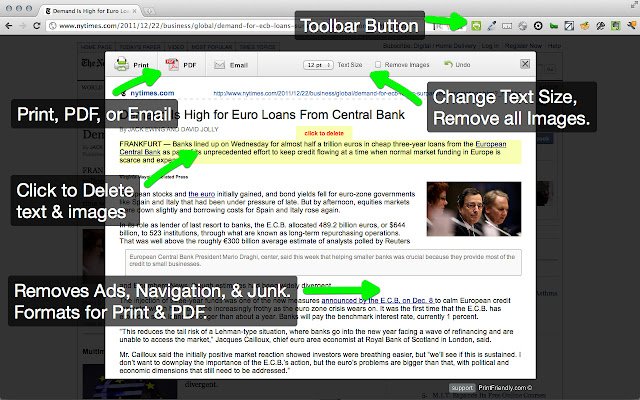
The latest release of Print Friendly & PDF for popular web browsers—Chrome, Firefox, Edge, and Safari—version 6.11.12, enhances the way users print web pages. This tool effectively cleans and formats content, eliminating unwanted ads, navigation elements, and other extraneous material, which results in more efficient use of paper and ink. Key features include a Print Preview function that optimizes content for printing, and an "Edit Before Printing" option that allows users to customize their printout by removing unnecessary images and text.
To use Print Friendly & PDF, new users can simply copy and paste a URL into PrintFriendly.com, while regular users are encouraged to add the extension to their browser for quick access to print-friendly pages. Developers and bloggers can integrate a print-friendly button into their websites to enhance user experience.
Additionally, users may find related tips useful, such as enabling two-page view for PDF documents in Google Chrome, managing how Microsoft Edge handles PDF and HTML files, and adjusting the XPS Viewer app in Windows 10.
In conclusion, Print Friendly & PDF streamlines the printing process, making it more user-friendly and cost-effective, while also offering customization options to meet individual needs. With its recent update, it continues to be a valuable tool for both casual users and professionals looking to optimize their printing habits
To use Print Friendly & PDF, new users can simply copy and paste a URL into PrintFriendly.com, while regular users are encouraged to add the extension to their browser for quick access to print-friendly pages. Developers and bloggers can integrate a print-friendly button into their websites to enhance user experience.
Additionally, users may find related tips useful, such as enabling two-page view for PDF documents in Google Chrome, managing how Microsoft Edge handles PDF and HTML files, and adjusting the XPS Viewer app in Windows 10.
In conclusion, Print Friendly & PDF streamlines the printing process, making it more user-friendly and cost-effective, while also offering customization options to meet individual needs. With its recent update, it continues to be a valuable tool for both casual users and professionals looking to optimize their printing habits
Print Friendly and PDF for Chrome, Firefox, Edge, and Safari 6.11.12 released
Print Friendly & PDF for Chrome, Firefox, Edge, and Safari cleans and formats web pages for the perfect print experience.
Print Friendly and PDF for Chrome, Firefox, Edge, and Safari 6.11.12 released @ MajorGeeks