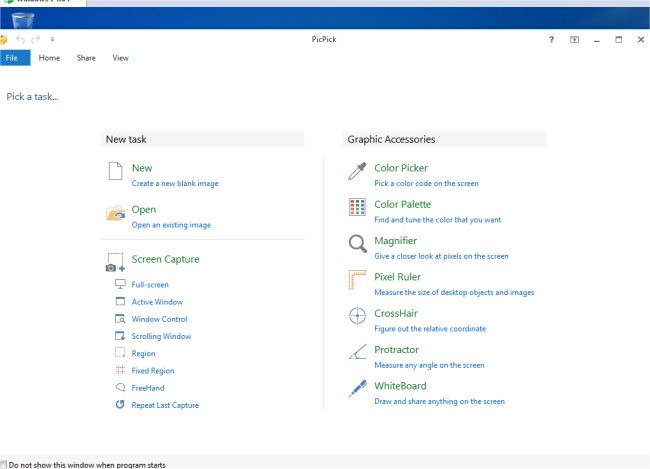
PicPick 7.7.0 has been released, enhancing its reputation as a comprehensive screen capture tool that offers a variety of features for users. This versatile application includes a user-friendly image editor, a color picker, a color palette, and tools such as a pixel ruler, protractor, crosshair, and whiteboard. With PicPick, users can capture screenshots of their entire screen, specific active windows, scrolling windows, or designated areas of their desktop.
In addition to capturing images, PicPick enables users to annotate and highlight their screenshots using text, arrows, shapes, and other tools available in its built-in image editor, which features a modern Ribbon-style menu for ease of use. Users can also apply various effects to their images, including drop shadows, frames, watermarks, mosaics, motion blur, and brightness adjustments to enhance visual appeal.
Furthermore, PicPick allows for seamless sharing and saving of images through multiple platforms such as email, FTP, Dropbox, Google Drive, SkyDrive, Box, Evernote, Facebook, and Twitter. Users can customize their experience with advanced settings that enable personalized hotkeys, file naming conventions, image quality adjustments, and other options tailored to individual preferences.
As the software continues to evolve, it could potentially integrate more collaborative features, expand its compatibility with additional platforms, or introduce advanced AI-driven editing capabilities, further solidifying its position as a go-to tool for screen capturing and image editing
In addition to capturing images, PicPick enables users to annotate and highlight their screenshots using text, arrows, shapes, and other tools available in its built-in image editor, which features a modern Ribbon-style menu for ease of use. Users can also apply various effects to their images, including drop shadows, frames, watermarks, mosaics, motion blur, and brightness adjustments to enhance visual appeal.
Furthermore, PicPick allows for seamless sharing and saving of images through multiple platforms such as email, FTP, Dropbox, Google Drive, SkyDrive, Box, Evernote, Facebook, and Twitter. Users can customize their experience with advanced settings that enable personalized hotkeys, file naming conventions, image quality adjustments, and other options tailored to individual preferences.
As the software continues to evolve, it could potentially integrate more collaborative features, expand its compatibility with additional platforms, or introduce advanced AI-driven editing capabilities, further solidifying its position as a go-to tool for screen capturing and image editing
PicPick 7.7.0 released
PicPick is an all-in-one screen capture tool that includes an intuitive image editor, color picker, color palette, pixel ruler, protractor, crosshair, whiteboard and more.