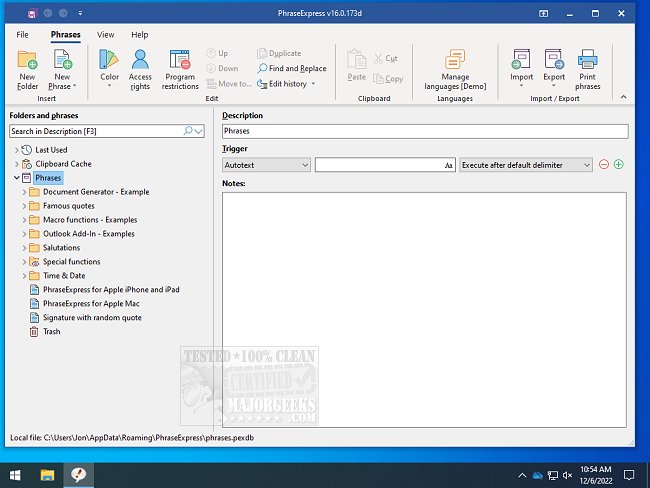
PhraseExpress version 18.0.76 has been released, enhancing its functionality as a powerful tool for managing frequently used text phrases, snippets, and abbreviations. This software allows users to streamline their workflow by enabling quick text expansion; for instance, typing "sig" can instantly insert a user's signature into any document or application.
Additionally, users can set up keyboard shortcuts for common phrases, like "DCT," which can automatically expand to "Dear Customer, Thank you for contacting us." This feature significantly reduces the time spent on repetitive tasks, making it an invaluable asset for professionals who frequently communicate similar messages.
Beyond text expansion, PhraseExpress offers various features, including the organization of text snippets, launching applications with keyboard shortcuts, auto-completing phrases, accessing the Windows Clipboard History, and correcting spelling errors across all applications. These capabilities make it easier to work efficiently and accurately.
Moreover, PhraseExpress can be integrated with other functionalities, such as managing file paths and clipboard history, improving overall productivity. Users can learn additional tips on using the clipboard effectively, including how to copy file paths, clear clipboard history, and disable clipboard features in Windows 10 and 11.
In future updates, users may look forward to enhanced customization options, improved user interface, and possibly integrations with more applications to further streamline their tasks. This continued evolution of PhraseExpress positions it as an essential tool for anyone looking to maximize efficiency in their daily computing tasks
Additionally, users can set up keyboard shortcuts for common phrases, like "DCT," which can automatically expand to "Dear Customer, Thank you for contacting us." This feature significantly reduces the time spent on repetitive tasks, making it an invaluable asset for professionals who frequently communicate similar messages.
Beyond text expansion, PhraseExpress offers various features, including the organization of text snippets, launching applications with keyboard shortcuts, auto-completing phrases, accessing the Windows Clipboard History, and correcting spelling errors across all applications. These capabilities make it easier to work efficiently and accurately.
Moreover, PhraseExpress can be integrated with other functionalities, such as managing file paths and clipboard history, improving overall productivity. Users can learn additional tips on using the clipboard effectively, including how to copy file paths, clear clipboard history, and disable clipboard features in Windows 10 and 11.
In future updates, users may look forward to enhanced customization options, improved user interface, and possibly integrations with more applications to further streamline their tasks. This continued evolution of PhraseExpress positions it as an essential tool for anyone looking to maximize efficiency in their daily computing tasks
PhraseExpress 18.0.76 released
PhraseExpress is for the organization of frequently used text phrases or snippets, expanding abbreviations, launching programs with text shortcuts, and more.