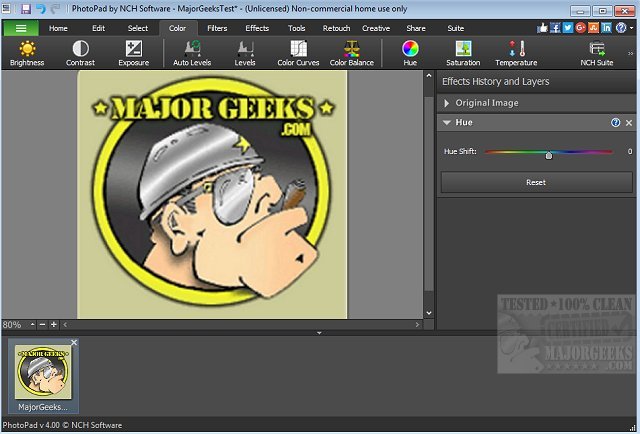
PhotoPad 15.18 Beta has been released, showcasing its capabilities as a user-friendly photo editing software that allows for extensive manipulation of images. The application stands out for its quick startup, eliminating lengthy installation processes, and enabling users to dive straight into editing. With a focus on efficiency, PhotoPad offers a suite of tools for cropping, rotating, resizing, and flipping images, all while supporting various popular formats and featuring a convenient drag-and-drop interface.
The software is particularly useful for those on tight schedules, as it allows for rapid enhancements, whether it's brightening a photo or correcting specific elements. Some of the standout features include:
- Touch-up tools to eliminate red-eye and blemishes
- A variety of photo effects, such as oil painting, cartoon, vignette, and sepia
- Quality improvement tools including blur correction, sharpening, and noise reduction
- Color adjustments for hue, saturation, brightness, and contrast
- Collage and photo mosaic creation
- Conversion of photos into cross stitch patterns or paint-by-numbers
- Panorama creation through photo stitching
- Support for popular image formats like JPG, GIF, and PNG
- Text and caption insertion, along with an included clipart library
- Frame and border additions
- Non-destructive editing for easy modifications
- Direct uploads to social media platforms like Facebook and Flickr
In addition to its core functionalities, users looking for similar capabilities in Windows 10 and 11 can explore various methods to view pictures as slideshows, restore the Windows Photo Viewer, and customize the editing context menu with options like 'Edit With Photos' or 'Edit With Paint 3D'.
As technology evolves, PhotoPad continues to enhance its features, catering to both casual photographers and professionals who seek efficient and powerful editing tools. The future updates could further expand its capabilities, possibly incorporating AI-driven enhancements for smarter photo editing and organization, making it an even more indispensable tool for image creators
The software is particularly useful for those on tight schedules, as it allows for rapid enhancements, whether it's brightening a photo or correcting specific elements. Some of the standout features include:
- Touch-up tools to eliminate red-eye and blemishes
- A variety of photo effects, such as oil painting, cartoon, vignette, and sepia
- Quality improvement tools including blur correction, sharpening, and noise reduction
- Color adjustments for hue, saturation, brightness, and contrast
- Collage and photo mosaic creation
- Conversion of photos into cross stitch patterns or paint-by-numbers
- Panorama creation through photo stitching
- Support for popular image formats like JPG, GIF, and PNG
- Text and caption insertion, along with an included clipart library
- Frame and border additions
- Non-destructive editing for easy modifications
- Direct uploads to social media platforms like Facebook and Flickr
In addition to its core functionalities, users looking for similar capabilities in Windows 10 and 11 can explore various methods to view pictures as slideshows, restore the Windows Photo Viewer, and customize the editing context menu with options like 'Edit With Photos' or 'Edit With Paint 3D'.
As technology evolves, PhotoPad continues to enhance its features, catering to both casual photographers and professionals who seek efficient and powerful editing tools. The future updates could further expand its capabilities, possibly incorporating AI-driven enhancements for smarter photo editing and organization, making it an even more indispensable tool for image creators
PhotoPad 15.18 Beta released
PhotoPad is a slick photo editor that permits you to manipulate most aspects of your photo images.